
• This forum is the machine-generated translation of www.cad3d.it/forum1 - the Italian design community. Several terms are not translated correctly.

new command position loaded at startup

  • Thread starter Thread starter ferro.84
  • Start date Start date

ferro.84

Guest
Good morning to all,
I wrote a new command, inside the test.lsp file, something like:
Code:
(in-package)
(use-package :oli)
;
(sd-defdialog 'prova
:dialog-title "title"
:toolbox-button nil
:variables
♪
:local-functions
♪
)
I read that this new command is loaded at the start of the cad I must:
1) put the test.lsp file in the folder of customizations (found by reading the output of the cad from file>sets> user interface>personalizz>show folders);
2) within that folder add this row to sd_customize file:
Code:
(oli:sd-load-customization-file "prova.lsp")
possibly creating the sd_customize file, if it does not exist.

Well, where do I find the command after starting the cad?
if I look for it for example by file>personalizza> keyboard> all commands I do not see it...
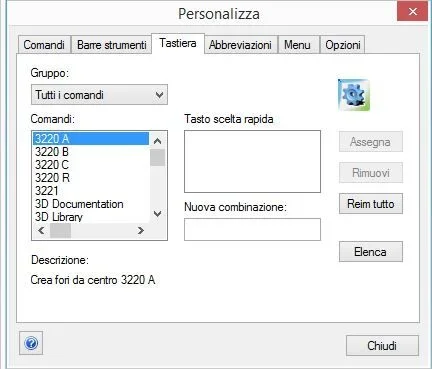
1.webpthe question also applies if I load the file lisp simply from command line with
Code:
(load "percorso_cartella_personalization/prova.lsp")
It'll be a banality, but I've planted here...

thanks in advance
 
thanks, it actually appears in the tool menu doing so.
Good to know for the future!
to have available the command in the cad otherwise, in order to create a button or a keyboard shortcut, I found that just do file>personality>new and in the command part write the command name, that is the file name lisp placed in the customization folder previously.
I don't think need to put the name after sd-defdialog ' inside the file.
in doubt, I always used the same name:)
1.webpand it works!
for me is a great result, I am happy.
 
thanks, it actually appears in the tool menu doing so.
Good to know for the future!
to have available the command in the cad otherwise, in order to create a button or a keyboard shortcut, I found that just do file>personality>new and in the command part write the command name, that is the file name lisp placed in the customization folder previously.
I don't think need to put the name after sd-defdialog ' inside the file.
in doubt, I always used the same name:)
View attachment 51865and it works!
for me is a great result, I am happy.
if peoples also the group put everything in order your commands that otherwise they put themselves at the root and then you struggle to find them.
distinguish commands for solodesigner (3d) and annotation!

Lisp name and function name are 2 different things! in the key you have to upload the name of the function, inside the same file you can go to fill out all the functions (lisp) you want, but call back with the command.
I hope I've been clear.
 
I understand.
thanks for the clarification :)
so we managed to run a new command written in lisp for modeling and uploaded to boot from cad by adding rows to sd_customize file.

I was now trying to run a new command for the 2d (found on the network), instead of for the 3d, but I don't know which file to edit to upload it (add its rows in sd_customize does not work).

I find myself a mistake like:
1.webpI ask help: where should I put the file lisp I made for the 2d?
which *_customize file should I create/modify?

Thanks again
 
I understand.
thanks for the clarification :)
so we managed to run a new command written in lisp for modeling and uploaded to boot from cad by adding rows to sd_customize file.

I was now trying to run a new command for the 2d (found on the network), instead of for the 3d, but I don't know which file to edit to upload it (add its rows in sd_customize does not work).

I find myself a mistake like:
View attachment 51866I ask help: where should I put the file lisp I made for the 2d?
which *_customize file should I create/modify?

Thanks again
should be am_customize in the annotation folder but I go to memory, do a test
 
By going to memory too, didn't I feel like loading stuff on am_customize, does the lisp work if you hand-load it from yearning?
Do you launch automatic annotation loading?
 
I made local mind, yes, you have to put it in the am_customize file, just as it said above hunter.
 
By going to memory too, didn't I feel like loading stuff on am_customize, does the lisp work if you hand-load it from yearning?
Do you launch automatic annotation loading?
by hand in annotation works, to charge it automatically but I do not know where the am_customize file is located.

Can't the cad tell you, questioned maybe with something to write from the command bar?
 
by hand in annotation works, to charge it automatically but I do not know where the am_customize file is located.

Can't the cad tell you, questioned maybe with something to write from the command bar?
if you don't create it with notespad++
c:\users\sti-am\appdata\roaming\ptc\creo elements direct modeling 20.0\20.0\annotation\am_customize
 
I created the am_customize blank file in my analogue path:

c:\users\tecmec4\appdata\roaming\ptc\creo elements direct modeling 19.0\19.0\annotation

and added the line:
Code:
(oli:sd-load-customization-file "prova.lsp")
but unfortunately test.lsp is not loaded at startup.

the thing I managed to do to swab is to create a new command "load lisp"
with inside a line type:
Code:
(load)
to press once you have loaded the cad (unfortunately, a button instead of writing from command bar. . . )
 
Code:
(load)
to press once you have loaded the cad (unfortunately, a button instead of writing from command bar. . . )
I don't want to write a cable but in the am_cudtomize you don't have to write the instruction in lisp, but the instruction to upload the file lisp that contains the code, ie your
(load "etc etc.lsp")
 
I don't want to write a cable but in the am_cudtomize you don't have to write the instruction in lisp, but the instruction to upload the file lisp that contains the code, ie your
(load "etc etc.lsp")
Good morning.
I tried to do this, but it doesn't work.
in doubt I tried to put (load "course...prova.lsp") in the sd_customize, instead of in the am_customize, but try.lsp does not charge at startup and in addition I have problems to pull on the annotation module.
 
Good morning.
I tried to do this, but it doesn't work.
in doubt I tried to put (load "course...prova.lsp") in the sd_customize, instead of in the am_customize, but try.lsp does not charge at startup and in addition I have problems to pull on the annotation module.
you are right I went to see my am_customize and there are critte instructions in lisp, not file loading paths, probably works in both ways.
have you tried to write the content of the test.lisp directly in the am_customize, instead of recalling it as an external file?
 
you are right I went to see my am_customize and there are critte instructions in lisp, not file loading paths, probably works in both ways.
have you tried to write the content of the test.lisp directly in the am_customize, instead of recalling it as an external file?
I'll try later, but I think it's the same thing.
I think I'm working on the am_customize in the wrong place, I'll let you know. .
 
I'll try later, but I think it's the same thing.
I think I'm working on the am_customize in the wrong place, I'll let you know. .
I looked at my installations:
in 18.1 I find it at the same level as sd_customize, in 20.0 in /annotation, I think it is the same. Try to see that you don't have two, that maybe that bed for second will erase that bed first.
 
I looked at my installations:
in 18.1 I find it at the same level as sd_customize, in 20.0 in /annotation, I think it is the same. Try to see that you don't have two, that maybe that bed for second will erase that bed first.
I always go to memory, the right one should be under ...../italian/....
 
this if you put it in the program directory. I have it in the user dir (the one under roaming)
I added the instruction (load "percourse...prova.lsp") in my local file c:\program files\ptc\creo elements\direct modeling 19.0\personality\italian\sd_customize\annotation\am_customize and now it is loaded test.lsp.
Good!
first I had added the same instruction on the file c:\users\tecmec4\appdata\roaming\ptc\creo elements direct modeling 19.0\19.0\annotation\am_customize that I had created purposely and test.lsp did not charge.
it would be nice to understand where to put my annotation additions/personalizations on servers instead of local, so that we also have my colleagues available.
where possibly create an am_customize for this purpose, I don't know...
 
If you want to put everything on the server the game begins to get complicated a little, for now I would recommend you to copy the settings if you are not in many, then when you get good manual with the lisp you will be able to venture into the server events, of course personal opinion
 

Forum statistics

Threads
44,997
Messages
339,767
Members
4
Latest member
ibt

Members online

No members online now.
Back
Top