
• This forum is the machine-generated translation of www.cad3d.it/forum1 - the Italian design community. Several terms are not translated correctly.

tips for stringing/launching together composed for fast study

  • Thread starter Thread starter reggio
  • Start date Start date

reggio

Guest
hi to all, often happens to have to perform fast studies or to sketch a new machine to present, creating it by making collages of various other pieces / assemblings, in those cases, it is not necessary, indeed it is a waste to create a clone and coding it, etc. etc., it would be much more convenient to take the model or the assieme, to save it as part and to be able to "stirate" to pleasure until you give it a form similar to give it to give it to the desired result, so only idea, so

If I were in 2d, I would use the iron command, when instead we find ourselves dealing with a subaxis, things become more complicated...

How do you do that?

in the example below for example I should widen of +100mm (50dx 50sx) dragging me around tree and bearings, perhaps without worrying too much about the angle of the changing conical, a stretch to give a maximum idea and have a footprint; in the next case I should compress, shorten of - 80mm (40dx 40sx)
how could I do in these cases and in other cases, without having to always clone and change everything?
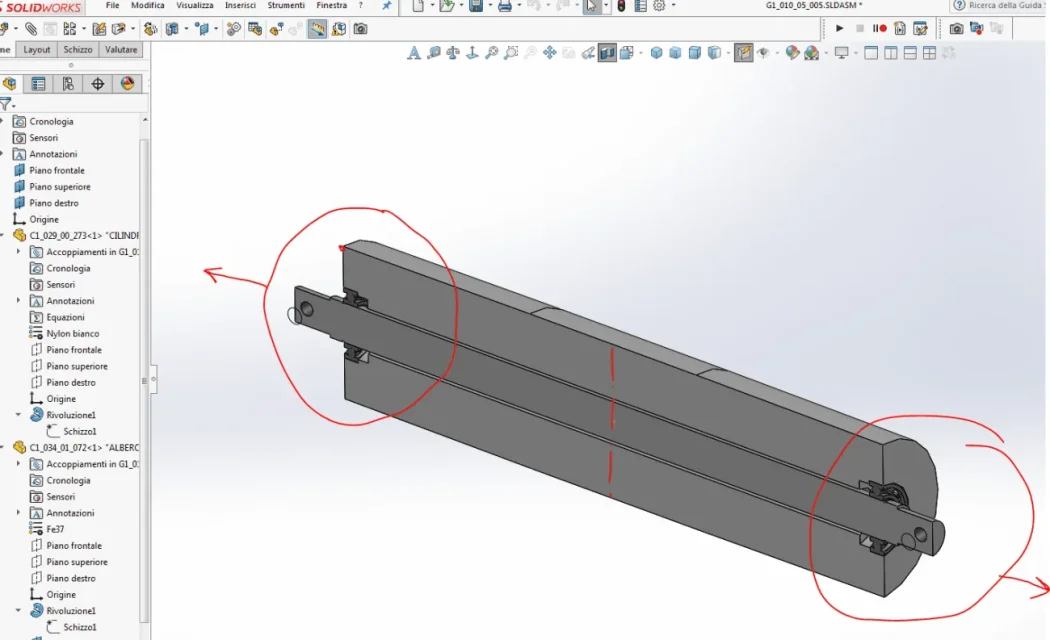
allarga.webp
 
moving face is not present in environment together. you can not use the scale function because you should create a unique body.
the extension function recommended by shirokko seems to be the solution, but it only works in part environment and stretches only on the z axis then before using the function you have to rotate all the bodies in the correct direction
 
Move face?
I use it to create the crude from an imaginary finished piece
Hello and thank you! :

I tried but it gives me error, probably because of the commercial components (cuscinet) that cannot manage,
If they select only surfaces of cylindrical objects or "rights" then take the command ... but at that point I lose all jokes, holes, processing and in any case I must select every single surface that I want to move ..:(
 
moving face is not present in environment together. you can not use the scale function because you should create a unique body.
the extension function recommended by shirokko seems to be the solution, but it only works in part environment and stretches only on the z axis then before using the function you have to rotate all the bodies in the correct direction
you can create an ad hoc coordinate system, or rotate the extension axis dynamically
 
Hello and thank you! :

I tried but it gives me error, probably because of the commercial components (cuscinet) that cannot manage,
If they select only surfaces of cylindrical objects or "rights" then take the command ... but at that point I lose all jokes, holes, processing and in any case I must select every single surface that I want to move ..:(
I tried to disable the bearings and using the command from tab mold tools (before I followed the indications of the help and I threw selecting surfaces and then dx key - wrong, gives error)

Yes, of course I had realized to save together as part, I go well, simplify the operations of "bozza"

ps: I will also try
 
I tried to disable the bearings and using the command from tab mold tools (before I followed the indications of the help and I threw selecting surfaces and then dx key - wrong, gives error)

Yes, of course I had realized to save together as part, I go well, simplify the operations of "bozza"

ps: I will also try
Reggio, have you tried?
 
Hi, I only tried now, for what I saw, I prefer to move face,
this because you push in an extension doesn't allow me to select more bodies...
2019 allows me to do it. You have 2016, don't you?
However, the important thing is that you solved it.
 

Forum statistics

Threads
44,997
Messages
339,767
Members
4
Latest member
ibt

Members online

No members online now.
Back
Top