• This forum is the machine-generated translation of www.cad3d.it/forum1 - the Italian design community. Several terms are not translated correctly.

orthogonal line compared to the line of origin

  • Thread starter Thread starter ragnol
  • Start date Start date

ragnol

Guest
I'm ashamed of it, but it's so much.

in sema (software) there is a elementary thing that I just can't do in autocad in a direct way, and I have to first draw an orthogonal line, then move it where I need it etc...and it seems impossible not to do it faster.

the question: wanting to trace from the points "a" and "b" (already determined) the two green lines dotted, imposing that they are perpendicular to the right of origin...how can I do?

straight, start from point "a", then I should use the "perpendicular" snap and select the line "a-b", but I get a line of length nothing, and autocad does not ask me "until where you want to get it" as it does semen....

Is there a direct way to track these two green lines?

Thank you and excuse the stupid question.. .
 

Attachments

  • Ortogonale.webp
    Ortogonale.webp
    7.7 KB · Views: 9
The fastest method is to change the orientation of the xy plan.

ucs object and select the line that will have to act as x (in this case the line along the alignment ab).
 

Attachments

  • ucs.webp
    ucs.webp
    20.2 KB · Views: 8
certain, set the ucs that through the option "to object" and selecting the line between a and b, make the lines, with activated vegetable garden, orthogonal to the above line.
if you do it through the dedicated toolbar the steps to rotate the ucse then return normal are extremely easy and quick.
 
I have an icon (one of the few I have) dedicated to the rotation of the snap to object and another that brings it back to world.
that at the end does exactly what made a special key on the tecnigraph many years ago (but many manco know what it is and how to use a tecnigraph)
 
and that icon/command is?

(the tecnigraph I've made time to use it to geometries. Pietous extract, mina stains that I carried with the palm everywhere... I was a dog... let's not talk about the "rapid", I sucked. :-( )
 
in the classic menu the icons find them in the toolbar ucs, the command under the menu displays. in the ribbon I can not help you, square meters should not be difficult to find or add it.
you can always match keys as you do with many other commands (line, move, circle, etc...)
 
premise: you first draw an orthogonal line and then move it where you need it.
There are other ways to set the ucts. I use the keyboard so much and then write to the flight ucs (to send) og (to send) or select with the right click the icon of the reference system. opens the menu and select object. you can drag the axle icon and rotate it directly so that one of the axes will match. if you have active the viewcube you can directly select theucs, do new and then (right button) selections from the object ucs menu.
at the end with ucs and 2 times sending you can go back or for example do it with the other systems mentioned above. viewcube stores the ucs and of course there is always available the wcs.

p.s.
a nice thing when changing the uct is the possibility to rotate the work plan. write down.
 
However, without wanting to argue, I remain puzzled when a program "specific to draw lines" has no basic functions that programs oriented to anything else do, in their poor part "cad".

Of course autocad does a million other things, but it is precisely on those bases (which then are the ones I use) that I say "why did not think/copy? ".

ps: I understand, turning the uct you get, but how many clicks and clack to do and return to the global? so to say, neither
 
I understand, turning the uct you get, but how many clicks and clack to do and return to the global?
three clicks
two clicks to orientate in the new direction (1 select the object ucs icon, 2 select the object)
a click to return with normal orientation (global licon ucs selection)

less so I think it is difficult
 
no, actually there is no need for any click: select the starting point of the line, and if you walk near the orthogonal direction take a "momentary sync" that allows you to draw it directly at 90°. if you have to do almost ten (common with old buildings) are tens of fewer clicks...

the same thing worked in dietrich's
 
Well, if you're one
rest puzzled when a program "specific to pull rows" does not have basic functions
I remain puzzled when one has a powerful tool (knowing it to use) and not knowing how to use it if it takes it with the tool.
you have a ferrari and you complain that makes 60 per hour, when with the volvo automatic change you easily make 130.
the solution is to know that at the ferrari you can change gear. with the first over 60 you don't. It is not the hardware that is not suitable.

creates a beautiful icon with inside the macro
^c^cucs;_ob;
and another with a macro
^c^cucs;_w;
and with just one click you will turn the uct, selecting the object and with another click you will return behind. forever.
 
I didn't take it with anyone. a program born to do anything else has a trivial cad function that autocad does not have.

you who know how to use it you still have to create a macro associated with the iconcin to rotate the ucts.

a program born to model in 3d and transfer cam does it without having to move a finger.

I did not say that autocad sucks, which does not allow to model 3d, which does not allow to use nested blocks or create lisp functions.

I said he didn't have that native banal cad function.

I don't care to do the 230km/h, I don't care to start the ferrari with the crank put under the radiator, since the panda has the ignition with the button.

I'm still asleep. Do it yourself.
 
I would point out that there are already icons
right ucs object
left global ucs
1673983739181.webpI then discovered that it is possible to track an orthogonal line without turning the ucts, but I do not know if it is linked to a variable. positioning at one end of a line, the cursor "free" the continuation of the same, it is seen in fact that it creates a line that acts as a magnet, the same thing does with the perpendicular line (you see it in the image). unfortunately it seems to me to do it only from the ends and not from intermediate points; this means that after tracking the line you have to use another command to stop it1673984373224.webp
 
Exactly massive, I also saw it if you're at an extreme. but if you have doors, windows, plots, chimneys etc etc. often work at internal points.

as said, I will not die for this:)

edit: it is the same thing, but made from any point of a line. Maybe it turns out that it depends only on the value of a variable. . .
 
command: lp2e
1) select line for extension
2) indicate the point on the line where you have to create that orthogonal
logic:
I create an orthogonal line at the clicked point of l=2, I look for the intersection point with the extension line, design the line, gate the line l=2.

greetings
 

Attachments

straight, start from point "a", then I should use the "perpendicular" snap and select the line "a-b", but I get a line of length nothing, and autocad does not ask me "until where you want to get it" as it does semen....
I reread well what you are used to doing in this "sema" (software dedicated to wooden constructions).
and it is mathematically and geometrically wrong the behaviour of the program (seed).
if a segment "part" from point to and you want to extend it to perpendicular of ab, the segment has zero length as the points coincide.
therefore autocad, with its mathematically correct construction, draws you a segment of nothing length (mathematically correct).
euclide would become smooth, if drawing a segment from to to to the pencil he would draw a rotate of 90°.
We sleep peacefully all.
I keep for good the software that allows me to say from a guy with a driller "make a hole in the mountain with angle 32° vert, 27th horizontal. 14,15m long - not 14,20m because otherwise I miss the gallery"
you care for good the software to play with wooden mozzarella.. .
peace.

p.s. your panda paradigm doesn't fit. It's not about "moving" the software, it was about running speed.
 
I then discovered that it is possible to track an orthogonal line without turning the ucts, but I do not know if it is linked to a variable
it is possible to track from any point, it is called polar tracking (f10) and just set it with reference to the segment. can be reached through _3dosnap polar tracking panel.
 
Crystal, you misunderstood, the "zero length" thing was autocad-related if I use the perpendicular snap, but I'm not here to spit it out.

and you did not understand how I do "of there": point "by chance" on a line, I move more orthogonal with the mouse, the program allows me to move to 90° exact (a kind of flying snap).

I don't give a damn about doing galleries, I'd like to pull a line a team without unnecessary clicks, since software to make toothpicks does.
"you care for good software to play with wooden mozzarella... "But why are you so grumpy? Do you feel so bad? :

ps: it's like I'm taking someone's ass because they use a software to make tablecloths... :-)
 
Last edited:
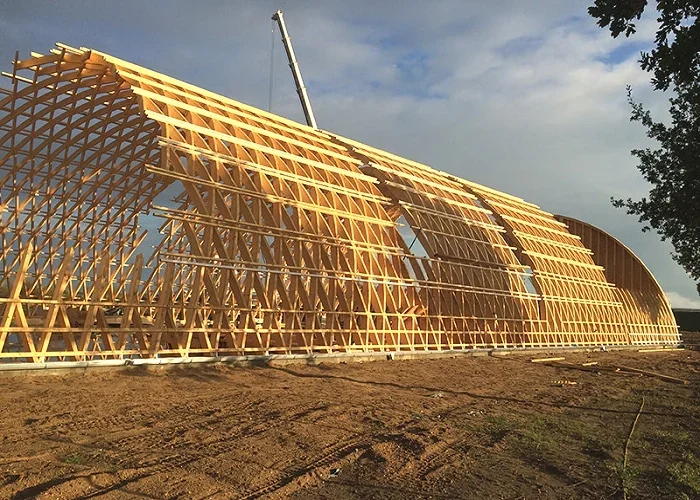
ps: examples of wooden mazzarella
 

Attachments

  • 2.webp
    2.webp
    127 KB · Views: 7
  • 3.webp
    3.webp
    26.3 KB · Views: 7
  • 4.webp
    4.webp
    36.8 KB · Views: 7
  • 5.webp
    5.webp
    71.1 KB · Views: 7
  • 1.webp
    1.webp
    59 KB · Views: 7

Forum statistics

Threads
44,997
Messages
339,767
Members
4
Latest member
ibt

Members online

No members online now.
Back
Top