Daniele-san
Guest
Hello.
a tip for gpu for ptc creo
nvidia geforce rtx 3070 ti What do you think?
Thank you.
a tip for gpu for ptc creo
nvidia geforce rtx 3070 ti What do you think?
Thank you.

hi daniele-san, right these days I was taking a look at so much to stay a bit on the piece and don't dazzle me on the topic video cards.Hello.
a tip for gpu for ptc creo
nvidia geforce rtx 3070 ti What do you think?
Thank you.

 techgage.com
this is a rare analysis, thanks for the link.viewport performance look at catia, solidworks, snx, creo, 3ds max & maya
Viewport Performance Look At CATIA, SolidWorks, SNX, Creo, 3ds Max...
We're taking a fresh look at the many workloads available in SPECviewperf. This time around, we're taking a much deeper look at subtest results, to gain a better understanding of how SVP's overall scores are generated. With the help of 28 GPUs, two resolutions, and 38 subtests, we have a lot of...
hi gil, I always thought specviewperf a reliable test since when a pc is unable to run the various tests gives you an error message and does not complete the test. It is normal that the more powerful the PC is better manages the whole not only the graphic compartment. time ago I tried one of the last versions of specvieperf on my vetusta workstation and the test of the platform that is a beast as heaviness also slowly turned is by this I realized that it was not yet time to change hardware as I hardly would have found cases limit as this test.this is a rare analysis, thanks for the link.
I suppose you should assess the performance taking into account that they are professional programs. ergo, it is not the search for the maximum fps generated what counts. I think that in the design when you arrive at 30fps you are fine, because it is quite static images or that you move slowly. for me what matters is
1) image loyalty, lack of artifacts
2) system stability without crash
3) the important is to reach those 30fps, with models as large as possible. but going beyond 60fps is quite useless.
4) Silence, because I don't use headphones with ball background music, and I don't want to stay 8 hours near a wheel that looks like a helicopter.
instead take a model and make it turn to the madness, to see if you generate 120 or 180 fps is pure theory. It is like saying that for the transport of heavy goods, a utilitarian car is better than a truck because the peak speed is higher, without taking into account the transportable mass.
It seems obvious to me.is the position expressed by you shipped for creo or even for other programs cad? can you post links to some tests that can refute your location?
 at some point I start turning the model, which is not particularly large.
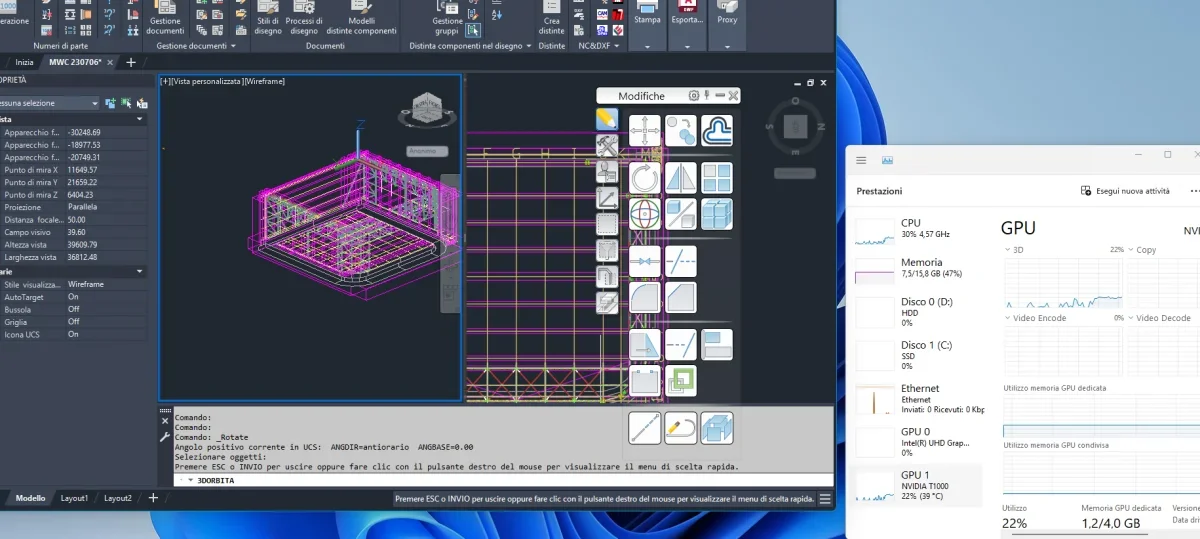 Finally I launch a trivial render and here we see that the load is all towards the cpu. because autocad makes with that. does not have a modern engine that exploits the cores of the gpu that should be better.
 I have no chance to do in-depth checks, I know how hardware works on a few programs. Now on the pc I have only advance and I certainly do not contract licenses for my personal benefit, so well be sharing your experiences.
Hey, gil, I'm trying to answer you.I do these trivial tests with my pc to see how the hardware turns out.
fast model of advance steel. you see the use of cpu and gpu to use paratically to zero. the first gpu you see in the task manger is the integral that I do not use, so ignore it to do so.View attachment 69366at some point I start turning the model, which is not particularly large.
Of course, it is not enough to fully exploit the hardware, but it is seen to rise both gpuche cpu to about 25/30%. so I use both.View attachment 69367Finally I launch a trivial render and here we see that the load is all towards the cpu. because autocad makes with that. does not have a modern engine that exploits the cores of the gpu that should be better.View attachment 69368I have no chance to do in-depth checks, I know how hardware works on a few programs. Now on the pc I have only advance and I certainly do not contract licenses for my personal benefit, so well be sharing your experiences.
balancing hardware components is always a source of doubt and is not easy.
from what I saw from a cpu gaming to a pro the difference of performanc, depends on the use; can be very, but also little. So both choices I think make sense. but I repeat I have no elements for a precise analysis.
Is the slot compatible between the two cards?I forgot...
the k4000 is of 2014, the 4070 is of this year.
sincerely I did not try the new video card in the old pc (old pc intel i7 975 new amd ryzen 7 7800x3d).Is the slot compatible between the two cards?
 creosite.com
In the meantime I read that the pciexpress protocol is retrocompatible, of course accepting the fact that a pcie 4.0 card will not be 100% exploited on a PCie 1.0 or 2.0 motherboard, for example.sincerely I did not try the new video card in the old pc (old pc intel i7 975 new amd ryzen 7 7800x3d).
Che cpu Thai?behavior with creo and 4070 is what you described (I attach image management activity of gpu in rotation phase of 3d).
