• This forum is the machine-generated translation of www.cad3d.it/forum1 - the Italian design community. Several terms are not translated correctly.

[aiuto] workflow progetto 3d

  • Thread starter Thread starter epasinet
  • Start date Start date
Why not contact videocom? develop tutorials is complex and you are always looking for ideas and collaborators. You can say I'll send you:cool:
thank you pla! for me would be an extreme satisfaction to publish a guide.
for now I continue to study and when I have managed to close the circle I will be very glad to continue.
 
Why not contact videocom? develop tutorials is complex and you are always looking for ideas and collaborators. You can say I'll send you:cool:
I'm taking a course at the university, and I was about to create a 10-minute minitutorial on basic functions... could it affect the thing?
 
In fact, perhaps because of our university education that is based a lot on the two-dimensional design, at 3d you have to get there by degrees.
vw is however a very advanced software, and in fact the same concept of categories and gloss is a much more evolved than what it proposes autocad, it is fundamental for the correct development of a 3d model and it is important that it is immediately understood.
to move around the 3d world so you have to gain some awareness of what you are doing, knowledge of the tools and limits of the software, of course. :-)
the concept of "everything and immediately" to which he has accustomed us for example sketchup, in this case it must be abandoned, because on, as the name itself says, it serves for the draft of the model. vw instead serves to go to the yard. substantial difference I would say, no?! ;-)
so it takes patience and commitment to achieve good results.... calm and patience.. .
then, with the experience everything changes. I have built many things, I have shaped many forms, but I know how to get the result because for years I use this software.
you will see that with patience and experience you will come.
And now, I'm sorry, but the nna doesn't stop and I found out this morning I had a lot to do on this weekend!! :-)
I do.

I do.
 
I have the feeling that my 2010 vector architect demo does not have the windows and doors complex. I attach a screenshot
Somebody help me?
 

Attachments

  • Porta Architect.webp
    Porta Architect.webp
    69.6 KB · Views: 13
confirmation: in demo version, the functions of the door and window are limited to the simple version (not complex).
 
Thank you guys! I thought I was a hangman!
cmq is proceeding in my path of self learning and identification of a complete workflow.
I'll give you a screenshot of what I've done today in two and a half hours.
I learned how to make hybrid symbols and the scale is an example; to make them is a s-t-u-p-i-d-a-t-a, just place the 2d design under the 3d model, select all and create the symbol! how you put it down seemed like an enterprise!? !
cmq I have to say that I have met several logistic problems.
For example, once I placed the staircase on the polished ground floor, I couldn't change the height of the walls below. the procedure worked with the perimeter walls of the floor according to that they adapted perfectly under the bonfires but in the case of the staircase I did not really succeed. I see it hard. .

then drilling the loft is a business! In fact, after making ground floor walls, staircase, ceiling and first floor walls, I had to drill the ceiling for the stairwell. the procedure is very simple because it is enough to draw a polygon corresponding to the photo in "modifica solaio" mode but the problem is that in "modifica solaio" mode I did not hesitate to see the filtered content of the other glosses and therefore I had no reference to be able to trace the hole! I tried to draw the hole polygon on the shiny ground pine and then try to copy it and paste it into the loft in modality but vector, when neckline, does not keep me position!!!!!!! So I wrote on a sheet a bit of reference measures and drew the hole from scratch drawing guidelines according to the measures I had transscribed.. :

for the rest we say that there are several aspects to be unseen like when I wanted to create the view of the first floor I was not able to show the scale through the hole of the ladder hole on the floor!

or when I create a viewport of a section how do I manage the thickness of the dissected lines and those not dissected?

or when I create the viewport of a prospectus in hidden lines mode because I see the horizontal line of end walls ground floor and start walls first floor?

or, why do the section lines in the plant see only on the viewport of the ground floor, where I traced them and do not see also on the viewport of the first floor?

or, do I put the odds on design glosses or viewports in presentation lights?

In short, so many things to clarify to have a "base" workflow, that is to create a project of simple representation taken from model 3d.

when this simple process will be clear then I will begin to unscrew the ability to compute automation of super-scales, volumes, r.a.i.
and then if I have managed to route me as I want to learn tabs and spreadsheets. . .
 

Attachments

  • TAVOLA_Squadratura.webp
    TAVOLA_Squadratura.webp
    170.4 KB · Views: 16
then drilling the loft is a business!
the loft is like any polygon just draw us over the hole and do what here is called clip surface (soption of surfaces, basically) without being beaten with the polygon of origin.
or when I create a viewport of a section how do I manage the thickness of the dissected lines and those not dissected?
in the info centre you should also find those settings
or, do I put the odds on design glosses or viewports in presentation lights?
for the purposes of graphic rendering, it is advisable in viewport annotations. In this way, even changing scale, the font size remains unchanged.
I do.
 
the loft is like any polygon just draw us over the hole and do what here is called clip surface (soption of surfaces, basically) without being beaten with the polygon of origin.


in the info centre you should also find those settings


for the purposes of graphic rendering, it is advisable in viewport annotations. In this way, even changing scale, the font size remains unchanged.
I do.
Thank you for your help.
As far as drilling the floors, as I had previously written, it seems simple and intuitive the possibility of subtraction between surfaces but my problem was not this but the fact that when you enter "modification" mode to draw the surface to be subtracted, you do not have the possibility of having references to track the hole! In fact in "modification solo" I see my beautiful white surface of the loft but I do not know where to go to snapping the hole!! If I didn't explain well, tell me.
 
as paste function uses "paste reporting" ... this as a general suggestion, it serves to maintain the position.
 
as paste function uses "paste reporting" ... this as a general suggestion, it serves to maintain the position.
Thank you marco! I came to try with the paste copy but I didn't know there was a paste dedicated to keeping the position.
 
Here I am!
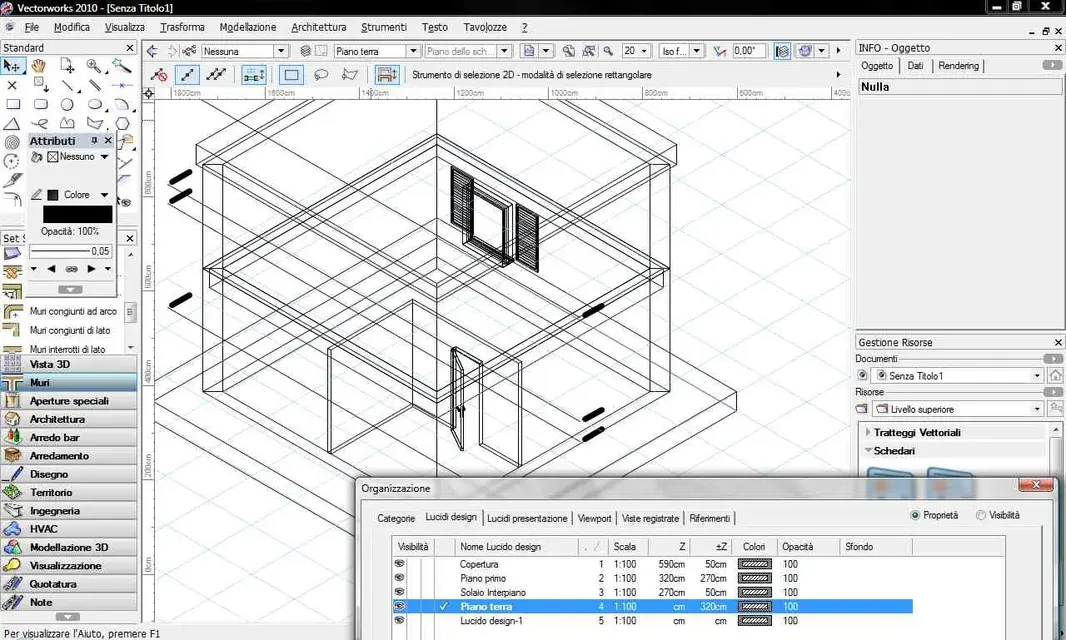
the study continues incessantly. This morning I began to evaluate the insertion of architectural elements into the walls and floors.
I created a simple model, simple with walls made of two different layers.
Unfortunately as you see from the obtained section the result is not satisfactory. in fact the walls of the ground floor are divided by a line with the walls of the first floor.
and even the floors can't merge them with the walls by applying the same mesh or restraint?!? (... aside from that I couldn't find where the red of the dissected loaves changes!! ! ! )

Does any pious soul have any advice or suggestions? ? ! ?
 

Attachments

  • Sezione.webp
    Sezione.webp
    111.4 KB · Views: 13
  • Lucidi.webp
    Lucidi.webp
    158.8 KB · Views: 12
When you go to create a viewport section, a window opens to configure it. in this window there are a number of options and buttons. Did you try to crush them all? for example advanced properties?
you can do it later, from the info stand... There are always the same.

Sorry, what's the difference between editing a loft to make him a hole and making him a hole without arousing it, if the first creates you problems having no more references? !
I do.
 
When you go to create a viewport section, a window opens to configure it. in this window there are a number of options and buttons. Did you try to crush them all? for example advanced properties?
you can do it later, from the info stand... There are always the same.

Sorry, what's the difference between editing a loft to make him a hole and making him a hole without arousing it, if the first creates you problems having no more references? !
I do.
grazi lory.
I tried all the settings for the creation of the viewport section including the advanced settings but I did not find in the setting to choose the fill color of the sectioned elements, or how to merge the elements with the same architectural elements..?!? I just found the parameter to adjust the thickness in percentage.
As far as the floors are concerned, they can be drilled already in the creation phase! But often I happen to have to edit them and it bothers me to give them back from scratch even if it is fast.

I'm trying to ask you some specific questions, because maybe I'll explain.

1) how do you delete the horizontal line that in the section of my previous reply, divides the walls of the ground floor from the walls of the first floor?

2) how do you assign a retino/trate to the soles that you see in section?

3) how do we control in a section with activated architectural elements, what architectural elements of different elements must be merged and what not?! ? This question is similar to the first but here I ask if, for example, it is possible to check whether the loft can be merged only to the supporting part of the masonry.

thanks enrico
 
I just found the parameter to adjust the thickness in percentage.
in the advanced properties of the viewport section you can decide which category to give it. at that point, you edit the category.
As far as the floors are concerned, they can be drilled already in the creation phase! But often I happen to have to edit them and it bothers me to give them back from scratch even if it is fast.
I guess you didn't understand. Stop a second and reflect.
creates a loft.
then draw us over any polygon, circle, rectangle, star, etc..
select the sole and polygon and go to the surface size command.... then tell me what happened, I'm curious.
1) how do you delete the horizontal line that in the section of my previous reply, divides the walls of the ground floor from the walls of the first floor?
is always a setting that you find in the advanced properties of the viewport section (but read the manual... ? )
2) how do you assign a retino/trate to the soles that you see in section?
edit the category and give it to him.
3) how do we control in a section with activated architectural elements, what architectural elements of different elements must be merged and what not?! ?
... always a setting that you find in the advanced properties of the viewport section. .

I do.
 
I think epasinet doesn't understand the role and functionality of viewports..... I think you should start there.
 
I think epasinet doesn't understand the role and functionality of viewports..... I think you should start there.
Yes, above all, and I know to repeat, it is not necessary to go quickly, but to proceed gradually.
understand well the objects you are using and how they work, understand the world 2d and then the 3d, and how they bind each other.

I also add that the bim concept is quite complex and is not only linked to the 3d features of a program, specifically to the object, but also to a project management system. Therefore you can only get there knowing well the tool you want to use, considering also and above all the limits besides, of course, the potential.
I can't say much about it. I can only say that we are working, even now, to arrive, to small steps but great efforts, to have an increasingly evolved project management.
I do.
 
guys my problem is simply that I don't understand the pipeline, the workflow, the call it as you want of vectorworks!

in my head I realized that the base of the bim design is to realize the model intended as a three-dimensional object. This model must not only be geometry but also quality and therefore every three-dimensional component that makes up the model must be inclusive of its own description and value to be able to determine later the price according to the impeded quantity. Once the model has been completed, the representation of the same goes on. to do this create 2d views of the model called viewport. Such views may be orthogonal projections in plant, in section or in prospectus, or assonometric or prospective projections in plant, section or outside.
then the model can be questioned to extrapolate specific information as we did with a database. you can ask to list how many doors from 80 there are, how many mc of brick masonry of thickness 20cm there are and how much they cost put in operation, or you can extrapolate executive details going to get some views of some particular technological knots.
then I can question the model to know its size as the area of a floor or the volume of a room, etc..

This I think is what must be able to do a bim design program.

what I am trying to do is understand if vectorworks is able to do all this with limits and predictions that you carry behind and therefore mine is only a phase of evaluation of the program to evaluate it before spending the important amount that costs the license. and I repeat to you that before doing this I am doing with vector I have already done it with sketchup, with addcad and with archicad and none of the previous months after my analysis failed to satisfy me in the workflow previously described.

I hope you will forgive me if I go crazy every now and then but I am spending so much resources and energy to reach a personal conclusion that is more difficult than ever.

Thanks again
 
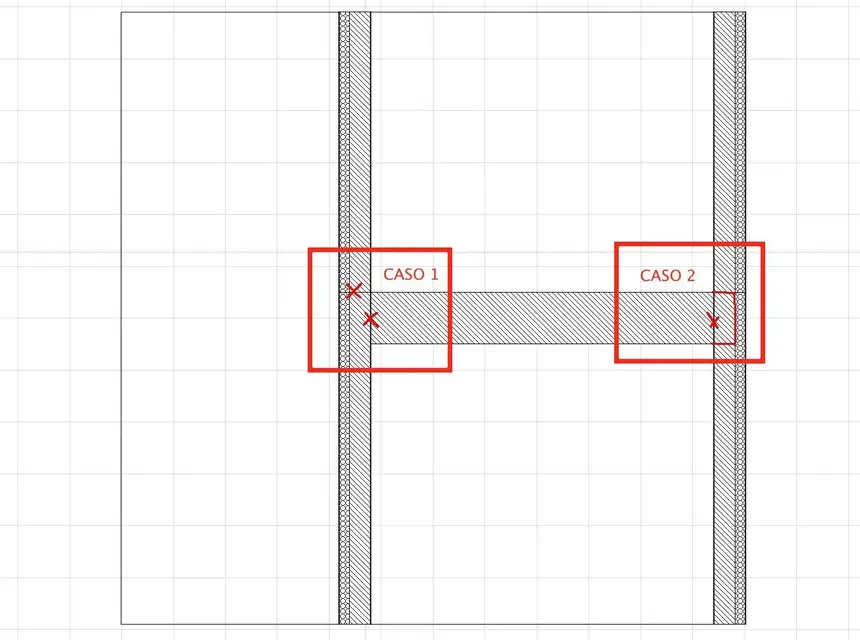
I managed on advice of lory to assign to the loft the retino through the properties of the category belonging. However, despite having dispelled all the voices in the creation of the viewport I cannot manage the intersection between the ceiling and the wall.
I'll get you an image. I would like to understand how to merge as in case 1 and how to keep the loft isolated as in case 2.
 

Attachments

  • SEZIONE.webp
    SEZIONE.webp
    81.9 KB · Views: 11

Forum statistics

Threads
44,997
Messages
339,767
Members
4
Latest member
ibt

Members online

No members online now.
Back
Top