• This forum is the machine-generated translation of www.cad3d.it/forum1 - the Italian design community. Several terms are not translated correctly.

automatic axis lines on board.. .

  • Thread starter Thread starter leggera
  • Start date Start date

leggera

Guest
Good morning.

I am making a table where we need to put small quotas using axes as in this case:
1705575116129.webpin another view I think I have devised the axis and cannot find the function to make it visible again.

Is that possible?

Thank you.
 
the axis you are looking for is a origin or comes from a sketch line?
is one of origin derived from a revolution.
present when you open it with the dx button and remove it from the display?
Here I think I have removed the check and now I don't know how to view it again. . .
 
I usually do filter select priority part
parte.webptouch the component -> button dx -> located in the browser
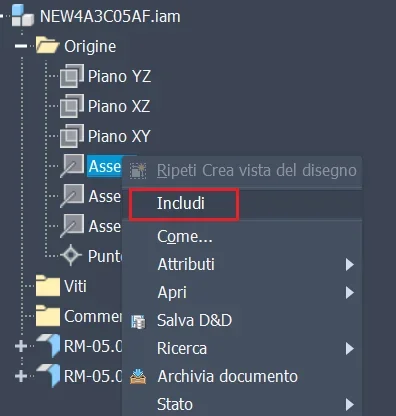
I open the tree of origin and touch what I want to include.
 
hi beppe,

I think we're talking about two different things.
I meant in the table environment when you open the dx key and decide to hide a line.
1705651179686.webpHow do you review it? ?

in fact in the 1st message to put a reduced quota I put the axis with the function button dx >
automatic axis lines, then I guess I devised the axis and I don't want to see it again.
 
I usually to make these odds I identify my part/aid in the browser and select the plan/axis of origin that I want to "include".
a fly made the quota select the plan/axis and remove the visibility (if I remove "includ" the quota that inherits the reference jumps).
if I want to make the reference axis/plan again visible I do the same procedure, i.e. I identify in the browser the part/axis from which the reference is issued.
 
the axis I need to make the quota, having hidden it and not knowing how to make it visible I do not know how to create it.
 

Forum statistics

Threads
44,997
Messages
339,767
Members
4
Latest member
ibt

Members online

No members online now.
Back
Top