• This forum is the machine-generated translation of www.cad3d.it/forum1 - the Italian design community. Several terms are not translated correctly.

automatic execution of macro vba

  • Thread starter Thread starter Catafratto
  • Start date Start date

Catafratto

Guest
I want to share the soperta I did today: how to run the vba macros automatically.
in the past, it could be done, but in the last versions of inventor the possibility had been removed (in old post the thing was widely treated) and introduced ilogic that offers many possibilities but for which basically you have to rewrite what previously worked perfectly. I had never noticed this command:

inventorvb.runmacro("project application", "modulo1", "testautorun")

that allows ilogic to make "partire" the macro "testautorun" (the preferred macro name) contained in the "modulo1" of "project application" (alt-f11 to go to the vba editor)

In practice you can create an ilogic rule, activated by the preferred event trigger (e.g. before the rescue), which starts one or more macros, such as the one that exported pdf/dxf/dwg or that of the scales in cartiglio so much to understand.

the thing can be really useful to recover old utilities that were automatic and are no longer, without needing to remake everything.

I hope this is useful to someone and if it was already known... ignore the post!
Good Friday to all!
 
bye, it was not known at all, thank you for the straight, shortly I will try the system:)

Thank you!
 
It's an artifice to activate any macro vba following an event, the best thing is to test
 
education "fast":
management>adjustment rule
put the name you want, you open the window where you copy the line (with the changes you need based on the module and macro name) placed at the beginning

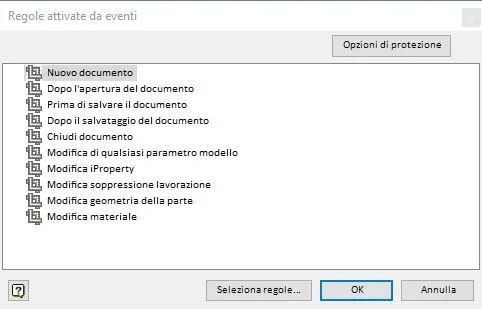
Event triggers > choose which events activate the rule

for more detailed descriptions need more time

the rule unfortunately is tied to the file, so if the test does what you want you can put in the templates for new pieces but for old stuff is more a problem
 
I have a problem!

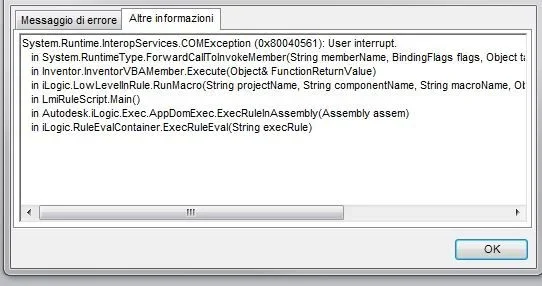
I created the rule and everything works well but it gives me a mistake.

to create sheets, to every change the development changes alone in the ipropietes thanks to the rule...and so far everything well!...the problem arises when I am in a set, I insert my sheets, save, close and I exit the error!

Exit the error "run-time, I do "debug" and sends me to the macro of development with evidence the lines that would be wrong (think)... what can be?

I attach screenshots.

Thank you.
errore.webprun time.webperrore FlatPattern.webp
 
Mah!
Who can say... :redface:

The error report you receive indicates that the macro is activated when there is nothing open. . .

what event have you linked the execution of the ilogic rule? perhaps to "close the document" (may explain the problem)
is the ilogic rule present only in the sheets?
 
Yes, I did it only in the sheet and I also set "close the document"

do you think it's done in all types of files? sheet, parts, together, etc...
 
I would impose it on "before saving the document", so he does his job to save: with close can be found precisely the closed part and not know what to do

- the development thing would leave him on the sheets alone.
- you can create "external" rules (look at the rules tabs) that you write once but then you still have to connect in each file, with the advantage however that each edit will be made once and for all, otherwise each part has its own local rule. certain rules I would set them up in the template.
 
Intrigued by the topic I looked better ilogic: actually the most direct solution is to use this rule instead of the macro:
Code:
dim sviluppo as string
dim lungh as integer
dim largh as integer

lungh = ceil(sheetmetal.flatextentslength)
largh = ceil(sheetmetal.flatextentswidth)
sviluppo = lungh & " x " & largh


iproperties.value("custom", "sviluppo") = sviluppo
does the same using ilogic automatisms
 
You're a genius!

this is better and does not create any problem!! !

I have seen however that rounds excess...for example if I make 20,1 development does 21....
 
round(n, 1) round n to a decimal
always to the whole top
floor always at the bottom
choose what you like most:tongue:

if you want decimals in the first rows dim... instead of integer put double
 
...
the rule unfortunately is tied to the file, so if the test does what you want you can put in the templates for new pieces but for old stuff is more a problem
cannot automatically execute an external rule, so that it can be performed by all files, without having to incorporate it?
In rule change, in the options tab, there is the option "do not run automatically", which assumes that the rules, even the external ones, can be executed automatically, but it seems not to work.

Alternatively, it is possible to automatically perform (for example when opening a file), a macro vba?
 
the post is old and beautiful news has been introduced since. . .1594188966926.webpas you see in the triggers you can activate external rules for all documents, or even those of a certain type.
 
but what version of inventor do you use?
I use the 18th and find myself this miserable mask:
Trigger.webp
 

Forum statistics

Threads
44,997
Messages
339,767
Members
4
Latest member
ibt

Members online

No members online now.
Back
Top