
• This forum is the machine-generated translation of www.cad3d.it/forum1 - the Italian design community. Several terms are not translated correctly.

because of a sloped plane

  • Thread starter Thread starter genesis1975
  • Start date Start date

genesis1975

Guest
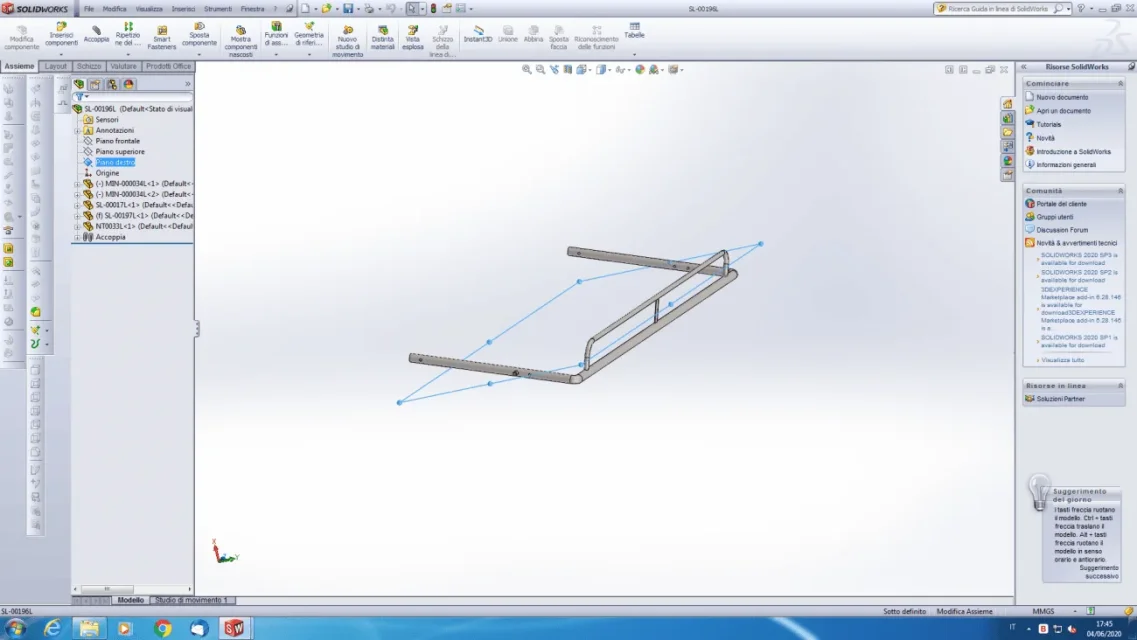
1591285585546.webpthis is a subaxieme formed by three parts each of which has planes arranged according to its height width and depth. ..but by viewing the plans of the set, it gives me for example as the right plane this tilted. ..logically then if I make a 2d drawing completely, it puts it sbilenco and therefore the msures are not the real ones... why do I do so?
 
Maybe sl-00197l...that's what's wrong, and how should I do it or should I do it to do it right or to put it in place?
 
make it mobile, select the origin of the part, that of the aid and make them coincident by flagging the alignment option
 
Then I tried to do it and he flipped it all over me making my axes aligned. ..but this is a subaxieme and I'm afraid that by saving it and closing it and returning to the bigger set, this operation turned me all the assembling, making it impossible. . .but if not except the alignment operation will remain as before...I'm not sure of the repercussions that had the operation in the general set, which is a cinematography
 
banal question: what bothers you to see or have the tilted subaxieme plans?
 
because when I go to table 2d and I have to quote, the length that comes out is not the real, but the projection according to the tilted plane
 
Then I don't understand why, even if I've never done the alignment operation so described, the subaxial plans have always been oriented well or almost, in my subaxis.
 
because when I go to table 2d and I have to quote, the length that comes out is not the real, but the projection according to the tilted plane
2 methods:
1st in the assieme positions the model as you want to have the first view in drawing, when in the drawing insert the first view selections between the options "current model view"
2nd rough view

attach the subaxeme that I make a concrete idea of what you're doing.
the fact that the fixed element is not the first of the list suggests that the parts were randomly placed
 
the first method I tried it again to put it as I wanted, but when after it happened that I rotated the asses, I also rotated the current position in table 2d.
I try with the second, I mix the angle that is in the 3d and then I rotate the view in the 2d...
 
but when it happened that I rotated the axieme, I also rotated the current position in table 2d.
not possible
I try with the second, I mix the angle that is in the 3d and then I rotate the view in the 2d...
do menu tools> online design views>try various options

I see you're always reluctant to attach files. it becomes difficult to help and advise you in modeling, which is obviously problematic.
It doesn't seem to me that 3 tubes are an industrial secret to protect, but if it's not like that I do mea culpa
 
without overturning the axieme with the alignment axes that I suggested you do the coupling of part 00197 between its plans with those of the axeme one at a time, therefore:
right floor 00197> front floor together
upper floor 00197> right floor together
frontal plane 00197> upper floor together (this assesses whether to make it coincident or use a distance)

If you look at the plans of the first component 000034 you will see that I correspond to that of the axieme, then you have inserted the component , then you have inserted all the others and you have put mobile the first and fixed the 00197. You can't complain if you don't plan modeling with criterion.
 
So I would have put the first 000034 component into alignment like you told me? But I never did, how do plans coincide?
 
But I never did, how do plans coincide?
I can only assume what you did from what I see:
-The fixed component is half the list.
- the component 00034 is the first of the list and has 2 floors on 3 coincidents to that of the assieme and the third is however parallel even if distant.

I did not say that the first component you entered it as indicated by me, i.e. selecting the origins, making them coincident and aligning the axes, but that it was the first to be inserted and therefore commanded the general orientation; this specification is necessary because it may be that the components of the list are moved before or after others for needs issues, but I doubt that is the case.

in a set when inserting, with the method insert part, the first component is made fixed and the plans are made automatically coincide.
 
then that subaxieme was born from a larger group in which I selected the parts that had to become subaxieme with ctrl and then I made "create subaxieme here". I don't know how the program puts me the selected parts. . .
However I usually when I create a set select a plan and then insert the component...I would like to understand from you how they fit the components so that they do not come home
 
So the first part I insert already puts it oriented and is the one that determines the plans of the right subaxieme?
What do I have to do that I didn't do because I don't get thrown out there randomly?
 

Forum statistics

Threads
44,997
Messages
339,767
Members
4
Latest member
ibt

Members online

No members online now.
Back
Top