• This forum is the machine-generated translation of www.cad3d.it/forum1 - the Italian design community. Several terms are not translated correctly.

cat v5 some questions

  • Thread starter Thread starter Cervantes90
  • Start date Start date

Cervantes90

Guest
hi I began to learn catia v5 for pure curiosity with the demo version even if for work use solidworks 2010 with which I look great! I used autocad and solid edge in the past. only with catia v5 I'm having problems learning but succumbed to understanding why it is so damned and uselessly Moroccan, with this I don't want to say that solidworks is better as a program also because I'm aware that catia is a 3d high-end program. the problem is that I don't understand why a high-end program is so slender in the way of use? I do some examples:
1) the first difficulty has been getting used to using the combination central mouse button pressed + ctrl (in my case the mouse wheel) to turn the piece 3d thing that instead with the only pressure of the wheel in solidworks and solid edge you turn it as you want,instead on catia doing so activate the pan. Then zoom with the wheel for me is of disarming comfort while that on cattelli devona ctrl. So this already makes me twist my nose.
2) to achieve certain things with solidworks I use seconds while with catia much more, I explain better: for example we enter in sketch mode in both programs and we see that to center any geometric shape compared to the origin on solidworks is easy and fast while on catia is unnecessarily Moroccan. type if we create a circle anywhere and then we want to center it in the origin in solidworks just select the center of the circle and drag it to the origin or even select both the central point of the circle and the central point of the origin and then press on the coincidence relationship. on the other hand, you must once you have created the circle quote the center of this last one and the point of origin and then click with the right mouse button and select coincidence. Another example is to create a square without the predetermined central point and center it on the basis of the origins, in solidworks just select the central points of two segments that form the geometric figure (horizontal and vertical) and then select the point of origin and press on the horizontal or vertical relationship according to the respective segment. While in caia you must first select the two horizontal or vertical segments and then a coordinate that is parallel to the selected segments and then go to the key of the relationships and select the respective relationships.
other example in sketch mode I don't know why if I want to create a line starting from the edge or segment of a already created 3d object does not select the edges as ever? on solidworks or solid edge does it quietly and it is very comfortable, I find myself very flattened with this way that it has craving to work.
I can continue with examples but I think you have understood what I am referring to, so my argument does not want to be a criticism but a question: why is it so unnecessarily Moroccan? Maybe it's me who can't use it properly but I saw tutorials on youtube and everyone uses it the same way. I hope that some catechism experts v5 enlighten me. then on the potential of the instruments I do not discuss absolutely nothing even because I have just begun and I have to do so much road, then I have seen the amount of things that can be done and is impressive.
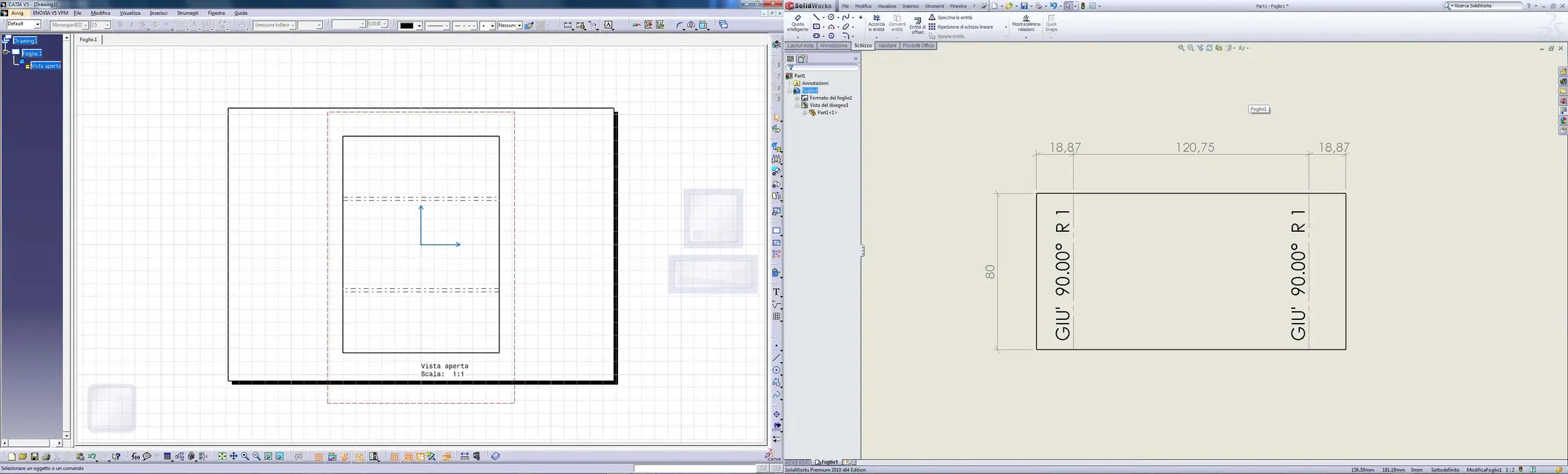
Last seen that I did not find the way to solve the problem maybe someone knows it, I created a sheet metal model with two folds so much to see how the program behaves, then I created the dxf of the development and until here no problem, after I created the file draft with the development of the sheet and I discovered that on the fold lines does not appear the features with the bending radius, the angle and the verse cmq lines are two that a problem on solidworks everything appears to me automatically, dotted line or continue more complete description of the fold without doing absolutely nothing.
I apologize for the grammatical errors you can find are not Italian, thank you in advance.
 
Hello cervantes,

the fact is that by self-taught you do not go very far and this applies to anything. you will never have the assurance that the way to do is the best and least that is right.
catia v5 is one of the easiest and most intuitive software in circulation and for what it costs must be! I am not the most suitable person to say "take a book" for a reason that will be clear to you in a short time (of research) but, really (!), do not throw time to find out what that and that other icon mean...

of the noble
 
catia v5 is one of the easiest and intuitive software in circulation and for what it costs must be!. . .

of the noble
That's the opposite.
between all cad, catià is the least easy and intuitive.
the high cost is not an index of what you mentioned.
the high cost is due to 3 factors.
1) advanced features
2) corporate structure (how do you pay thousands of employees) if you do not sell it as uranium
3) Name
 
That's the opposite.
between all cad, catià is the least easy and intuitive.
the high cost is not an index of what you mentioned.
the high cost is due to 3 factors.
1) advanced features
2) corporate structure (how do you pay thousands of employees) if you do not sell it as uranium
3) Name
Is a question more intuitive?
 
for me all the cads have merits and flaws: ................ but since those who pulled the "sweet" use solidworks, I installed time ago a copy of solidworks at home to prove it, in one evening I failed to do a decent sketch (and I don't think a "deficent"), which with catia I do in a few seconds :wink:.
a colleague of mine dismissed from my company (used from 5 or 6 years catia v5) and went to work in a company with solidworks ....... Well we saw ourselves after 2 years and we spoke immediately (professional training) of cad 3d and told me coming from catia and going to solidworks I came back light years in the sense that it is very + "stupid" with catia resume assiemi parts and drawing it was very fast with solidworks it is difficult that everything goes smooth , I do not go in merit x that I do not know solidworks..... .
cmq since they are part of the same family (dassault systemes) I do not believe that it catches v5 costs + only to pay employees , in ferrari, audi ,bmw , nasa , airbus , cesna .................. and many others do not believe that they spend a lot of money in licenses to keep the dassault . . . . . . . . . . . . . . . . . . . . . . . . . . . . . . . . . . . . . . . . . . . . . . . . . . . . . . . . . . . . . . . . . . . . . . . . . . . . . . . . . . . . . . . . . . . . . . . . . . . . . . . . . . . . . . . . . . . . . . . . . . . . . . . . . . . . . . . . . . . . . . . . . . . . . . . . . . . . . . . . . . . . . . . . . . . . . . . . . . . . . . . . . . . . . . . . . . . . . . . . . . . . . . . . . . . . . . . . . . . . . . . . . . . . . . . . . . .

cmq all cad , as I said in the opening, have merits and defects just know how to take the qualities and be careful of the defects, and this you understand on the skin only by using a cad for work and not playing us every now and then...............
 
Is a question more intuitive?
you are much more intuitive:finger: I recommend you don't waste time with cv5 and immediately switch to nx (even little:wink:)
the best in absolute is the brain brain brain brain...that, if you know how to use it, is the + intuitive of all. :finger:
 
Is a question more intuitive?
Yes, indeed, perhaps.

I am not the most suitable for comparisons since I use nx for many years and therefore I can confuse automatism with ease of use.
a mistake that I think make in many (me included) is to transpose working methodologies on different cad.
for example I found myself in huge difficulty with whether it is a single body, while nx is a multiple body, so certain things I do with nx can not do with it.
on the ease of use of nx: I think it's one of the few cads, if not the only one, whose files have a single extension, there's no distinction between model, together, drafting sheet... I find this very versatile, other users, who come from different systems, panic.
some commands allow you to do very complex things and therefore have a lot of options in the menu. Is this an advantage or a disadvantage? depends on what you want to do.

I introduced myself into this thread for the question you asked, re-proposing it on the nx forum, maybe you will have more answers.

bye:
 
on the ease of use of nx: I think it's one of the few cads, if not the only one, whose files have a single extension, there's no distinction between model, together, drafting sheet... I find this very versatile, other users, who come from different systems, panic.
I'm sorry, can you tell me if a model did the table? Do you have to open nx?
 
I'm sorry, can you tell me if a model did the table? Do you have to open nx?
It's long to explain, and then I don't know if you understand (I'm going to come out of course and apologize for the confidence :smile:).
the table can be managed in two ways: with one you do the drafting within the same file, with the other (called master model) you do the drafting in another file. I think it's a minor 'problem' but I repeat, maybe the long use has me a little bit accustomed to this.
very interesting instead the fact of 'individual' files is that you can manage very well top down structures without having to leave by force with a scheme.
What strength do you find in the cads you do?
Hi.
 
I agree with what he says of the noble.
pretending to learn a cad by yourself is almost impossible, but you can have some fun.
so you want to spend some time answering some points of this discussion
1) the first difficulty has been getting used to using the combination central mouse button pressed + ctrl (in my case the mouse wheel) to turn the piece 3d thing that instead with the only pressure of the wheel in solidworks and solid edge you turn it as you want,instead on catia doing so activate the pan. Then zoom with the wheel for me is of disarming comfort while that on cattelli devona ctrl. So this already makes me twist my nose.
for the correct use of catia you have to get a three-tase mouse (butta the wheel that does not serve much, surely you will think and how you make us with all the other programs! I assure you that you can do without it, just think about the mec that has only one button!:smile:) the correct sequences for the use of the mouse are:
txsx; for selection on tree and on graphics.
txcen pressed; translation according to the screen plan
click with the central; shifting the rotation point to the screen center
central tx pressed+ 1click with txdx, moving the mouse forward/back;zoom
txcen pressed + txdx pressed; rotation around the center of the screen.
txdx on the menu fields of a command; pop-up menu activation
when you try to make these manoeuvres do it slowly, with some exercise you will already realize that you are no longer forced to use many commands.
2) to achieve certain things with solidworks I use seconds while with catia much more, I explain better: for example we enter in sketch mode in both programs and we see that to center any geometric shape compared to the origin on solidworks is easy and fast while on catia is unnecessarily Moroccan. type if we create a circle anywhere and then we want to center it in the origin in solidworks just select the center of the circle and drag it to the origin or even select both the central point of the circle and the central point of the origin and then press on the coincidence relationship. on the other hand, you must once you have created the circle quote the center of this last one and the point of origin and then click with the right mouse button and select coincidence. Another example is to create a square without the predetermined central point and center it on the basis of the origins, in solidworks just select the central points of two segments that form the geometric figure (horizontal and vertical) and then select the point of origin and press on the horizontal or vertical relationship according to the respective segment. While in caia you must first select the two horizontal or vertical segments and then a coordinate that is parallel to the selected segments and then go to the key of the relationships and select the respective relationships.
when you open a sketch you will notice the presence of the two-dimensional system in the center of the scermo, if you already know that it has to start from there call the command circles in the zero axis for which the circle is already centered.
then the rule applies to all the caia commands:
a click on the button command; the command is active only once;
double click on the button command; the command is active until it changes command or double esc.
in the sketch open the submenù (black flask) you will find all the combinations you talk about.
learn to also use the profile command, and much more useful, of the basic geometric figures (clik on a line start point according to clik fine line, hold the txsx on the ultra point and rotate the mouse create a tangent arc).

If you can do this, you've already halved your work time.
As far as the use of 3d edges recurs you to make use of lake because they are the first source of error, when you change a model-

do not complicate too much sketches, better make a simple feature more than incur or better resort to all errors in the reconstriction phase of the model.
Last seen that I did not find the way to solve the problem maybe someone knows it, I created a sheet metal model with two folds so much to see how the program behaves, then I created the dxf of the development and until here no problem, after I created the file draft with the development of the sheet and I discovered that on the fold lines does not appear the features with the bending radius, the angle and the verse cmq lines are two that a problem on solidworks everything appears to me automatically, dotted line or continue more complete description of the fold without doing absolutely nothing.
in drawing environment you find the quotation called "functional" and must be used for the quotation of the folds.
That's the opposite.
between all cad, catià is the least easy and intuitive.
I disapprove this quote, simply because while the other cads mentioned have a very similar comfiguration (as similar as to office) catia has its own graphical configuration that from my point of view is very refined and thought to those who have to work cad (an example on all wide graphic work area that is not reduced by a myriad menu)

a mistake that I think make in many (me included) is to transpose working methodologies on different cad.
for example I found myself in huge difficulty with whether it is a single body, while nx is a multiple body, so certain things I do with nx can not do with it.
I agree that multibody modeling clearly amplifies the possibilities of modeling and especially in my opinion helps to structure a particular in order to simplify the change that in the end is normalmnte 90% of the work that is done.
on the ease of use of nx: I think it's one of the few cads, if not the only one, whose files have a single extension, there's no distinction between model, together, drafting sheet... I find this very versatile, other users, who come from different systems, panic.
This also happens in catia where geometry is lesserized in catpart files (superfici, solids, sheetmetall) product and table are only visualizations, as a distinction does not seem so complex, surely creates problems to those who have to attack a pdm.
some commands allow you to do very complex things and therefore have a lot of options in the menu. Is this an advantage or a disadvantage? depends on what you want to do.
I actually agree and have the same opinion, in the casket commands.

the table can be managed in two ways: with one you do the drafting within the same file, with the other (called master model) you do the drafting in another file. I think it's a minor 'problem' but I repeat, maybe the long use has me a little bit accustomed to this.
very interesting instead the fact of 'individual' files is that you can manage very well top down structures without having to leave by force with a scheme.
this seems to recognize that it is all tied to that it must attack a pdm behind the cad
What strength do you find in the cads you do?
I'm sorry if I introduce myself to stef, very refined as a question, but I still have to understand what are those of nx :biggrin:, although I realized that it definitely fits with aesthetic ease to his pdm.

or as usual nobody wants to say that all cads do the same things (why mathematical algorithms are for all the same), and that they are tools that must be adapted to the needs of the company?

:smile: I hope I wasn't boring.

but then I wonder that we are asking this question about v5 in area v6, someone of unigraphic and interested in talking about the latter
 
I agree with what he says of the noble.
pretending to learn a cad by yourself is almost impossible, but you can have some fun.
so you want to spend some time answering some points of this discussion


for the correct use of catia you have to get a three-tase mouse (butta the wheel that does not serve much, surely you will think and how you make us with all the other programs! I assure you that you can do without it, just think about the mec that has only one button!:smile:) the correct sequences for the use of the mouse are:
txsx; for selection on tree and on graphics.
txcen pressed; translation according to the screen plan
click with the central; shifting the rotation point to the screen center
central tx pressed+ 1click with txdx, moving the mouse forward/back;zoom
txcen pressed + txdx pressed; rotation around the center of the screen.
txdx on the menu fields of a command; pop-up menu activation
when you try to make these manoeuvres do it slowly, with some exercise you will already realize that you are no longer forced to use many commands.


when you open a sketch you will notice the presence of the two-dimensional system in the center of the scermo, if you already know that it has to start from there call the command circles in the zero axis for which the circle is already centered.
then the rule applies to all the caia commands:
a click on the button command; the command is active only once;
double click on the button command; the command is active until it changes command or double esc.
in the sketch open the submenù (black flask) you will find all the combinations you talk about.
learn to also use the profile command, and much more useful, of the basic geometric figures (clik on a line start point according to clik fine line, hold the txsx on the ultra point and rotate the mouse create a tangent arc).

If you can do this, you've already halved your work time.
As far as the use of 3d edges recurs you to make use of lake because they are the first source of error, when you change a model-

do not complicate too much sketches, better make a simple feature more than incur or better resort to all errors in the reconstriction phase of the model.


in drawing environment you find the quotation called "functional" and must be used for the quotation of the folds.


I disapprove this quote, simply because while the other cads mentioned have a very similar comfiguration (as similar as to office) catia has its own graphical configuration that from my point of view is very refined and thought to those who have to work cad (an example on all wide graphic work area that is not reduced by a myriad menu)


I agree that multibody modeling clearly amplifies the possibilities of modeling and especially in my opinion helps to structure a particular in order to simplify the change that in the end is normalmnte 90% of the work that is done.


This also happens in catia where geometry is lesserized in catpart files (superfici, solids, sheetmetall) product and table are only visualizations, as a distinction does not seem so complex, surely creates problems to those who have to attack a pdm.


I actually agree and have the same opinion, in the casket commands.


this seems to recognize that it is all tied to that it must attack a pdm behind the cad


I'm sorry if I introduce myself to stef, very refined as a question, but I still have to understand what are those of nx :biggrin:, although I realized that it definitely fits with aesthetic ease to his pdm.

or as usual nobody wants to say that all cads do the same things (why mathematical algorithms are for all the same), and that they are tools that must be adapted to the needs of the company?

:smile: I hope I wasn't boring.

but then I wonder that we are asking this question about v5 in area v6, someone of unigraphic and interested in talking about the latter
Many thanks for the very helpful answers:)! cmq boys I have to tell you that in September I leave my job to do a master computer graphics course because this is my true passion in fact I did not study mechanics I learned everything on the job, I had only done in 2008 a autocad course to then find work in a small mechanical workshop in which they needed a 3d designer, the problem was that autocad I did not need for sheet metal developments and so I went to solid edge since they had it on the computer. I learned it myself with the excellent tutorials of this program and with those of youtube. it's a year that instead I use solidworks 2010 also this learned alone through tutorials. now instead before leaving this world of the 3d parametric I wanted to learn a high-end program so for curiosity and I chose catia v5. So I thank everyone for the answers in particular to ferritium answering your question: I created this topic on the catia v6 section by mistake! Thank you.
 
I agree with what he says of the noble.


when you open a sketch you will notice the presence of the two-dimensional system in the center of the scermo, if you already know that it has to start from there call the command circles in the zero axis for which the circle is already centered.
then the rule applies to all the caia commands:
a click on the button command; the command is active only once;
double click on the button command; the command is active until it changes command or double esc.
in the sketch open the submenù (black flask) you will find all the combinations you talk about.
learn to also use the profile command, and much more useful, of the basic geometric figures (clik on a line start point according to clik fine line, hold the txsx on the ultra point and rotate the mouse create a tangent arc).
I wanted to answer you on this point, I made the example of creating the circle out of the origins (what you call a two-dimensional system in the center of the sketch) on purpose, I know that you can create the circle directly starting from the zero of the sketch axis and that there are so many predetermined forms, I just wanted to say that in many cases you will have to center the hole on the basis perhaps to other objects and become them can macchinoso with the tools v5. But instead what is wrong is me because every program has a way of working and in fact I wanted to understand that of catia and with your explanation I begin to understand it. that of the double click on the button command I did not know in fact it became frustrating every time having to select quota for each line that I had to quote haha! instead on the explanation of the profile command I already knew thanks to a tutorial of youtube. Greetings
 
I'm sorry if I introduce myself to stef, very refined as a question, but I still have to understand what are those of nx :biggrin:, although I realized that it definitely fits with aesthetic ease to his pdm.
I don't use pdm.
or as usual nobody wants to say that all cads do the same things (why mathematical algorithms are for all the same), and that they are tools that must be adapted to the needs of the company?

:smile: I hope I wasn't boring.
not all do the same things or better only some manage to do everything (nx, catia,pro\e) while others are less 'powerful'.
but then I wonder that we are asking this question about v5 in area v6, someone of unigraphic and interested in talking about the latter
I didn't know, I found myself with cervantes asking how nx was.

But the debate seems good to me, why don't we move it in a cad in comparison?

hello to all:wink:
 
I was referring to what you see in the image, in solidworks the view of the development of the piece has two lines and each a note with the characteristics instead on catia v5 does not show the central lines of the folds and not even a note of its features more does not make sense to quote those lines because it does not serve for live realization! how can I do in cay??? the only thing that comes to mind and that I have seen on a tutorial is to create halfway lines between the fold lines and then to quote them but it seems a little absurd and forced to do this!
 

Attachments

  • draft.webp
    draft.webp
    245.8 KB · Views: 67
Good morning to all,
I answer with a metaphor from "deviate mental" (what they are): catia is the astute of perfection, all other software are curves that tend, who more and who less, to the astute without ever getting there.

We must also say something very important: Catia is too noble for ordinary and deadly companies that would spend thousands of euros without exploiting its full potential.
 
What are your arguments about?
catià v5 has the ugliest interface between all cad.
I only attach an image.
How much does the basic licence cost?
with all that costs, more professional icons?
They're not stupid.
think if in your home you would propose such an icon for an interface of your product, what your dt or colleagues might think.
and should I pay you 1500 euros a month?

the curve of draining of catiah is the lowest in absolute.

what makes faith are the statistics on this forum.
There are hundreds and hundreds of neophytes or students who start using sw without courses and cubes and asses manage to do them.

ask to make cubes and assemble from scratch with catiah v5 and see if they succeed.

I don't speak for party taken, but the truth is right here, on the forum.
 

Attachments

  • catià v5.webp
    catià v5.webp
    104.3 KB · Views: 80
cmq since they are part of the same family (dassault systemes) I do not believe that it catches v5 costs + only to pay employees , in ferrari, audi ,bmw , nasa , airbus , cesna .................. and many others do not believe that they spend a lot of money in licenses to keep the dassault . . . . . . . . . . . . . . . . . . . . . . . . . . . . . . . . . . . . . . . . . . . . . . . . . . . . . . . . . . . . . . . . . . . . . . . . . . . . . . . . . . . . . . . . . . . . . . . . . . . . . . . . . . . . . . . . . . . . . . . . . . . . . . . . . . . . . . . . . . . . . . . . . . . . . . . . . . . . . . . . . . . . . . . . . . . . . . . . . . . . . . . . . . . . . . . . . . . . . . . . . . . . . . . . . . . . . . . . . . . . . . . . . . . . . . . . . . .
Does it cost you more than a washing machine made by a company with 100 employees or 1000?
the cost of a cad is also linked to the company structure, as happens in the industrial metalmechanical one.
 
I'm sorry, can you tell me if a model did the table? Do you have to open nx?
a tag is inserted (part or together or specification).
versatility lies in the fact that a part can become together and vice versa.
However who is under teamcenter, you do not care why managed by the pdm.
 

Forum statistics

Threads
44,997
Messages
339,767
Members
4
Latest member
ibt

Members online

No members online now.
Back
Top