• This forum is the machine-generated translation of www.cad3d.it/forum1 - the Italian design community. Several terms are not translated correctly.

clarification on positioning holes

  • Thread starter Thread starter cacciatorino
  • Start date Start date

cacciatorino

Guest
I'm making a plate with laminated holes to mount ball recirculation skates.

once the hole command is activated and the type of hole encounters three problems:

1) the size of the lamato hole proposed by swx is at least imaginative, where do I correct them?

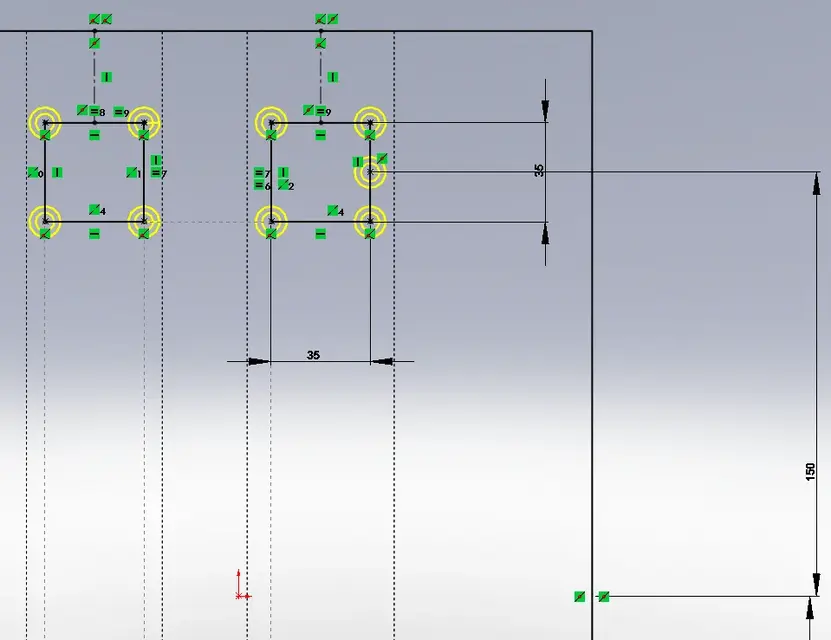
2) when I go to design geometry to place my holes, for example 4 rectangles as in the attached case, then swx does not let me use the tops of the geometries to put directly the hole for the fact that there is already a point in that place. for now I have not found better than putting the hole near, and then touch the summit of the rectangle and the center of the hole and give it the bond of coincidence. with 16 holes this takes away time.

3) If I want to quote the position of the rectangles (the quota 150 in the attached example) I find no other way than to put a construction point in the middle of one of the sides, but thus swx thinks that I want to put a hole, which I do not want. Do I have to resort to additional auxiliary geometries to put this quota "150"?
 

Attachments

  • 103.zip
    103.zip
    117.4 KB · Views: 5
  • fori.webp
    fori.webp
    28 KB · Views: 27
I'm making a plate with laminated holes to mount ball recirculation skates.

once the hole command is activated and the type of hole encounters three problems:

1) the size of the lamato hole proposed by swx is at least imaginative, where do I correct them?
in the property manager check out the display custom size option will give you the opportunity to customize the size of the lamatura.
2) when I go to design geometry to place my holes, for example 4 rectangles as in the attached case, then swx does not let me use the tops of the geometries to put directly the hole for the fact that there is already a point in that place. for now I have not found better than putting the hole near, and then touch the summit of the rectangle and the center of the hole and give it the bond of coincidence. with 16 holes this takes away time.
That's a limitation I never understood...
3) If I want to quote the position of the rectangles (the quota 150 in the attached example) I find no other way than to put a construction point in the middle of one of the sides, but thus swx thinks that I want to put a hole, which I do not want. Do I have to resort to additional auxiliary geometries to put this quota "150"?
instead of a point we "draw" a construction line at extreme free.
However it is enough that after the quota command clickdx on the segment and selections select average point and the quota will be between the average point of the line and the reference you will then choose.
 
in the property manager check out the display custom size option will give you the opportunity to customize the size of the lamatura.
Clearly, I meant how I could put them in place once and for all. :confused:

instead of a point we "draw" a construction line at extreme free.
However it is enough that after the quota command clickdx on the segment and selections select average point and the quota will be between the average point of the line and the reference you will then choose.
I thought I was doing this, but I thought there was something more immediate.
 
for holes size you can see below: system options/creation wizard holes and then from them click on configure
you find the tables where solid goes fishing the size for the creation of the holes .
This change can be fatal and should be attentive to what is done (the teacher's suggestion to the solidworks course :-) ).
always about holes, you would know where to find the text file with holes descriptions, for example "through" etc.
I hope I've helped you.
hello and good work
 
a related question:

noin I find the option "midplane" on the holes.

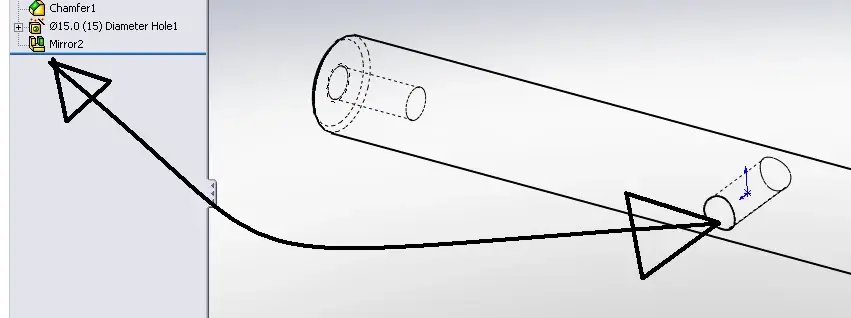
I should make a diametric hole on a cylinder (see image) but if I leave from the middle floor I can't do it passing. Do I have to build a tangent plan first or do half a hole and then mirror it?
 

Attachments

  • foro_2.webp
    foro_2.webp
    14.5 KB · Views: 18
I'm making a plate with laminated holes to mount ball recirculation skates.

once the hole command is activated and the type of hole encounters three problems:

1) the size of the lamato hole proposed by swx is at least imaginative, where do I correct them?

2) when I go to design geometry to place my holes, for example 4 rectangles as in the attached case, then swx does not let me use the tops of the geometries to put directly the hole for the fact that there is already a point in that place. for now I have not found better than putting the hole near, and then touch the summit of the rectangle and the center of the hole and give it the bond of coincidence. with 16 holes this takes away time.

3) If I want to quote the position of the rectangles (the quota 150 in the attached example) I find no other way than to put a construction point in the middle of one of the sides, but thus swx thinks that I want to put a hole, which I do not want. Do I have to resort to additional auxiliary geometries to put this quota "150"?
1) I confirm the bug and reported.
If you give me links to din and iso values I can forward it with more data to the hand.
the answer of old is the right one.
I remember that you can store the hole with your settings and call it back whenever you want.
with 2012 you can edit the original values in the toolbox.
I do not recommend the solution of maca.
Last, it would be nice that the new nm arrival showed something, because until it proves its usefulness on this forum, for me it could stand where it was.
toolbox values have been wrong for years and it is absurd that they are still present.

2) old solution and I agree with you.
We need an er.

3) old solution.
 
I'm making a plate with laminated holes to mount ball recirculation skates.

once the hole command is activated and the type of hole encounters three problems:

1) the size of the lamato hole proposed by swx is at least imaginative, where do I correct them?

2) when I go to design geometry to place my holes, for example 4 rectangles as in the attached case, then swx does not let me use the tops of the geometries to put directly the hole for the fact that there is already a point in that place. for now I have not found better than putting the hole near, and then touch the summit of the rectangle and the center of the hole and give it the bond of coincidence. with 16 holes this takes away time.

3) If I want to quote the position of the rectangles (the quota 150 in the attached example) I find no other way than to put a construction point in the middle of one of the sides, but thus swx thinks that I want to put a hole, which I do not want. Do I have to resort to additional auxiliary geometries to put this quota "150"?
for points 2 and 3 I usually do 1 sketch with the rectangles for construction and the half-point you mentioned and then use the hole command and support me on the previous sketch. you create the same number of entities on two different sketches and do not slow the work so much.
a related question:

noin I find the option "midplane" on the holes.

I should make a diametric hole on a cylinder (see image) but if I leave from the middle floor I can't do it passing. Do I have to build a tangent plan first or do half a hole and then mirror it?
Why not a normal extruded cut?
Last, it would be nice that the new nm arrival showed something, because until it proves its usefulness on this forum, for me it could stand where it was.
toolbox values have been wrong for years and it is absurd that they are still present.
Well, there are many users who pass without leaving the mark. if you participate actively would be great, but I remember that no user has obligations here if not compliance with the rules and other users.

I have seen that you have marked that you use 2012 0.0, but is it not in pr1 at the moment?
 
for points 2 and 3 I usually do 1 sketch with the rectangles for construction and the half-point you mentioned and then use the hole command and support me on the previous sketch. you create the same number of entities on two different sketches and do not slow the work so much.
I'm gonna get used to it, too. I'm still polluted by other cad's workflows.
Why not a normal extruded cut?
In this case, yes, but if the hole is threaded? However, it's quite rare.


Well, there are many users who pass without leaving the mark. if you participate actively would be great, but I remember that no user has obligations here if not compliance with the rules and other users.
But who do you mean? :confused:
 
I'm gonna get used to it, too. I'm still polluted by other cad's workflows.
I understand you! the trouble is not changing cad, but integrating another cad besides what you use. I feel like I have a head of wood when I started from 0 with swx....
In this case, yes, but if the hole is threaded? However, it's quite rare.
add a cosmetic thread with annotations by leaning to the iso standard.
But who do you mean? :confused:
There is a new user who is part of newly inscribed, I think soliduser referred to him.
 
known with pleasure that even in swx there are still several workarounds to do for simple functions. :-)
 
Well, there are many users who pass without leaving the mark. if you participate actively would be great, but I remember that no user has obligations here if not compliance with the rules and other users.

I have seen that you have marked that you use 2012 0.0, but is it not in pr1 at the moment?
I have edited the profile already for the future....so it is a few weeks to the maximum.

for the speech of matteo nm, given the answers that have given the technicians nm to their users and who have shared here, I do not seem to think that the assistance is to be considered such, keeping what someone has also had the courage to say not to report cosmetic bugs.
I would like to see something concrete.
 
a related question:

noin I find the option "midplane" on the holes.

I should make a diametric hole on a cylinder (see image) but if I leave from the middle floor I can't do it passing. Do I have to build a tangent plan first or do half a hole and then mirror it?
the hole you can do on the cylindrical face without planes and will be orthogonal to the face.
the sketch will be of type 3d and for the quotation of point 3d there are various techniques.
 
the hole you can do on the cylindrical face without planes and will be orthogonal to the face.
the sketch will be of type 3d and for the quotation of point 3d there are various techniques.
I add that if you have "under" the sketch we were talking about, you can not quote and assign a simple relationship like "long the x,y,z" depending on how you oriented the piece.
 
known with pleasure that even in swx there are still several workarounds to do for simple functions. :-)
hi ozzy, it always depends on what you do and how you decide to proceed. in this specific case you could still do only points and bind them with horizontal and vertical relationships + some quota.

Alternatively you could do 2 vertical points between them, a vertical construction line, mirror the two points, make another construction line and mirror the 4 points. then 3 quotas blocks the sketch because there are already symmetries.
the streets are always many, more or less direct, the speech of the sketch below, in my case, usually is in the skeleton....
 
and what do you owe this "please"?
I've been teasing you every now and then...
hi ozzy, it always depends on what you do and how you decide to proceed. in this specific case you could still do only points and bind them with horizontal and vertical relationships + some quota.

Alternatively you could do 2 vertical points between them, a vertical construction line, mirror the two points, make another construction line and mirror the 4 points. then 3 quotas blocks the sketch because there are already symmetries.
the streets are always many, more or less direct, the speech of the sketch below, in my case, usually is in the skeleton....
Of course, but in fact I didn't understand why you have to draw lines, is it not easier to use simple points?
ps: in swx is the set function for points?
 
I've been teasing you every now and then...

Of course, but in fact I didn't understand why you have to draw lines, is it not easier to use simple points?
ps: in swx is the set function for points?
Yes, there is.


abcde
I don't remember. when I started using wf 4 I was amazed at this lack, filled with wf 5.

In reality the wizard holes work as a set for points without making the series, in the first phase of the command you choose the type of hole and in the second you place the instances of the hole with simple points.
in case the bolt is used, it is possible to insert only one instance and use the drilling function to repeat all the fasteners in one blow by leaning against the drill itself.
 
I don't remember. when I started using wf 4 I was amazed at this lack, filled with wf 5.

In reality the wizard holes work as a set for points without making the series, in the first phase of the command you choose the type of hole and in the second you place the instances of the hole with simple points.
in case the bolt is used, it is possible to insert only one instance and use the drilling function to repeat all the fasteners in one blow by leaning against the drill itself.
Then I just can't figure out what it is to draw the lines of the quadrants. . .
 

Forum statistics

Threads
44,997
Messages
339,767
Members
4
Latest member
ibt

Members online

No members online now.
Back
Top