• This forum is the machine-generated translation of www.cad3d.it/forum1 - the Italian design community. Several terms are not translated correctly.

creating windows in the layout space with autocad 2014

  • Thread starter Thread starter Granato
  • Start date Start date

Granato

Guest
Hello, everyone!

I have a problem with the 2014 autocad:

with previous versions I was used to design in the model and then to scare using the paper space where I created one or more windows.

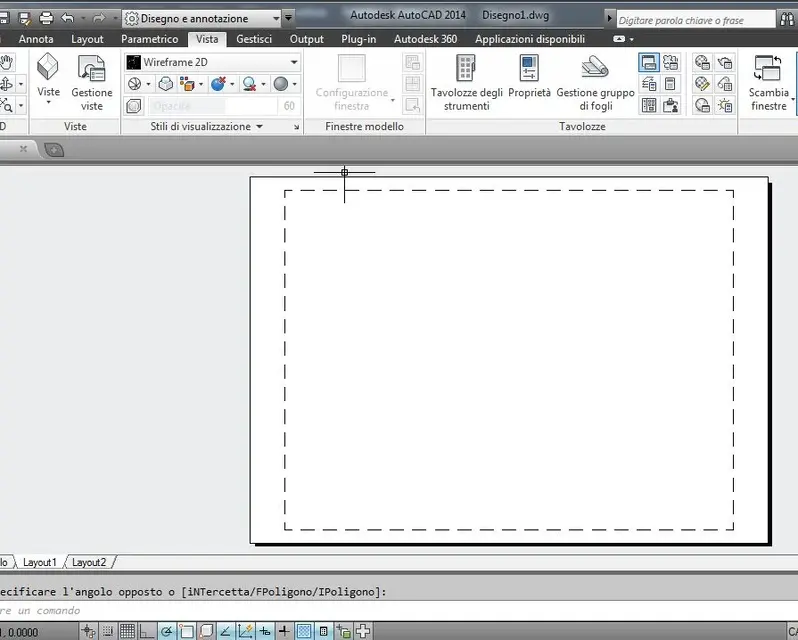
Now I don't understand how to create the windows in the layout space as, as you can see from the images I have attached, if I'm in the layout space itself, and I go to the tab "view", the program deactivates the group "model windows" and so I can't create a window at will (among other things I don't understand why this group calls it "model windows" when we really are in the layout and not model space).

Conversely, as you can always see from the other image attached, if I am in the model space and go into the tab "view", the group "windows model" this time is active and you have the opportunity to create the windows at will even if I don't know what we do since we are in the model and not in the layout.

Thank you very much
 

Attachments

  • Senza titolo-1.webp
    Senza titolo-1.webp
    38 KB · Views: 24
  • Senza titolo-2.webp
    Senza titolo-2.webp
    40.5 KB · Views: 14
no and then if I click with the dx on the mobile window there is no option to put the print scale...mah
 
I've done a try now. the tab you say you serve in model space to divide the screen into multiple windows; in fact the icon window configuration is a drop-down menu, open it and click on another solution and you will see the screen split.
to create windows on the layotu you have to do it through the card layout that in fact in space model is inhibited.
 
I've done a try now. the tab you say you serve in model space to divide the screen into multiple windows; in fact the icon window configuration is a drop-down menu, open it and click on another solution and you will see the screen split.
to create windows on the layotu you have to do it through the card layout that in fact in space model is inhibited.
That's where he was! they put the layout tab that I had not seen, instead in 2012 this tab was not there.

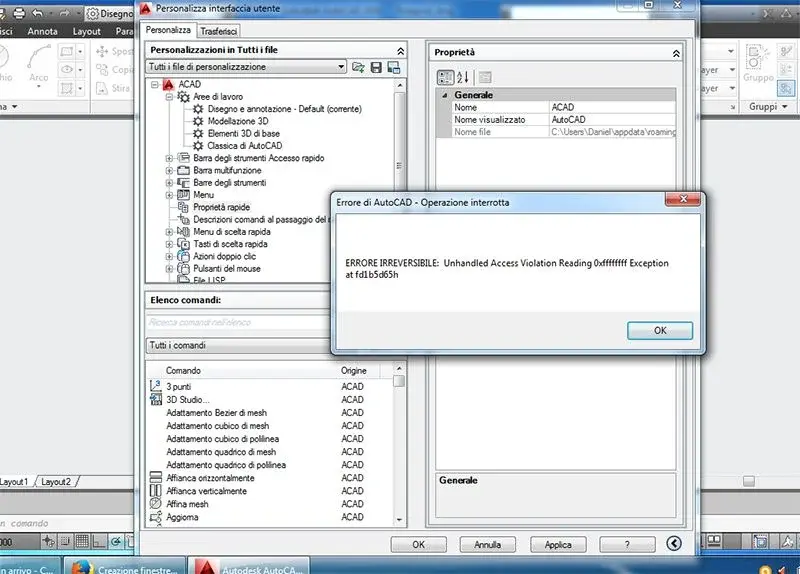
Can I ask you something nice? with 2012, after creating the mobile window in the layout space, if I clicked on the edge of the window, it seems to me that a menu was opened where there was the option to assign the print scale to the window itself... now there is some problem because as you can see from the attached image, if I click on the edge of the mobile window it does not open any window where you assign the print scale, but only opens that window "pick" that I indicated with the arrow...

Can you tell me something about that?

Thank you very much
 

Attachments

  • Senza titolo-1.webp
    Senza titolo-1.webp
    52.9 KB · Views: 15
that window is related to fast properties. means that the double-click action on the window entity activates the command quickproperties. to change the behavior of double click on the various entities you have to go tools>personality interface and navigate the voice double click
 
that window is related to fast properties. means that the double-click action on the window entity activates the command quickproperties. to change the behavior of double click on the various entities you have to go tools>personality interface and navigate the voice double click
But why do I have to do this?

If I click 1 time on the mobile window, it opens that window "pezzo" of the fast properties, then the fast properties actually open, only they remain empty.. .
 
always in the customization interface there is the voice quick ownership there are the properties that appear for each element. verify that rumors have come up.
 
first select the viewport you want to scale and then the scale from the list stairs that you find on the bottom right.
At the same time, the correct scale values are assigned to texts, quotas etc. of type annotative.
You don't even have to go through the quick menu of properties. then, if you want, you can also block the viewing scale by selecting the padlock that you find near the list stairs (if you have to select the viewport).
 

Forum statistics

Threads
44,997
Messages
339,767
Members
4
Latest member
ibt

Members online

No members online now.
Back
Top