• This forum is the machine-generated translation of www.cad3d.it/forum1 - the Italian design community. Several terms are not translated correctly.

creation sheet metal slide with curvature in solidworks

  • Thread starter Thread starter AngeloP88
  • Start date Start date

AngeloP88

Guest
Hello everyone,
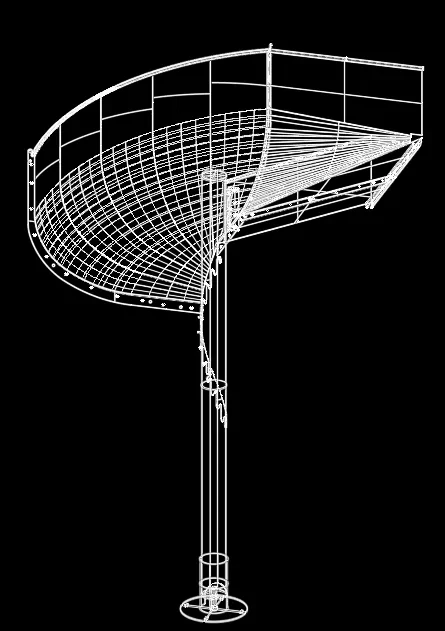
My name is angel and I am finding difficulties in modeling a sheet metal slide with curvature in solidworks.
I should get a curvature of this kind but I can't approach the problem because it's the first time I find myself facing such a problem.
If someone has any suggestions to give me, they are well accepted.
I attach the reference model to how it should go out
Thank you very much
 

Attachments

  • Cattura.webp
    Cattura.webp
    32.4 KB · Views: 39
thanks for the suggestion. then for the conversion to sheet metal how can I do? do I need to use directly bending with loft?
 
Last edited:
Good morning. I'm trying but I have problems in creating the profile of the slide with the basic extrusion function with loft. the same with basic extrusion with sweep. help please
 
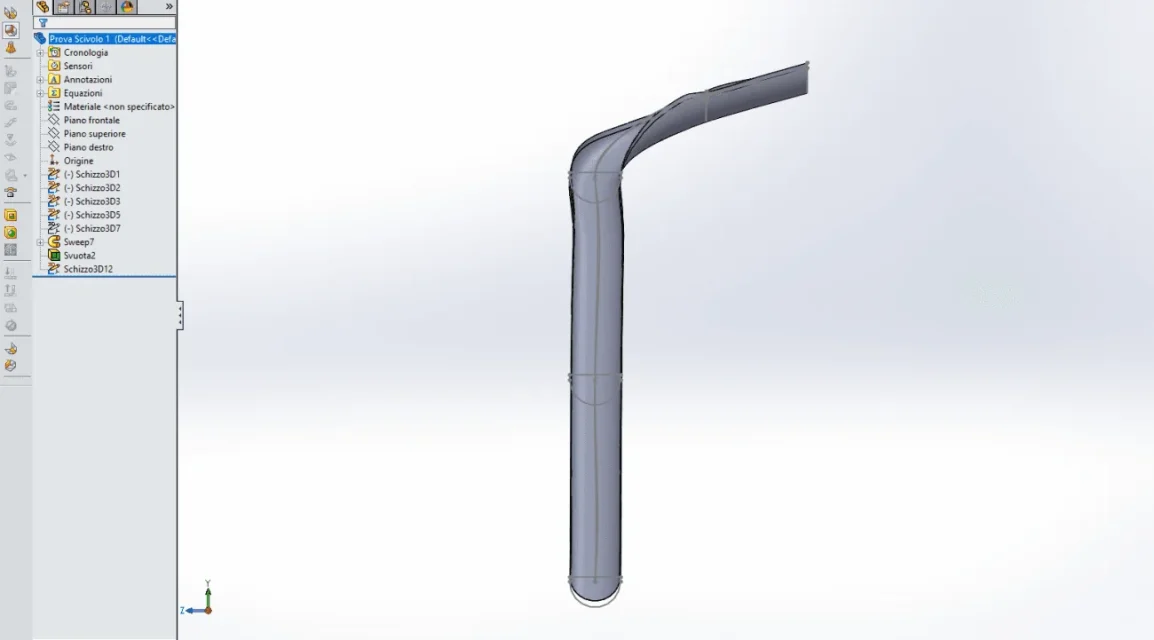
then I am doing a test with a typical profile because at the moment I do not have the precise quotas of the exact profile. I initially tried to extrude with loft generating 3d sketches and a reference curve but didn't generate anything.
I then used extrusion with sweep using the typical profile and the reference curve made with a 3d sketch spline and that's what generates me. it gives me a twist that I can't correct through the adjustment of the 3d spline. And then anyway from here I can't convert it into sheet metal.
 

Attachments

  • Cattura.webp
    Cattura.webp
    26 KB · Views: 31
if there are problems in profile sketches or guide curves it is impossible to know without file.
all 3d sketches are subdefined and this is a serious mistake if you want to better manage a modeling.
a solidworks figure will never turn it into sheet metal
 
Okay, sorry, I'll also get you the file I'm working on.
I'm sorry, but it's the first time I use these functions and I'm having difficulties.
 

Attachments

I also received the drawings of the slide as they would.
I'll coach them if they can serve.
Thanks again for the help you're giving me.
 

Attachments

just a few comments on the flight:
sweep function is used when the profile is constant
loft function is used when the profile is not expensive
the empty function is useless; in addition to the fact that the anointing sweep also manages the thickness, just make the starting sketch with the desired thickness.

3d sketches require a good mastery of the use of constraints and the sketch environment in general.
in these it is better to make a little more road but to build 2d sketches creating specially the plans where necessary
 
thanks for the information.
So you suggest using 2d sketches and loft function?
before I tried but I couldn't still generate the desired profile.
I can't handle it.
 
So you suggest using 2d sketches and loft function?
I wrote that the loft function is used if the profile, more correctly the section, is not constant.
is the section of the slide constant or not?
 
from the drawings that I received the section between beginning and end of the slide must be constant.
the problem is the curved area.
 
Couldn't you give me an example with a warp like that and send me the file?
so I see it and I can understand and move on. Of course if it's not a problem for you.
Thank you.
 
Maybe I try to do something tonight.
starting from the fact that you have to use the sweep function then an initial profile and the path you build as many 2d sections as possible by making plans additional. made this create the path with 3d sketch using the sections created to bind the sketch of the path; instead of using a straight line spline that collects. goes by itself that the more sections you can do better is the control of the path
 
Okay, thank you very much.
I continue modeling following your advice and then we update tonight.
Hi.
 

Forum statistics

Threads
44,997
Messages
339,767
Members
4
Latest member
ibt

Members online

No members online now.
Back
Top