
• This forum is the machine-generated translation of www.cad3d.it/forum1 - the Italian design community. Several terms are not translated correctly.

customization

  • Thread starter Thread starter TECNOMODEL
  • Start date Start date

TECNOMODEL

Guest
I am making the various templates because before my arrival you used the default and there was nothing customized.

made ipt and idw with i-properties, squares, paper etc. now I would like to customize lines, colors, aspects etc.

in the design template I find layers with various line color configurations, line type, thickness. I do not understand what they refer to.
are the lines that are created in sketch mode or even those of the view created by the system?

how do I create a sketch, such as the edge, know in which layer is the selected line? Can I change the layer in which it is defined?

regarding the parts, can you change the colors of the various sketch entities?

when I create something and select it I only have a layer to which color change but it keeps it for every sketch geometry, whether it be axis, boundary line or construction line.

If I open the side's style editor I only find the lighting and notes.

Does anyone know how everything works?
 
Hi.

layers are associated with line types, which you can change to your liking
example: boundary lines are on the "visible" layer
hidden lines are on the "hidden" layer and so on...
The thing is automatic and you don't have to think about how it happened with autocad
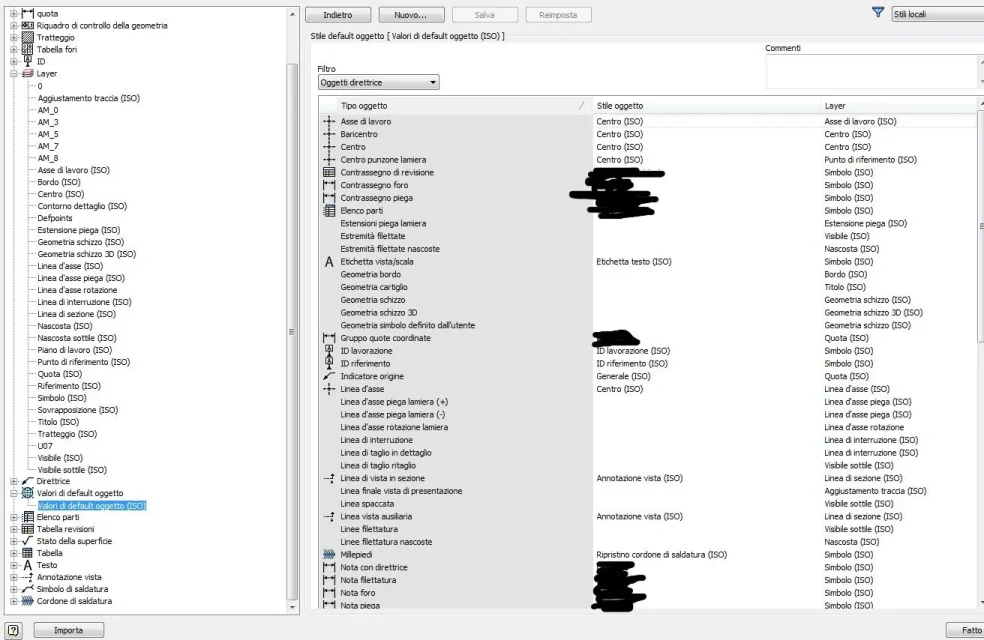
any changes you can make in the style editor as attached, associating each object to a layer to pleasure, which will have characteristics of line types and thickness

All this refers to the table, the lines of the sketches on the parts I don't know, I don't see why to change them. . .
editor_stili.webp
 
Okay, I've seen the style editor before.
but how do I know in which layer a certain line is assigned?
and once you make a line I can move it to another layer so that it tastes the features I want?

on the parts I would like to change the colors because I have a little difficulty with the default ones.
For example I would like the projected geometries to have one color, the lines of construction another and sketches another.
This would help me in selecting and identifying the various entities better.

But it seems to me that it is not possible to do it, even if it seems strange to me since all the cads give this possibility.
 
to know which layer is a certain geometry, selections and pop-ups on the top right of annotations bring you the style
that you can change to flight with what you prefer .. such and as to autocad; to select and highlight the various
entity, you can also use the selection filters that I hope you know if you have already done a nice course ..
 
to know which layer is a certain geometry, selections and pop-ups on the top right of annotations bring you the style
that you can change to flight with what you prefer .. such and as to autocad; to select and highlight the various
entity, you can also use the selection filters that I hope you know if you have already done a nice course ..
ok, in this way however I have to change the appearance every time I create an axis, a projected geometry etc.
is there no way to configure it a priori in the template?
 
no, you create ex novo or change your layer e.g. x axes with color, thickness , line style etc. and you go to associate it in the "default of the object" as you like, save and the thing is ok!
in inventor graphically you can create in the table idw the same settings (bylayer) as in autocad .. the difference is only in the management of texts that are consistent as thickness to the assigned font and not influenced in the thickness from the eventual ctb
print based on color as in autocad.

In my opinion, you must try to understand what "norma" and "default of the object" means..
 
no, you create ex novo or change your layer e.g. x axes with color, thickness , line style etc. and you go to associate it in the "default of the object" as you like, save and the thing is ok!
in inventor graphically you can create in the table idw the same settings (bylayer) as in autocad .. the difference is only in the management of texts that are consistent as thickness to the assigned font and not influenced in the thickness from the eventual ctb
print based on color as in autocad.

In my opinion, you must try to understand what "norma" and "default of the object" means..
I would like to understand, the problem is that I can't find where it is explained.
about the layer to create and associate you mean in the sketches of the parts?
on the editor styles of the parts I have no layer but only environment and notes, I do not know where to go to create them.
 
. then, in a nutshell, the default of the object is a sort of "urban traffic" that directs traffic ..
in the sense that it is he who tells you which graphic object (created automatically or manually by tea ..) will have default
The style and layer characteristics .. is the setting of the settings .. look well the image that has been attached to you
in the previous post. .
this said of course is related to the table idw .

in the modeling of the parts the layers do not exist because they would not need a good cherry!!
to the limit if you load geometry from uncreated autocad bylayer , you display the graphics with individual properties
overwritten (you can see entities with different properties) or you can bypass this setting by selecting
in the sketch (by means of a special icon) the default properties in which you ignore the overwritten graphics and displays everything as default
to highlight the classic colors of free entities, bound or projected according to the color scheme
general that you have set.
 
. .
to highlight the classic colors of free entities, bound or projected according to the color scheme
general that you have set.
That's the problem, I don't have these color changes. geometries are all the same, if bound or projected they do not change color.
You know, working like this is a nightmare.
as color scheme I chose "presentation" as background "fumature"
I don't know if this setting is set to not change colors.
 
then you're the only one that doesn't change colors .. so you're telling me that a line (created from zero in inventor)
depending on whether or not it changes colour in the inventor's sketch??
if so, see if restoring the default properties of the sketch by means of a special icon does not change ..
otherwise you have a problem on your pc, hardware, etc.
At that point you should feel the assistance of your autodesk dealer!
 
then you're the only one that doesn't change colors .. so you're telling me that a line (created from zero in inventor)
depending on whether or not it changes colour in the inventor's sketch??
if so, see if restoring the default properties of the sketch by means of a special icon does not change ..
otherwise you have a problem on your pc, hardware, etc.
At that point you should feel the assistance of your autodesk dealer!
I thought it was weird that nothing changed.

I did as you said, now the sketch lines are black and when you bind blue.

I think I found a pretty messed up computer.

you say I should restore all the initial settings?

It's only worth looking, right? do not affect projects,templates, date design, etc?
 
the xml file definitely does not manage a custom color scheme , but only the options (various flux etc..)
already struggles with the file paths .. the colors are set in the register of windows.
Some things are better to let them stay otherwise every time you update the sw you are daccapo .. if you do not remember. .
 
eugenesis .. not eugenis ..

but the technicians who are taking your course, are they parma?? or emilia reggio???

This app, surely works simply on the winzozz register .. if you believe, you do a record video-print
before and after .. so you can reset the default .. or at worst you delete the whole key
that then inventor at the next launch recreates it..
 
it is not so simple to set a color scheme... .
Now I find myself anomalous behavior, like again the lack of color change of the bound elements.

Lucky I did the back up and I call everything back.
 

Forum statistics

Threads
44,997
Messages
339,767
Members
4
Latest member
ibt

Members online

No members online now.
Back
Top