• This forum is the machine-generated translation of www.cad3d.it/forum1 - the Italian design community. Several terms are not translated correctly.

decalco e ritaglio

  • Thread starter Thread starter deep70
  • Start date Start date

deep70

Guest
Hello to all boys,
I find it necessary to apply decals in a flat surface and then make redndering for a customer, I ask. Is there a method to cut out parts of decal in solidwprks? or needs to do so externally with dedicated programs, and in this case you have a program to suggest for such operations?
thanks to all in advance for any given answers.
Have a good day.
 
I don't understand, I'm going to discard, do you mean decals?
you have to work with raster pictures (picture type), gimp is free
 
with the decals,
In practice I have to cut out in a rounded way the edges and other parts of an image and then load it as a decal.
but I have no clear how to proceed. . .


I don't understand, I'm going to discard, do you mean decals?
you have to work with raster pictures (picture type), gimp is free
 
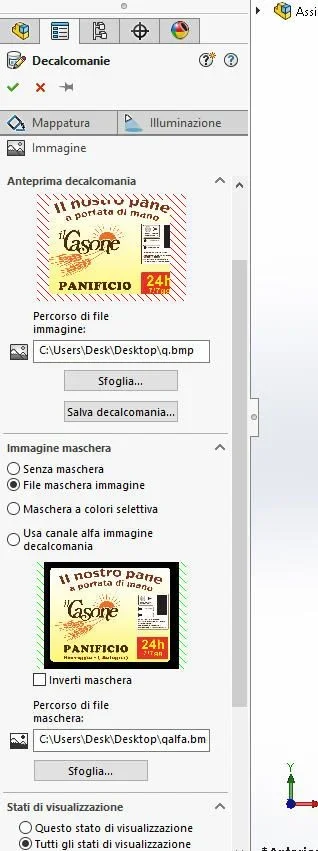
simple decal allows the loading of rectangular / square file, if you need to insert for example only a writing and not the rectangle that contains it, you must load a second file (Alpha channel mask) that tells solidworks which parts of the main image image must remove and make transparent.
the alpha mask file is a two-color image, where the black are the areas that need to be eliminated and the white ones that must be left. the alpha mask image must be the same size as the original image.
http://help.solidworks.com/2016/italian/solidworks/sldworks/t_example_of_decal_mask.htm
 
mmmhh thanks atreiou, what I need but and only cut out an image rounding the edges. .
I set autotrace.. But I see it hard...
simple decal allows the loading of rectangular / square file, if you need to insert for example only a writing and not the rectangle that contains it, you must load a second file (Alpha channel mask) that tells solidworks which parts of the main image image must remove and make transparent.
the alpha mask file is a two-color image, where the black are the areas that need to be eliminated and the white ones that must be left. the alpha mask image must be the same size as the original image.
http://help.solidworks.com/2016/italian/solidworks/sldworks/t_example_of_decal_mask.htm
 
mmmhh thanks atreiou, what I need but and only cut out an image rounding the edges. .
I set autotrace.. But I see it hard...
autotrace function you don't need if you need to apply a decal
I still don't understand what you have to do:confused:

if you just need to adjust the image to be applied as a decal by changing it:
Atreiou said:
you have to work with raster pictures (picture type), gimp is free
 
practically,
I have a bmp image starting, in this image (decal future) I have to round the edges from straight angles to radius 30mm say, after that in the center I have to obtain a picture cut always with rounded edges as right there in the model will go a square opening precisely.
I would probably need a photoshop or similar program to intervene on the image... but to have it. .


autotrace function you don't need if you need to apply a decal
I still don't understand what you have to do:confused:

if you just need to adjust the image to be applied as a decal by changing it:
 
practically,
I have a bmp image starting, in this image (decal future) I have to round the edges from straight angles to radius 30mm say, after that in the center I have to obtain a picture cut always with rounded edges as right there in the model will go a square opening precisely.
I would probably need a photoshop or similar program to intervene on the image... but to have it. .
then, from what I understood then the image is as if it was a mask of the changes you have to make to the solid
Right?

Can't you please attach the image you're talking about?
 
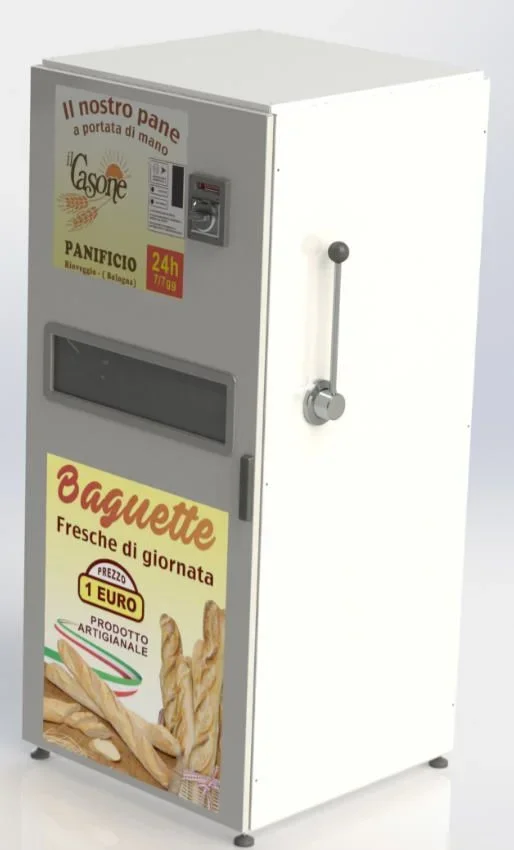
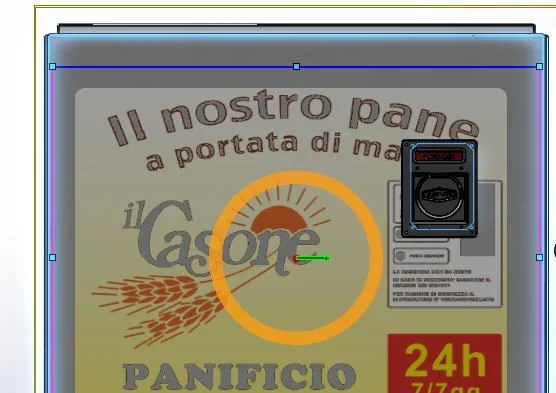
basically the decals that you see in the images I posted must have the corners connected, while instead of that black space it must be made a cut that will go to welcome the token. .
imm.webp
then, from what I understood then the image is as if it was a mask of the changes you have to make to the solid
Right?

Can't you please attach the image you're talking about?
 
I would do it with the alpha mask, practicing first the crack on the sheet for the tokener and then centering the decal on the crack
 
The fact is that nn are practical of things.. Can I help you? How do I make this mask?
 
You need a graphics program.
take the original image and save a copy, save them as "copy_alpha"
open it and draw in the image a rectangle with rounded edges, the sides of the rectangle must coincide with the edges of the image, the interior of the rectangle must be white, what remains out, that is the 4 edges with the 1/4 circle must be black

if you want the coin hole to be transparent, draw a black rectangle even in that position

then add decal as usual but choose to load apart alpha image for transparency, there is a special check.
 
so it would also be good as edges, sin that though I also cut the red color of words. .

imm2.webp
 

Forum statistics

Threads
44,997
Messages
339,767
Members
4
Latest member
ibt

Members online

No members online now.
Back
Top