• This forum is the machine-generated translation of www.cad3d.it/forum1 - the Italian design community. Several terms are not translated correctly.

description panelling in table

  • Thread starter Thread starter 19marco77
  • Start date Start date

19marco77

Guest
Good morning people,

to simplify work in the workshop I should solve this:

in welding environment during the modeling of the structures I also add the sheet panelling. using structural profiles the sheet enters the groove and must therefore be larger than the "hole" (in the design I make it match the size of the hole).

I should give an automatic name to the description item in the cutting table but I have no idea how to place a quota within the description.

type:
aluminium sheet ("height rate" +15mm) x ("width rate" +15mm) x 2

so that in the description of the cutting table I appear:

aluminium sheet 500x400x2

In this way if I change quotas to the structure also updates the description of the various panels. Is it possible?
Thank you.
 
Good morning people,

to simplify work in the workshop I should solve this:

in welding environment during the modeling of the structures I also add the sheet panelling. using structural profiles the sheet enters the groove and must therefore be larger than the "hole" (in the design I make it match the size of the hole).

I should give an automatic name to the description item in the cutting table but I have no idea how to place a quota within the description.

type:
aluminium sheet ("height rate" +15mm) x ("width rate" +15mm) x 2

so that in the description of the cutting table I appear:

aluminium sheet 500x400x2

In this way if I change quotas to the structure also updates the description of the various panels. Is it possible?
Thank you.
Take inspiration from this video.
 

Attachments

Take inspiration from this video.
Sorry last question (thanks for the video. very useful)

Can I use a quote in the formula?

sheet "d2@schizzo20@telaio fp10.sldprt"x"d1@schizzo20@telaio fp10.sldprt"

to the size taken from the sketch should add 15 mm

Thank you. and good lunch:smile:
 
Sorry last question (thanks for the video. very useful)

Can I use a quote in the formula?

sheet "d2@schizzo20@telaio fp10.sldprt"x"d1@schizzo20@telaio fp10.sldprt"

to the size taken from the sketch should add 15 mm

Thank you. and good lunch:smile:
but do you want to have something physically not designed in the table?
Try to see this example you mean something like that?View attachment tabella .rar
 
Sorry last question (thanks for the video. very useful)

Can I use a quote in the formula?

sheet "d2@schizzo20@telaio fp10.sldprt"x"d1@schizzo20@telaio fp10.sldprt"

to the size taken from the sketch should add 15 mm

Thank you. and good lunch:smile:
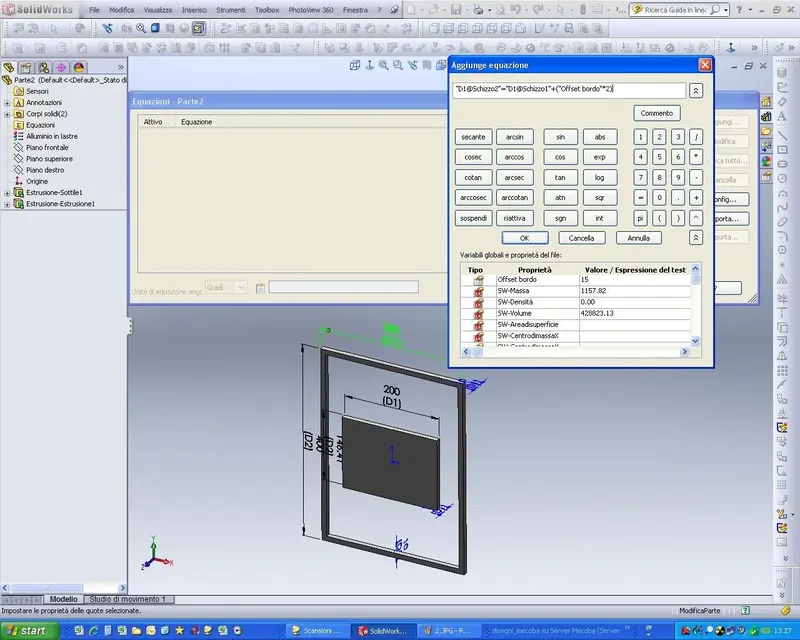
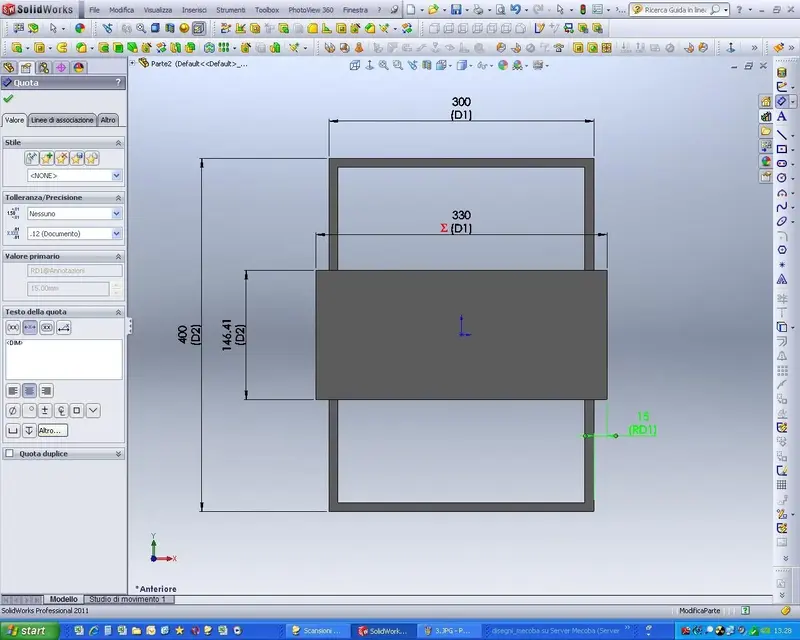
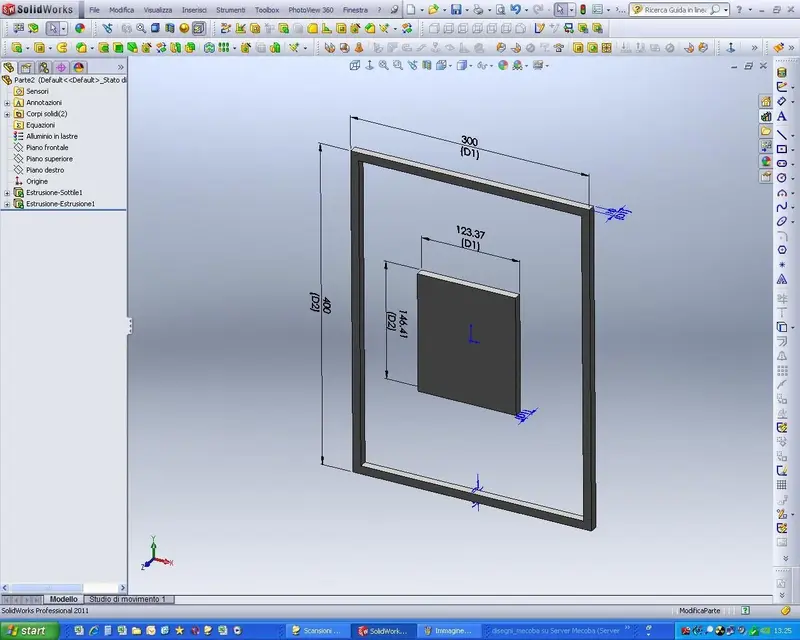
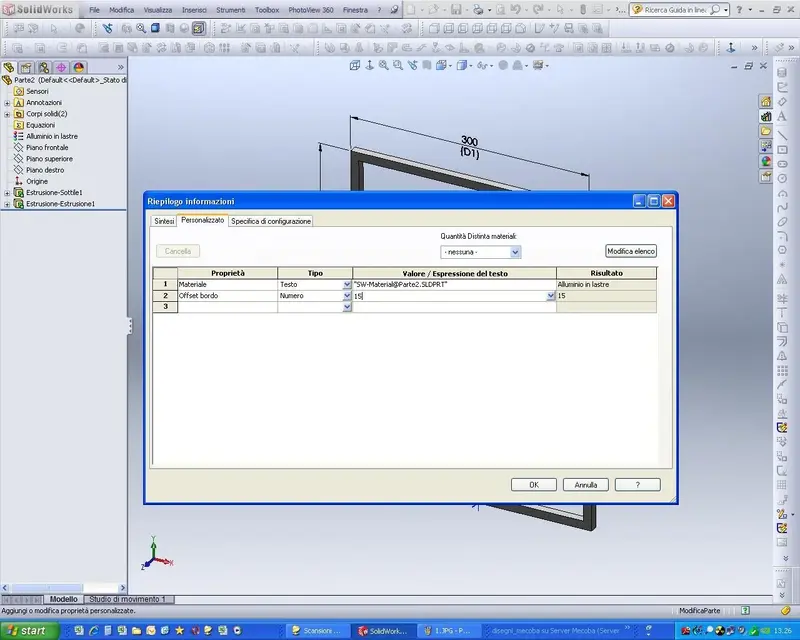
you can do it with an equation, with 2012 you can create a global variable, while with 2011 you have to do as from attached images.
I also attach the example file.
for the display in the table, go to recall the resulting quota and show it in the table. (you must fill in, adding, a property in file/ownership)
 

Attachments

  • 1.webp
    1.webp
    94 KB · Views: 14
  • 2.webp
    2.webp
    92.1 KB · Views: 13
  • 3.webp
    3.webp
    117.9 KB · Views: 12
  • 4.webp
    4.webp
    89.4 KB · Views: 14
  • offset.zip
    offset.zip
    56.6 KB · Views: 2
but it does not update the part but only the note, right? :smile:
only the table table table is exact, unfortunately it is not clear to me what it wants to get, generally on the table in the table I put the actual dimensions of the components/corps that I modeled so I should not add (the 15 mm) in more... I think it would want to make appear only in the table of the increased dimensions. . .
 
but do you want to have something physically not designed in the table?
Try to see this example you mean something like that?View attachment 26898
exact:
I would like to glare the dear solid, more than anything because I do not care to have the right part of the measure but only the note in the table.
in the column "value / expression of the text is there no way to add a quota (by hand)?

Otherwise I will see with which I am better among your 2 thighs;)
 
only the table table table is exact, unfortunately it is not clear to me what it wants to get, generally on the table in the table I put the actual dimensions of the components/corps that I modeled so I should not add (the 15 mm) in more... I think it would want to make appear only in the table of the increased dimensions. . .
It is true, in the axieme the plates I put them only as an aesthetic but then I take advantage of the table to print my distinct cut. but I would be wrong to compare what I really need to cut.
 
It is true, in the axieme the plates I put them only as an aesthetic but then I take advantage of the table to print my distinct cut. but I would be wrong to compare what I really need to cut.
if you do not want to insert the column on the table you can still insert in the part a global variable "modified length" given by the value of the body that models and add a value "15mm" that should have the l in this way you can insert in the table the value "mod length".
 
will be little "professional" but I solve everything by putting the edge of the hillside sheet at a point of structural profile (the same that I would use to calculate the real size of the sheet on a real structure) and take these measures. In this way if I change the frame sketch, I update the sheets and tables :biggrin:

thanks to the advice boys:finger:
 
will be little "professional" but I solve everything by putting the edge of the hillside sheet at a point of structural profile (the same that I would use to calculate the real size of the sheet on a real structure) and take these measures. In this way if I change the frame sketch, I update the sheets and tables :biggrin:
as you see there is only one way to get what you want in swx.
then without seeing how models, it is even more difficult to advise you to the best, if nothing else you came an inspiration to solve your problem. :finger:
 
if you do not want to insert the column on the table you can still insert in the part a global variable "modified length" given by the value of the body that models and add a value "15mm" that should have the l in this way you can insert in the table the value "mod length".
as you see there is only one way to get what you want in swx.
then without seeing how models, it is even more difficult to advise you to the best, if nothing else you came an inspiration to solve your problem. :finger:
I tried to p&g to give you an example but it gave me a mistake:(
the system I have adopted could be useful to others who, like me, use structural profiles and sheets inside the quarries. is convenient and fast :biggrin:
 
Take inspiration from this video.
day mike:)

Are you okay?

Just a quick question... can you configure the table "synthesis cutting list" within the distinct cutting properties? In the end, they are always the same changes I have to make. I did not find the way to save the table as you do within the drawing.

good work;)
 
as you see there is only one way to get what you want in swx.
:

a question to fly..

when I have to fix the cut distinction I need to always add the same lines of description.

Is it possible to change something so that I automatically appear these descriptions?

and according to you can insert the comments you make?

Thanks :wink:
 
day mike:)

Are you okay?

Just a quick question... can you configure the table "synthesis cutting list" within the distinct cutting properties? In the end, they are always the same changes I have to make. I did not find the way to save the table as you do within the drawing.

good work;)
Sorry, I missed your request.

Yes, you can save the table as a template. you can call it back to the table whenever you want and insert it already formatted for how you saved it.
 
:

a question to fly..

when I have to fix the cut distinction I need to always add the same lines of description.

Is it possible to change something so that I automatically appear these descriptions?

and according to you can insert the comments you make?

Thanks :wink:
you must edit the properties in the file (file>propriety) of part and/or together that you will save as a template.
I even created a template with the factor k property, so on the design I have the possibility to insert the factor k value for a flight control.
 
you must edit the properties in the file (file>propriety) of part and/or together that you will save as a template.
I even created a template with the factor k property, so on the design I have the possibility to insert the factor k value for a flight control.
Thank you. better late than ever.. Now I'm gonna do a little rehearsal and see if I can do something quick:finger:

good continuation
 
you must edit the properties in the file (file>propriety) of part and/or together that you will save as a template.
I even created a template with the factor k property, so on the design I have the possibility to insert the factor k value for a flight control.
other doubt (be patient I tried to search among the various forums before :p)

Can I export the generated cutting table in excel?

and if the table is larger than the sheet (intensive as drawing 2d) how do you manage the tables with many articles? :confused:
 

Forum statistics

Threads
44,997
Messages
339,767
Members
4
Latest member
ibt

Members online

No members online now.
Back
Top