salsero
Guest
Good day to all.
I was already enrolled in the forum when I participated in the projects of prof. mazzi.
now I have rewritten with new mail etc... I would need a great hand from you on the famous autodesk software.
At the moment I went to mac with a mini mac... I find myself having to draw parts of a structure that I will have to realize with a friend.
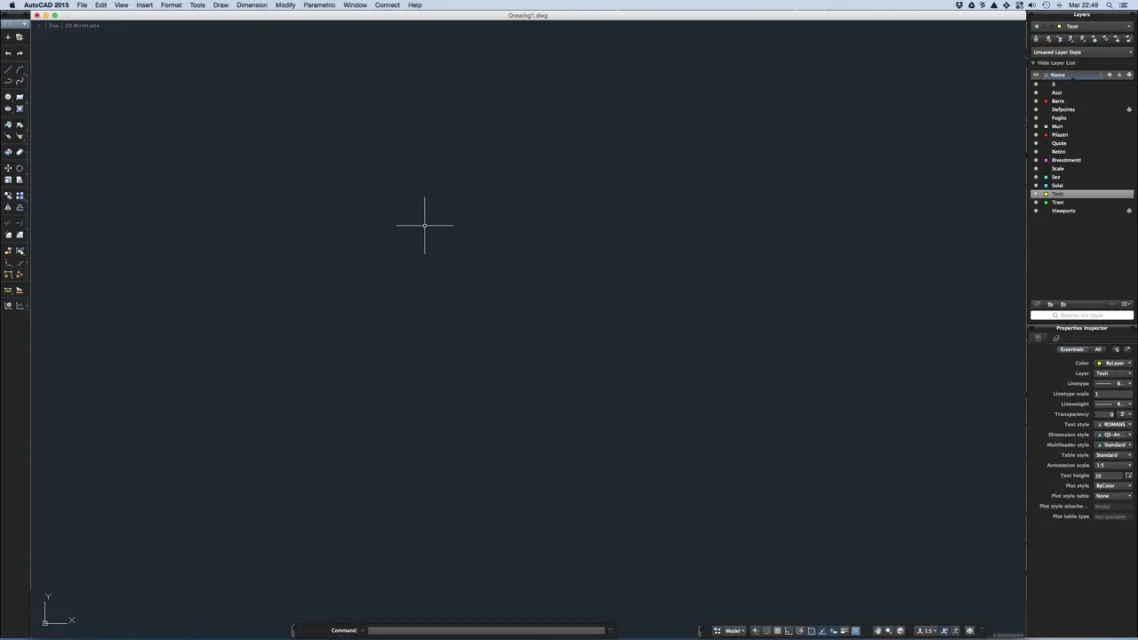
I am now very accustomed to the interface autocad curtains per pc.. and opening it on mac(aducational version) my are found in front of a very bad surprise....the design command bar (line, rectangle.. Exploding offsets etc...) that I used to find at the top of the screen there is...I tried to look for how to make the bar look online that on youtube but in all videos when starting the program the coffin that in the mac to what I see in the videos is located on the left of the screen.
I saw that there should be a gear-shaped icon in the lower right paste of the screen to be able to rub the bars you want to see. . but in my case the iconic gear is the only one missing. I'm desperate. .I don't want to make a second partition by putting w7 and inciting them autocad... How can I view is blessed drawing bar?
p.s.in case prof mazzi is still enrolled I place a great greeting from my chatrian .g
I was already enrolled in the forum when I participated in the projects of prof. mazzi.
now I have rewritten with new mail etc... I would need a great hand from you on the famous autodesk software.
At the moment I went to mac with a mini mac... I find myself having to draw parts of a structure that I will have to realize with a friend.
I am now very accustomed to the interface autocad curtains per pc.. and opening it on mac(aducational version) my are found in front of a very bad surprise....the design command bar (line, rectangle.. Exploding offsets etc...) that I used to find at the top of the screen there is...I tried to look for how to make the bar look online that on youtube but in all videos when starting the program the coffin that in the mac to what I see in the videos is located on the left of the screen.
I saw that there should be a gear-shaped icon in the lower right paste of the screen to be able to rub the bars you want to see. . but in my case the iconic gear is the only one missing. I'm desperate. .I don't want to make a second partition by putting w7 and inciting them autocad... How can I view is blessed drawing bar?
p.s.in case prof mazzi is still enrolled I place a great greeting from my chatrian .g