
• This forum is the machine-generated translation of www.cad3d.it/forum1 - the Italian design community. Several terms are not translated correctly.

drawing bar not present in autocad for mac

  • Thread starter Thread starter salsero
  • Start date Start date

salsero

Guest
Good day to all.
I was already enrolled in the forum when I participated in the projects of prof. mazzi.
now I have rewritten with new mail etc... I would need a great hand from you on the famous autodesk software.

At the moment I went to mac with a mini mac... I find myself having to draw parts of a structure that I will have to realize with a friend.

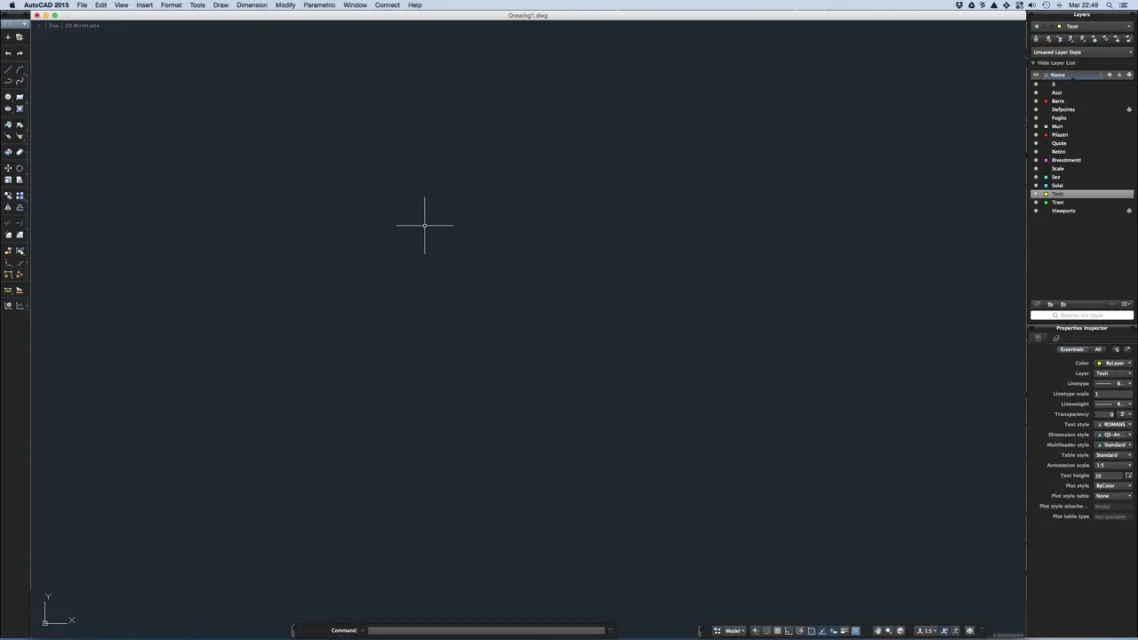
I am now very accustomed to the interface autocad curtains per pc.. and opening it on mac(aducational version) my are found in front of a very bad surprise....the design command bar (line, rectangle.. Exploding offsets etc...) that I used to find at the top of the screen there is...I tried to look for how to make the bar look online that on youtube but in all videos when starting the program the coffin that in the mac to what I see in the videos is located on the left of the screen.

I saw that there should be a gear-shaped icon in the lower right paste of the screen to be able to rub the bars you want to see. . but in my case the iconic gear is the only one missing. I'm desperate. .I don't want to make a second partition by putting w7 and inciting them autocad... How can I view is blessed drawing bar?


p.s.in case prof mazzi is still enrolled I place a great greeting from my chatrian .g
 
I can only now read calmly that writing from smartphone I have committed a huge gaffe...

The professor is not crazy... but it is the prof. d. mazei... I apologize for the error
 
I honestly don't know what your problem is. I guess it's an interface adaptation problem.
if you are trying to customize autocad simply go to tools->customize->interface(here) or if you prefer write directly to which (just as you do on the version for windows).
here you should have the opportunity to create all the palettes you want and whatever you want.
possibly look at the online guide and/or search on the internet/google/youtube that something always jumps out.

p.s.
But maybe your problem is that there's no control bar?
press command-1 to make it appear.
you can still go to tools->palettes to show all the bars you want.
 
Then I took a picture from the phone. I'm sorry for the bad quality. .then I tried to press cmd and 1 but no bar unfortunately appears...the situation that I am in front of you see in the photo
 
look that you have not attached any image.
with the mac to take a photo of the entire screen you have to press: capital-command-3
if you want to do it only of a piece press: capital-command-4 and then select the area.

I bring you an image of the autocad interface with the main windows active. I reduced the size to not make an image too big.shermata.webpon the left is the command bar.

possibly try to do this:
Command+0 prizes to switch to full screen mode without any palette. Give it to him when he asks.
resume command+0 to return to normal mode.
Perhaps you re-set the palettes. Usually there are those with drawing commands, properties and levels, the dialog box and the various commands for snaps and the like (then there are others but usually they are off and are activated specially).

p.s.
to attach the images go to the advanced editor and then in attached management.
 
So... to attach the file gives me error... so nothing. ..premendo ccmd and 0 or 1 nothing happens is just hear a sound...to make you understand I have the bars that you have right and down.. but the bars left and top in my interface are not present-

having downloaded the software to the official website autodesk.. that perhapsdistinguishing and rehabilitating everything could benefit?
 
I can't tell you that it happened but you have to check that os x version you are using and which autocad because they may not be compatible. I am using os x yosemite 10.10.5 with autocad 2015 and all its hotfixes that proposed me autodesk just came out. Everything works properly.
some things you can still do:
1) repair permissions (sometimes installation of new software incans permissions).
to do so go to the application utility folder and select disk utility. select your disk and then repair permissions.
It may take a few minutes.
2) other possibility: try creating a new user and install there autocad: you have to open the preferences panel and choose users and groups.
from there create a new user.
3) possibly there is another solution: erase autocad preferences (you will need to re-enter registration data).
from the finder menu choose go and, holding the option button (alt), select library and go to the preferences folder.
here deletes all that contains the autocad or autodesk name (it is immediate if you write in the search box at the top right).
Now try again to start autocad (you will have to enter the registration data again). should work (in theory).

p.s.
The strange things happen also on the mac :-)
 
then I checked and also I use bone 10,10,5 and I downloaded autocad 2015 from the education section... I've always done updates. I am downloading the 2014 version... we see what happens...I at the moment design( or at least try) with a 2013 mac mini me seems.. but I don't think it affects so much the thing
 
keep 2015. 2014 does not work properly with yosemite and later.
Try to do the things I told you. Probably went wrong in the installation.
 
then I tried to do all the things from you listed above but zero---now I removed autocad from the appropriate icon...I want to re-start it... but by mistake because it detects an open autodesk 360 instance and I do not vanti...I tried to delete autogesk from the applications but nothing...I now take the mac and throw it out the window
 
if you may be interested you may try this program: bricscad in mac version.
It's one of the many autocad clones even if it looks like one of the best and has its own functions.
in particular it has an equal interface in all versions (windows/mac/linux) and very similar to autocad.
find it here:https://www.bricsys.com/it_it/if you look well on the site also release a version for students for free.

p.s.
I hope this works smoothly.
 
then resurrect me...after having formatted and reinstalled (with not a few moccoli) dare.. now it all works wonder. .the only thing I ask you is if there is a way to have autocad graphics like that of autocad per pc...with the top drawing bar and all buttons as they are in autocad 2015 per pc
 
I'm sorry you had all these problems, but at least you solved it.
one of the peculiarities of autocad for mac is that the interface was intentionally designed so.
recalculates, basically, the interface of other programs such as vectorworks and for example all those of adobe etc.
Windows style interface format is not available.
it is however possible to customize the interface. with a little patience maybe something more practical jumps out.
That's why I suggest you bricscad, because it has a more autocad-like interface for windows.

p.s.
However you get used to everything. If you start using the mac version a bit later, you won't even notice the differences (except when there's a few commands).
 
Then yesterday I started drawing and it's okay... but I didn't understand how and never, but every now and then the program crashes me.....in fact I now lowered the time of automatic rescue from 10 to 3 minutes... I don't find some commands like me and others like. .adesso I have not yet carried out the upgrade 2 for fear to return to the situation of before...but you belong the small problems above reported funzia all in wonder
 

Forum statistics

Threads
44,997
Messages
339,767
Members
4
Latest member
ibt

Members online

No members online now.
Back
Top