
• This forum is the machine-generated translation of www.cad3d.it/forum1 - the Italian design community. Several terms are not translated correctly.

dwg files that do not open with gbg 6

  • Thread starter Thread starter flavio78
  • Start date Start date
quota styles do not exist, gbg uses the pen and current line for reference lines and quota lines, and instead the default pen in the settings for text and terminators (if in the "style" tab are not set to zero, otherwise take the current color drawing).

I was referring to standard formats like "m12-n.4 to 90°" or things like that.
I'm sorry if I stress you, but you're the only one who gives me some sensible answers.

I tell you, I've always worked in autocad and now I'm catapulted in gbg because one of our clients wants this.
our client provided me with a gbg license and its settings.
I find myself a menu with quotation stairs, I think made by him, including scale 1-2.5-5-10 and so on. I need the 1:2 scale that I don't have, how do I do it? Can you advise me?

Thank you.
 
I'm sorry if I stress you, but you're the only one who gives me some sensible answers.

I tell you, I've always worked in autocad and now I'm catapulted in gbg because one of our clients wants this.
our client provided me with a gbg license and its settings.
I find myself a menu with quotation stairs, I think made by him, including scale 1-2.5-5-10 and so on. I need the 1:2 scale that I don't have, how do I do it? Can you advise me?

Thank you.
in gbg you always work in scale 1:1 and then scale in print. if we consider a character h=3 in scale 1:1, we will have to use a character h=15 in scale 1:5, so that when re-scale mold I see the character h=3.
those settings almost certainly influence:

1) height of texts
(2) size of the terminators
3) pitch sampling.

I have gbg v7 and v6, but on v6 I don't know how to set the menus, but on my v7 those buttons run these commands, that you can write by hand in the input/output window that opens along with gbg:

1:1
hca 3 dimf 3 drif -3 pasc0 3 arr 8 8 8 8 eos

sc.1:2
hca 6 dimf 6 drif -6 pasc0 6 arr 16 16 16 16 16 eos

S.1:2.5
hca 7.5 dimf 7.5 drif -7.5 pasc0 7.5 arr 20 20 20 20 eos

etc.
 
in gbg you always work in scale 1:1 and then scale in print. if we consider a character h=3 in scale 1:1, we will have to use a character h=15 in scale 1:5, so that when re-scale mold I see the character h=3.
those settings almost certainly influence:

1) height of texts
(2) size of the terminators
3) pitch sampling.

I have gbg v7 and v6, but on v6 I don't know how to set the menus, but on my v7 those buttons run these commands, that you can write by hand in the input/output window that opens along with gbg:

1:1
hca 3 dimf 3 drif -3 pasc0 3 arr 8 8 8 8 eos

sc.1:2
hca 6 dimf 6 drif -6 pasc0 6 arr 16 16 16 16 16 eos

S.1:2.5
hca 7.5 dimf 7.5 drif -7.5 pasc0 7.5 arr 20 20 20 20 eos

etc.
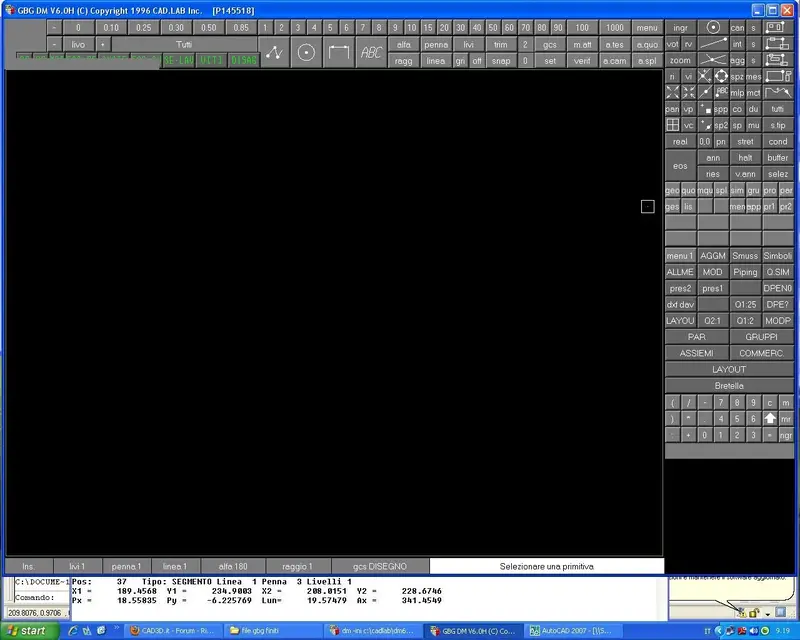
So I have to write on the white screen that opens with gbg what follows?
"hca 6 dimf 6 drif -6 pasc0 6 arr 16 16 16 16 eos"
 
So I have to write on the white screen that opens with gbg what follows?
"hca 6 dimf 6 drif -6 pasc0 6 arr 16 16 16 16 eos"
Yes, you have to go through the white window, press the space bar so that the cursor is activated, and then write the string and send. done this you can return to the graphic window. I realize he's a bit hot, but we're talking about a cad 15 years ago.
 
Yes, you have to go through the white window, press the space bar so that the cursor is activated, and then write the string and send. done this you can return to the graphic window. I realize he's a bit hot, but we're talking about a cad 15 years ago.
I'm sorry to say how to scale an object?

Thank you.
 
I'm sorry to say how to scale an object?

Thank you.
using the command moves copy with the subcommand ts:

1) translating command
2) command "ts"
3) insert scale factor --> sending
4) insert x --> sending
5) insert y --> send
6) move/copy --> selection --> eos
 
using the command moves copy with the subcommand ts:

1) translating command
2) command "ts"
3) insert scale factor --> sending
4) insert x --> sending
5) insert y --> send
6) move/copy --> selection --> eos
I'm sorry, but I can't do it. I'm really a pimp with a plan.
 

Attachments

  • Nuovo Immagine bitmap.webp
    Nuovo Immagine bitmap.webp
    84.6 KB · Views: 8
but the command translating I found the problem is that I can't scale the objects:frown:
Can you tell me how to print it?
Have you seen point 2 of answer n.26?

to print I think you have to use the gbplo executable. But as I told you, I don't know gbg v6 well.
 
Bye, guys.

I almost applied everything you suggested to me successfully, thank you.

a last tip: to move an object from one point to another point that is x=20 and y=0 as I do?

Thank you.
 
Have you seen point 2 of answer n.26?

to print I think you have to use the gbplo executable. But as I told you, I don't know gbg v6 well.
Hello thank you so much I managed to do everything.

I miss two more tips:

1) how do I move an object from one point to another that is 20 on the x axis and 20 on the y axis?

2) how do I make a certain measure? always you can
Because for now I'm pulling a line long enough I'm doing the orthogonal straight and I'm doing the parallel distance I prefer and then I'm cutting the right concerned. But honestly, I hope you can do it faster.

thanks for your help
 

Forum statistics

Threads
44,997
Messages
339,767
Members
4
Latest member
ibt

Members online

No members online now.
Back
Top