• This forum is the machine-generated translation of www.cad3d.it/forum1 - the Italian design community. Several terms are not translated correctly.

excel2007 to command assemblies and parts: from c:\ yes, on net no... (? ? )

  • Thread starter Thread starter reggio
  • Start date Start date

reggio

Guest
Hello, I try to explain better... with a simplified example
then in test.zip there are 2 components and a set, in practice we want
use excel to command all components of a given set and we would like to do so avoiding inserting the new table values per table but writing them only in one (in this case together.xlsx), will then be the other tables that "will go to take" the necessary data from together.xlsx and will calculate their parameters.

to work, try.zip must be disappeared in c:\try (otherwise links between excel files may not be found).

we said that to command the axieme and all the components is sufficient:
1) open all excel files (only because in this way we are sure to "talk" between them).
2) go only to the excel file called "assieme.xlsx" then in the table "master data" and change the fields written in black.
3) save and close all excel files.
4) open the design "assieme" confirming the updates and at that point we will get the desired total.
5) saving the total all tables are updated correctly without changing name.

this process, however, does not work if the files are saved on the net; as they save the tables, they are renamed (and do other various cases)
going to lose every connection.... :(

I wanted to know if it ever happened to you and if you can work such files on the network (commercials will usually be on the network on servers and then also the pdm works on the network).
 

Attachments

I'm not looking at your attachment yet. As for the network I have all the centralized data and used by all pcs. a quick and effective method to achieve the network problem is that of the network disks. Connect the network folder where you have swx files to all pcs using the same network disk label and at that point the path is like in a local and equal disk for all.
 
a quick and effective method to achieve the network problem is that of network disks. Connect the network folder where you have swx files to all pcs using the same network disk label and at that point the path is like in a local and equal disk for all.
hello and thanks :d
Unfortunately I believe that I am obliged to "pass" from the server, also the pdm db cent works me as a server.. .

Of course I asked for assistance... (I certainly didn't explain myself well and they wanted me to get around the problem otherwise.... They said it wasn't a swx problem... :frown:) now I sent him the example they're thinking... Let's see a bit they'll say. .
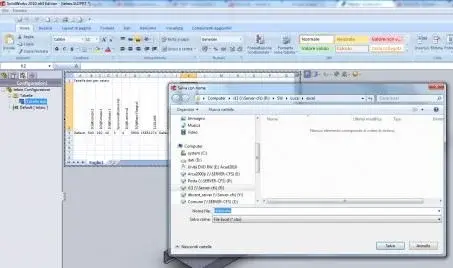
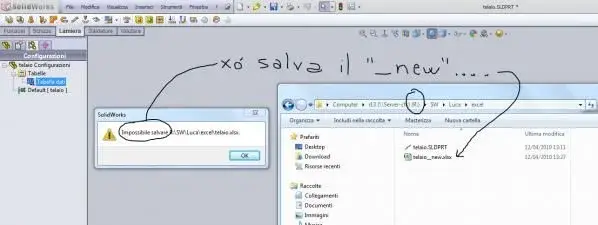
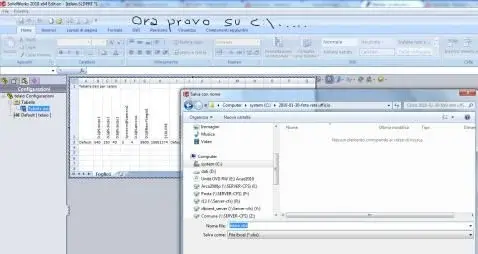
the problem that gives is that saving the total, also saves the data in the various excel tables (and this is right and go well) only that if I do it from c:\ saves without problems, if I do it from the network tells me that it has problems with the original ***xlsx files and proposes a new ***_new.xlsx (which is not good because you lose the references between the cells of the various files.) and then.

Oh I forgot to explain how I make files and connect them, maybe the "truck" is there, maybe it's for qlc...
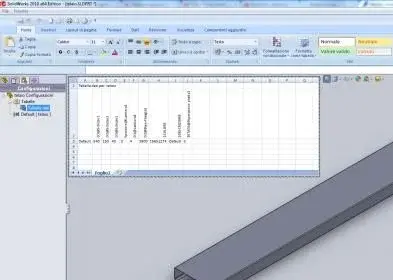
then simply, after finishing the particular save, I insert the table automatically (insert/insert tables/data/machine creation/selections the parameters that interest me/confirm) then in configuration managers select the table and with the dx (Save table),
Finally I delete the table created automatically and just saved and again I do (insert/insert tables/data rebels/from the file/select the file just saved).
at this point with excel I open the various files and I create the relationships between the cells of the different files in this way I will be able to "start" all the dimensions that interest me from a single sheet of excel :d

my illusion is to create so a "almost" configurator exploiting also (when learned ;-p) configurations, smart parts and "intelligent" couplings (by the way, how are they called and how do they use those data couplings to the parts that in the axieme "recognize" and mate automatically? )
 
from assistance respond:

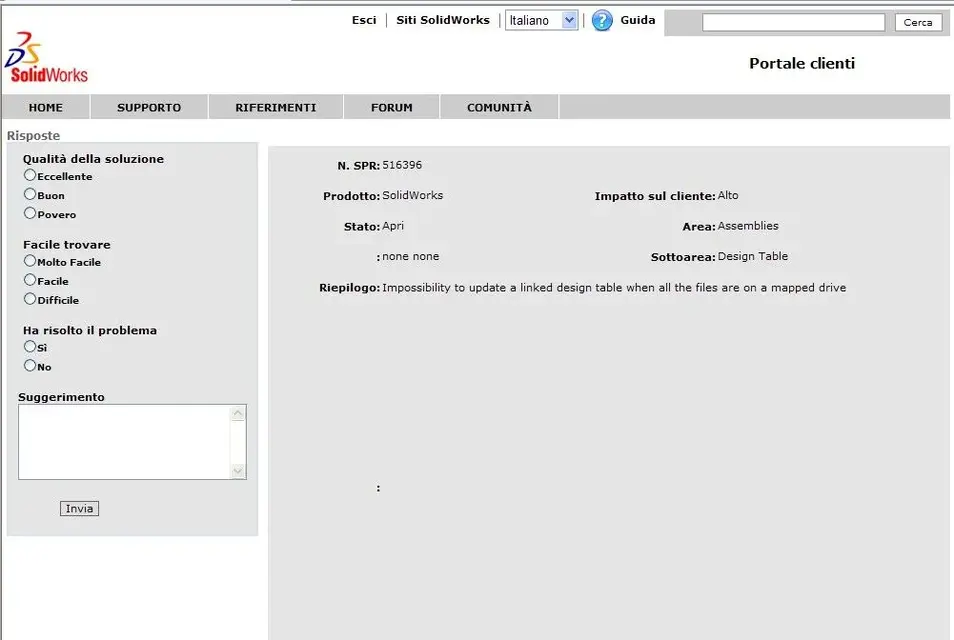
"solidworks has recognized the problem related to the impossibility of updating an external data table, if it is on mapped disk. in this regard a spr (software performance report) was opened with code: 516396."
:frown:
 
sent by reggio

...... Oh I forgot to explain how I make files and connect them, maybe the "truck" is there, maybe it's for qlc...
then simply, after finishing the particular save, I insert the table automatically (insert/insert tables/data/machine creation/selections the parameters that interest me/confirm) then in configuration managers select the table and with the dx (Save table),
Finally I delete the table created automatically and just saved and again I do (insert/insert tables/data rebels/from the file/select the file just saved).
at this point with excel I open the various files and I create the relationships between the cells of different files in this way I can make "partition" all the dimensions that interest me from a single sheet of excel :d ..... .


I behave otherwise I leave the various tables in the files of the parts or assemblies, I collect only the values of the cells that interest me to fly to an external excel file.
I work on the network or perhaps as King said above with a common network disk at all pcs and I never had probblems.
When I have to duplicate the axieme I also make a copy of the excel file I rename it and then you have to open the various parts, open the table and correct the name of the file to which it points and is all done.

Excuse me but to quote just a part of the message as you do?
 
Excuse me but to quote just a part of the message as you do?
when you reply by clicking on "quota" all the text is enclosed among the tags [quota] e [/quota]. You have to delete the text part that you don't need to tag hymn.
If you have to quote more phrases the selections then click the comic icon that encloses the text between the tags.
in the end it is better to read carefully because if you miss a tag of inizo or fine quoting then in the message the quoted text does not stand out from the rest
probably the "scientists" :rolleyes: that design these interface systems find too simple and rational the quoting system that is used on usenet or mail, with the signs ">" and the colors differentiated for quqoting and then turn to the "complication office simple things" that in every good house software never misses:smile:
Hi.
 
....I delete the table created automatically and just saved and again I do (insert/insert tables/data rebels/from the file/select the file just saved).
at this point with excel I open the various files and create relationships....

I behave otherwise I leave the various tables in the files of the parts or assemblies, I collect only the values of the cells that interest me to fly to an external excel file.. .
...eh .. but how do you connect the external cells of the file es: z:\prova.xlsx to the cells of the part es: test.sldprt without saving the table?
...to me it does not allow to connect with external files, but only among its cells:(
you would explain to me well or even better:biggrin: would you send me an example (even very trivial of a part that is connected to an excel file) ?
 
you would explain to me well or even better:biggrin: would you send me an example (even very trivial of a part that is connected to an excel file) ?
So I'll tell you a moment if you can't see us posting something.

The probblem I think is the formatting of the table.

I explain you have to create the table within your part then when it's in place that controls everything you want, do "map in a new window", the table is opened in excel at this point also open the file that needs to check your table, go to the cell to check (swallow tab) and write "=" two clicks on the sheet cell where it has to take the data.
at this point you see if in the sw cell there's the data you are fine, if instead as always happens to me there is the text of the link g:\lavori...... means that the table is formatted badly.
snap the top left corner of the sheet so select the whole sheet, right click "formed cells" and you need to check that they are formatted as number at that point you should have the right value.
close your table and you're fine, at that point in the "change" menu under "links" you find the path of the connected file, when you need to duplicate your part and maybe rename the pilot file, do "modifca" "links" " change origin" and you go look for the new all-finished file, you're changed the link and you're fine.
you also need to do two tests by changing data in the pilot file if the table is automatically updated when you open it or you have to do "mode" "links" "update"

I still have an old excel 2000, but it works

Have fun let me know

I link you to a site of excel on which I found several ideas http://www.terzaghi.it/excel/index.htm
 
..... do "map in a new window", the table is opened to you in excel .... .
you also need to do two tests by changing data in the pilot file if the table is automatically updated when you open it or you have to do "mode" "links" "update"
I still have an old excel 2000, but it works
hi and thanks, I just tried, your procedure is the same as I used, the only difference is that in my, using excel files (I use excel2007) saved outside, I just need to (it works only on local disk however...) open all excel files, change the data in the only "comandante" file then close them all by saving, then opening only the overall this will notice the links and also changes so it updates everything,
with "change table in a new window" instead you must not only open all parts, but open every single excel file to make sure that you update then save excel files and file part.... :(

In short, it is necessary that in sw they give up quickly... Since sw is a "parametric" I would say that this is a huge gap:(

(thank you again and soon)
 
hi and thanks, I just tried, your procedure is the same as I used, the only difference is that in my, using excel files (I use excel2007) saved outside, I just need to (it works only on local disk however...) open all excel files, change the data in the only "comandante" file then close them all by saving, then opening only the overall this will notice the links and also changes so it updates everything,
with "change table in a new window" instead you must not only open all parts, but open every single excel file to make sure that you update then save excel files and file part.... :(

In short, it is necessary that in sw they give up quickly... Since sw is a "parametric" I would say that this is a huge gap:(

(thank you again and soon)
You have to see... thinks that all those "games" of change references, substitution tables and "fixing tables" as well as you do with solidworks are not possible for example with a software as proe that the parametric invented it.
then there is always room to improve.
 
... thinks that all those "games" of change references, substitution tables and "attach to tables"
I can't follow you, I'm interested in understanding more than those "games" better explain to me? :
... are not possible for example with software as a proe that the parametric invented it.
then there is always room to improve.
we chose sw after seeing inventor and if so we do not deny it;-p I just emphasized that the function of saving on external files and relative reuse is provided by sw, only that it does not work.. .

ot: you can give me a tip to solve my new post<questa "scatena"....="" catena,="" curva="" in="" si=""> </questa>http://www.cad3d.it/forum1/showthread.php?t=14519 ?
 
I can't follow you, I'm interested in understanding more than those "games" better explain to me? :
I meant everything swx lets you do with ease. example:

I have a mixture of parts b - c and d, clone the axieme and clono the part d (with two saves by name or clona command from pdm). I get the axieme and part f. I carry out the modifications on the component f and I have two variants of together.
Now to make the board board you can simply take the table to, copy, paste and rename from explorer to assign the name and table. now with swx file -> open, select the table and click references. in the screen double click on the axieme name and select the axieme and.
open and save. the new table is now connected to the axieme and but it ended as much as the initial one.
then there are to manage/change external references between the parts, etc...
 
pfff from assistance and swx still nothing:

.... the "beautiful is" that you don't even understand if you are working on it or if you have forgotten ...

besides urging to new macut, I was thinking of installing the 2010 sp.1 to see if there they solved... Hopefully. .
 

Attachments

  • 29-12-2009-14.34.07.webp
    29-12-2009-14.34.07.webp
    28.8 KB · Views: 19
besides urging to new macut, I was thinking of installing the 2010 sp.1 to see if there they solved... Hopefully. .
...the nm signal goes back to late July/09.. .
it has not served neither to stress, nor to install 2010... so far only some work-around for nothing effective... .

I would therefore like to take up the speech.
then I would like to clarify that the problem does not appear when, changing posting (from other pcs) I try to use the same table/e excel and the same data swx or copying such data - in fact the problem is not that it loses the references maybe because it looks for the disk "x" and does not find it.
(for the record cmq we have the network under domain and each pc points to "r" as disk of the cad drawings, so in any case there should be no differences).the problem always makes it on the same machine and on the same paths: when I go to save the axieme, swx says that he can't write over the excel files (or that don't exist) and then he creates others by adding "_new.xlsx" at that point everything is lost because the various files don't recognize each other...

if I try to save again, again adds "_new.xlsx" and becomes "_new___new.xlsx".

What do you say, have you ever happened?
How did you solve it or how did you do it?

ps1) I had tried to make a video of the passages with "view/catt.chermo/reg.video" but did not show the windows of the messages... What's another kiss? sw2010+w7)
ps2) then I attached 6 of 6 images (the forum allows only 5...) in the 6th you see that the file in c:\... has not had problems, it is written well without "_new.xlsx".
 

Attachments

  • 1-Salva tabella excel.webp
    1-Salva tabella excel.webp
    7.5 KB · Views: 14
  • 2-Salva tabella excel.webp
    2-Salva tabella excel.webp
    12 KB · Views: 16
  • 3-Salva tabella excel.webp
    3-Salva tabella excel.webp
    15 KB · Views: 15
  • 4-Salva tabella excel.webp
    4-Salva tabella excel.webp
    15.4 KB · Views: 13
  • 5-Salva tabella excel.webp
    5-Salva tabella excel.webp
    15.2 KB · Views: 16
...sob... I'm really depressed, I can't get out...:frown:

possible that only I want to use sw+excel on the net instead of c:\?? ?

please help
 
Hello, I try to explain better... with a simplified example
then in test.zip there are 2 components and a set, in practice we want
use excel to command all components of a given set and we would like to do so avoiding inserting the new table values per table but writing them only in one (in this case together.xlsx), will then be the other tables that "will go to take" the necessary data from together.xlsx and will calculate their parameters.

to work, try.zip must be disappeared in c:\try (otherwise links between excel files may not be found).

we said that to command the axieme and all the components is sufficient:
1) open all excel files (only because in this way we are sure to "talk" between them).
2) go only to the excel file called "assieme.xlsx" then in the table "master data" and change the fields written in black.
3) save and close all excel files.
4) open the design "assieme" confirming the updates and at that point we will get the desired total.
5) saving the total all tables are updated correctly without changing name.

this process, however, does not work if the files are saved on the net; as they save the tables, they are renamed (and do other various cases)
going to lose every connection.... :(

I wanted to know if it ever happened to you and if you can work such files on the network (commercials will usually be on the network on servers and then also the pdm works on the network).
I tried both at work and at home and works.
I am using both at home and at work, sw2011 sp2 64-bit operating system windows 7 to 64-bit.
office 2010 at 64-bit.
I followed the initial directions and as logical, everything opens without problems.
I move excel files on the network and when I open the axieme it tells me:
1) I do not find the attached data table, do you want to find it?
I'll tell him you and I'll check it out from the network.
2) at the opening of the excel sheet together.xls tells me that it does not find the other excel sheets and in the above mask, I reassemble the paths of excel files that fly the tab 'master data'.

I reopen everything again and no error message comes up.
in the reassignment of the paths, I have inserted paths unc.

without wanting to miss us so much, I suggest you try using unc paths, because, regardless of the bug or not on the mapped paths, you would unleash any different network mappings between users.
I am also using all the latest software available (solidworks, windows and office), so I don't know if any problems have been solved with the latest versions.
So, to check this out, you could get a virtual machine and check if everything is resolved and then decide whether to update or not.
 
I tried both at work and at home and works.
I am using both at home and at work, sw2011 sp2 64-bit operating system windows 7 to 64-bit.
office 2010 at 64-bit.
I followed the initial directions and as logical, everything opens without problems.
I move excel files on the network and when I open the axieme it tells me:
1) I do not find the attached data table, do you want to find it?
I'll tell him you and I'll check it out from the network.
2) at the opening of the excel sheet together.xls tells me that it does not find the other excel sheets and in the above mask, I reassemble the paths of excel files that fly the tab 'master data'.

I reopen everything again and no error message comes up.
in the reassignment of the paths, I have inserted paths unc.

without wanting to miss us so much, I suggest you try using unc paths, because, regardless of the bug or not on the mapped paths, you would unleash any different network mappings between users.
I am also using all the latest software available (solidworks, windows and office), so I don't know if any problems have been solved with the latest versions.
So, to check this out, you could get a virtual machine and check if everything is resolved and then decide whether to update or not.
hi, I gave little install 2011 sp2.0 also in the office, last week I made a mini test (perno+foro) without too much confidence, and, apart from the fact that it renames the excel files alone (????) now seems to work... (not in 2009/2010/ I don't believe in 2011 sp.0) in the next few weeks I will do more challenging tests (such as that attached or qlc more). .
...after three years maybe we are:cool: it was now I would say...

What does "unc paths" mean?
 
Careful that could be a solidworks-office compatibility problem. a short time ago there was a compatibility table posted on the forum (maybe it had posted soliduser).
According to me, reggio, you should consult it and see if the os-office-solidworks combination is valid or from problems.
 

Forum statistics

Threads
44,997
Messages
339,767
Members
4
Latest member
ibt

Members online

No members online now.
Back
Top