• This forum is the machine-generated translation of www.cad3d.it/forum1 - the Italian design community. Several terms are not translated correctly.

explode blocks without displaying attributes

  • Thread starter Thread starter Giordano85
  • Start date Start date
excuse the terminology used. I wanted to create a layer and not set it as a current. I tried to do everything, but eventually when I choose the layer simply tells me that the "current layer has been disabled" and everything remains as it was before.
I have proceeded so from the beginning:
1. I created the pippo layer and made it invisible;
2.I exploded all the drawing and modified the forum you proposed to me as follows:
(setq aa (ssget "x" (cons 0 "attdef") (cons 2 "number, terminal, 3lev_ins_data"))))
3.digit send and then selez and !aa. I receive the following message:
select objects: !
<selection 10c="" set:="">found(s) 463
4. That's where I have the problem. then selecting the pippo layer that was hidden, I receive the message: "current layer has been disabled."

I hope I've explained quite well! eheh</selection>
 
when he says "find(s) 463" you have to give a second time sending; only at this point the entities will appear highlighted on the screen.
at this point from the drop-down menu select the layer and give ok to the message.
 
Sorry joseph, once I saw the message:
select objects: !
<selection b4="" set:="">found(s) 463

if I click again, I launch the selez command again. when I first typed!aa, I clicked twice sending, from there the message where 463 items were found, which I believe, should be the names of attributes not to display. I miss the last step to pass attributes on another layer. What's wrong? maybe some setting in layer creation?</selection>
 
select sending
select objects: Send!
select objects: (here is not recalled the select command, but is continuing the previous one, asking you to add other objects, which you do not have, and then reply with sending to close the selection.
at this point you should see on the screen all the selected attributes (blue greys)
finally choose the layer , etc.

p.s. that version of autocad uses (yet 2002 as in post 2010) ? may be that the sequence of commands has changed
 
I did as you said, from the beginning. but it still doesn't work. I recorded a little video with the hope of understanding what's wrong! :biggrin:

ps. autocad 2008 ;)
 

Attachments

when selecting the layer "pippo" does not result in any selected object, then autocad interprets your action as if you want to assign a new "current layer", this is the reason for the message "the current layer is disabled".

proof così:


command: capropselect objects: !aa<selection 681="" set:="">found(s) 463

select objects: </selection>indigotype the property to change [Colore/Layer/Tipolinea/Scalatl/SPesslin/Altezza/TRasparenza/Materiale/annotatiVo]: ltype the name of the new layer <0>: poplartype the property to change [Colore/Layer/Tipolinea/Scalatl/SPesslin/Altezza/TRasparenza/Materiale/annotatiVo]: indigo
 
should I therefore deduce that the selection command works differently between 2008 and 2013?
 
Good morning, guys, good morning.
I did all the tests of the case and came to have a great result. By iniazing the explosion procedure suggested by joseph and ended precisely by gp with the last his post, I was able to explode all the design and not display number x attributes. Ultimately now I have 2 possible alternatives:

1. lisp (attnull) + burst;
2. displaying explosive attributes on other layer.

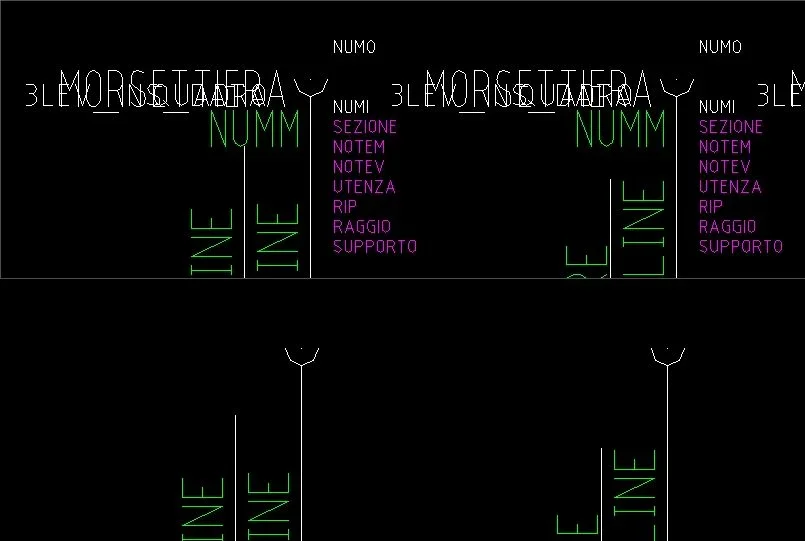
I find in solution number 1 the best. In the last, despite it is valid, it does not adapt to what I need. I should explode the drawing, but I would need the attribute containing the number of a pin to remain displayed even after the explosion and not that it is represented by the name of the attribute. for example if I have several blocks where to each for the numm attribute is matched a different number ranging from 1 to 10, I would like that after the explosion the values depicted are from 1 to 10 and not numm. the first solution you have given me allows, precisely, the choice of what you want to display, so it is the solution with the greater index of customization. what I needed. Thanks to both of you for the help and I hope that the topic will help those who, like me, will have the same need.
Good day!
 

Attachments

  • Immagine.webp
    Immagine.webp
    23.6 KB · Views: 3

Forum statistics

Threads
44,997
Messages
339,767
Members
4
Latest member
ibt

Members online

No members online now.
Back
Top