
You are using an out of date browser. It may not display this or other websites correctly.
You should upgrade or use an alternative browser.
You should upgrade or use an alternative browser.
MassiVonWeizen
Guest
I can't find a solution right now.
Are you sure it is not an export problem where it is set to export only surfaces?
Are you sure it is not an export problem where it is set to export only surfaces?
LucaOt
Guest
I don't know. to my colleague, with the 2018 version of the sw, manages to convert it into a solid body, starting from my own file. but he can't make it the section: sees the preview but when clicking on the green check the software responds that the piece is not dissectable. At this point I also think that it is some solidedge export problem. thanks anyway for the usual kindness and for the help. If I can come to the head, I will update you.
MassiVonWeizen
Guest
at the opening or with subsequent commands?can convert it into a solid body,
LucaOt
Guest
opening it simply, with standard settings. he opens the step file with solidworks 2018 and the software recognizes the piece as full and not surfaces.at the opening or with subsequent commands?
MassiVonWeizen
Guest
Can you attach the step?
MassiVonWeizen
Guest
have you made a comparison between your settings both general and specific step settings?
LucaOt
Guest
This unfortunately not. However import options should be the same: even he, to select the file chooses "all files" from file type, then the options do not even look at them. However tomorrow I will make better control and update the discussionCan you attach the step?
MassiVonWeizen
Guest
questo non c'entra nullaeven he, to select the file chooses "all files" from file type,
should be means you didn't control them when if you open it one way and your partner in another was the first thing to do.import options should be the same
there are two imports to control in system options:
General
step/iges/acis
make screenshots of your colleague and replicate them on your pc, if it doesn't work it makes sense to find other ways
LucaOt
Guest
As for the general settings, I put them exactly like my colleague. Step/iges/acis stacks in the 2018 version are in the menu, in 2017 there are no.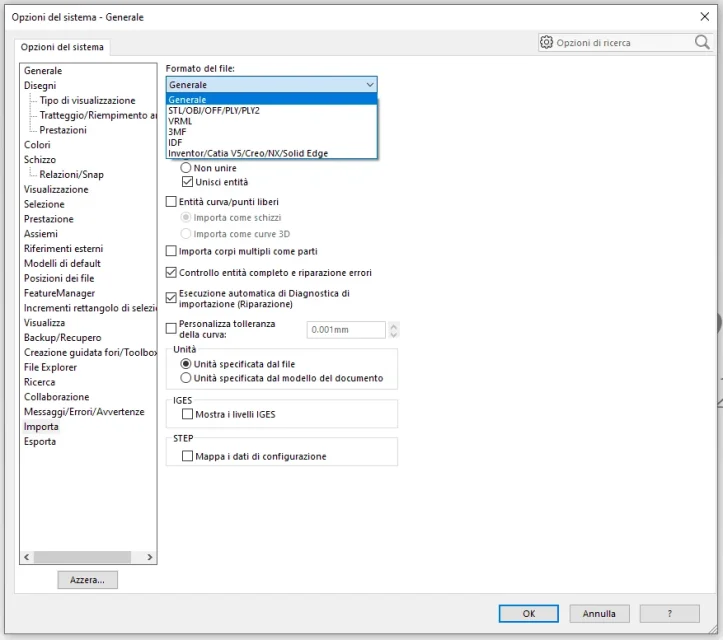 However, trying to change the settings to the "general" item recognizes the step however as internally empty surfaces.
However, trying to change the settings to the "general" item recognizes the step however as internally empty surfaces.MassiVonWeizen
Guest
to me it seems there are also in 2017http://help.solidworks.com/2017/ita...hidd_options_import_general.htm?verredirect=1
LucaOt
Guest
in the options menu -> import, my colleague appear as menu item, to me no. I don't know why.
MassiVonWeizen
Guest
and if you open>formed file steps>options?
LucaOt
Guest
opens the same options menu that you open directly by clicking on the top right gear of the menu...
LucaOt
Guest
I'll tell you something I noticed this morning: any solid goes to shape, inside remains empty. It was not a step problem but a problem of some setting that I accidentally activated. You know how to solve this?
MassiVonWeizen
Guest
never heard of anything like that.. .
I would tell you to try to reinstall
I would tell you to try to reinstall
LucaOt
Guest
:-( thanks to the samenever heard of anything like that.. .
I would tell you to try to reinstall
ceschi1959
Guest

MassiVonWeizen
Guest
lo hai fatto con solidworks?I 'discussed' the surface, repaired the hole and stitched. attached the parasolid.
ceschi1959
Guest
No, I didn't.lo hai fatto con solidworks?