• This forum is the machine-generated translation of www.cad3d.it/forum1 - the Italian design community. Several terms are not translated correctly.

from 3d sketch to multiple juices. . .

  • Thread starter Thread starter Conte91
  • Start date Start date

Conte91

Guest
Hello everyone,

I am making a 3d model with the aim of obtaining a development (or more) and sending it into production.
The case wanted me to be comfortable draw the external lines, therefore all the vertices and edges, on a single 3d sketch.
to get the development I intend to create surface bodies and separate them where it best.

Now my question is: to get my surfaces from my 3d sketch which is the fastest way?
Of course I could also pass through the creation of a body but for now the only solution I have is to create an exaggerated number of sketches on which, through converting entities and "filling surface", to extract my surfaces. - Excuse the repetition-
which would mean: a sketch = a surface.

n.b. all overfishing are triangles and there are no curved lines

I accept any kind of suggestion and thank you in advance:)
 
You don't understand anything.
post at least one image.
a development of what? sheet?
 
You don't understand anything.
post at least one image.
a development of what? sheet?
gentle boulders,

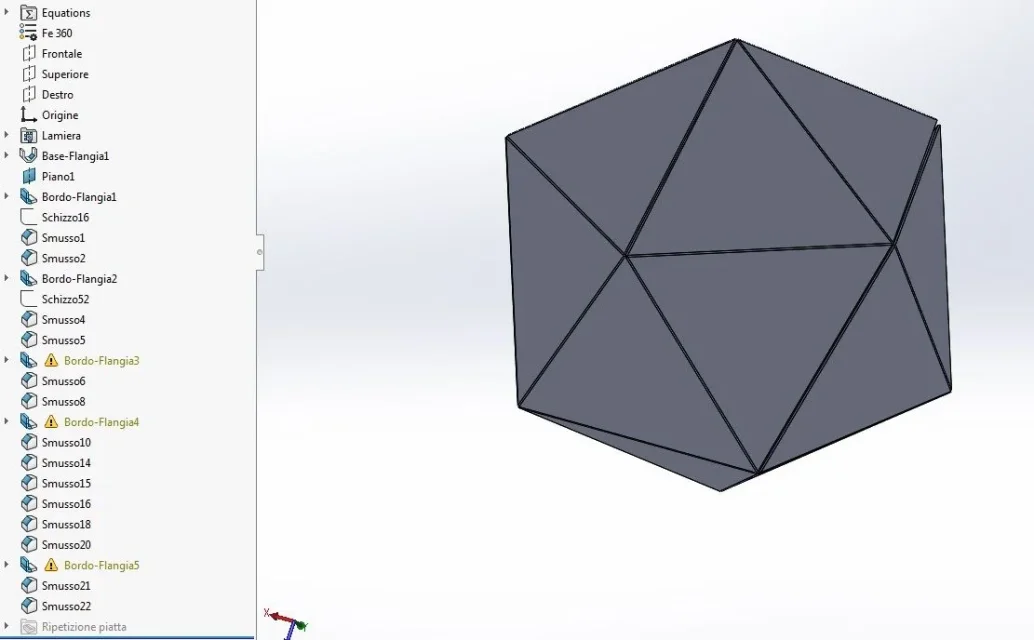
I attach another image to simplify the speech.
This is a nut, I want to build it in sheet metal, yes.
I have a 3d sketch that locates all on edges and vertices.
I want to get to the development of sheet metal, but I'm going to do it by developing the supeficie with a command inherent to the latter.
My question is, what is the fastest way to get this surface? (using this unique 3d sketch)dado.webp
 
Can't you do it directly in sheet metal? use 3d sketch as control layout and models all with sheet functions with the certainty of having a developable object
 
That's how it comes. It would be better, but I did so much to take off my touch.
the warnings that you see on the functions do not compromise the flattening
 

Attachments

  • Immagine.webp
    Immagine.webp
    38.7 KB · Views: 26
thanks for the answers,
I am doing a test with the commands sheet:
to create the base flange I need a 2d sketch and I can create it, but to ensure that the folded flange has that shape as you did ? normally select the edge and create a rectangular flange, right?
 
you need to change the edge flange profile. once created the flange selection "modifies flange profile". Look at the guide...
http://help.solidworks.com/2017/ita...s.htm?id=5825d5e20ac449f7821c4c4beda4112b#pg0
thanks for your advice,
for now I first create a 3d sketch, use convert entities to have a closed profile linked to the previous sketch and finally use the filled surface command (which directly creates the face without having to tinker with other sketches and/or function settings)

My 3d sketch is much more complex than that nut, it will take a lot of work and a lot of time.
 
Come back.

I went on partially with the project and just came back from the holidays.. .

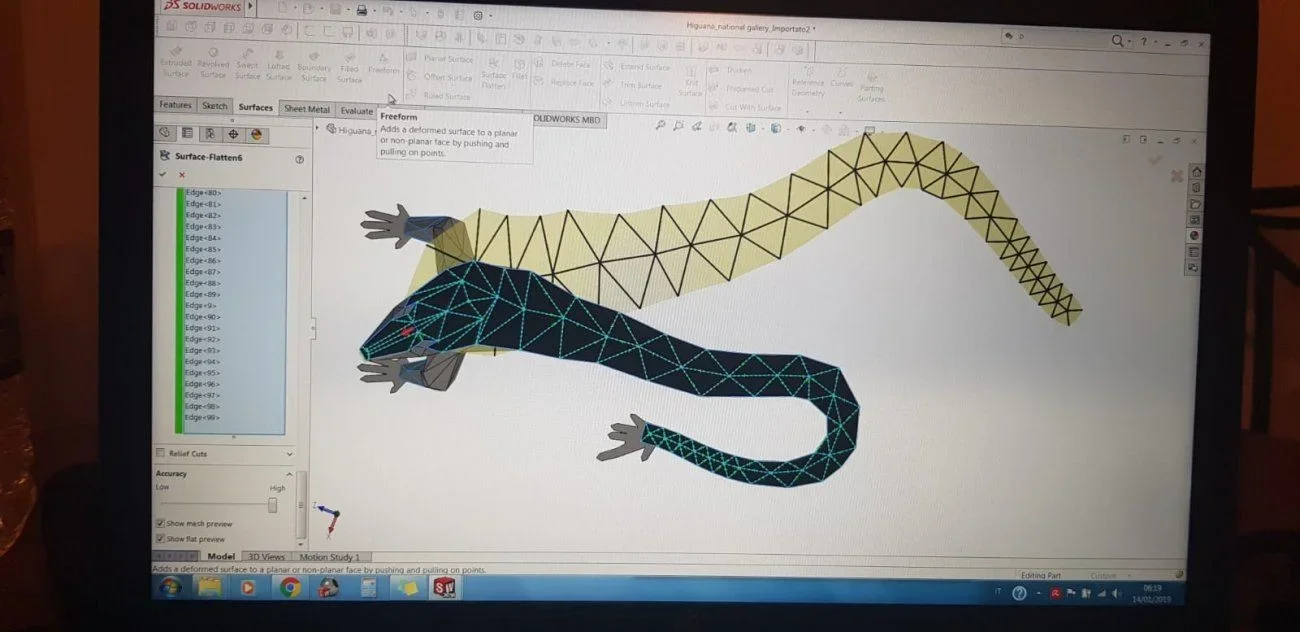
I wanted to share with you what was actually the subject of the discussion.

at the end I used surface controls, generating individually surface surfaces and then creating, depending on how I felt it appropriate to divide the piece for production purposes, surface bodies created with supeficie offset control [impostato con il valore di offset = zero]It's useless to say I put an eternity on it. . .
If someone had suggestions on how to do this kind of thing with a different and better method I would be happy to accept the advice :).
Perhaps in this case it would be more appropriate to move it to "mechanical cads in comparison" ?

thanks to all
 

Attachments

  • WhatsApp Image 2019-02-08 at 2.54.50 PM.webp
    WhatsApp Image 2019-02-08 at 2.54.50 PM.webp
    75.8 KB · Views: 26
I did not understand why you work with surfaces instead of solids.
with solids you can model the flattened shape, then design n° sketches for n° folds and use the function of folding sheet with sketches.
It goes as if an object like that doesn't model it in an hour and, depending on the control you want to have geometry, maybe even in half a day
 
I did not understand why you work with surfaces instead of solids.
with solids you can model the flattened shape, then design n° sketches for n° folds and use the function of folding sheet with sketches.
It goes as if an object like that doesn't model it in an hour and, depending on the control you want to have geometry, maybe even in half a day
Hello massive, I downloaded your file but it is not clear how you did the first flange function of the edge, do you bother explaining it to me?
 
on it is clear how you made the first flange function of the edge
What is not clear? If you don't tell me how I can explain it?
if it is like getting triangular shape just open the sketches that are created within the function and change them as you like
 
What is not clear? If you don't tell me how I can explain it?
if it is like getting triangular shape just open the sketches that are created within the function and change them as you like
I didn't explain it at all. practically it is not clear how you got the triangular shape through the flange without using the extruded cut.
 
as I wrote in the previous answer change the sketches. expand the flange function of the edge and you find n° sketch for n° flange
 

Forum statistics

Threads
44,997
Messages
339,767
Members
4
Latest member
ibt

Members online

No members online now.
Back
Top