• This forum is the machine-generated translation of www.cad3d.it/forum1 - the Italian design community. Several terms are not translated correctly.

graphic definition of circles

  • Thread starter Thread starter AutostuDent
  • Start date Start date
Massive.. the pedit command... which serves.. I mean, I tried to work on it. but eventually I managed to do what I needed without the pedit command.. Is it possible?

in order. .
cut-out

join

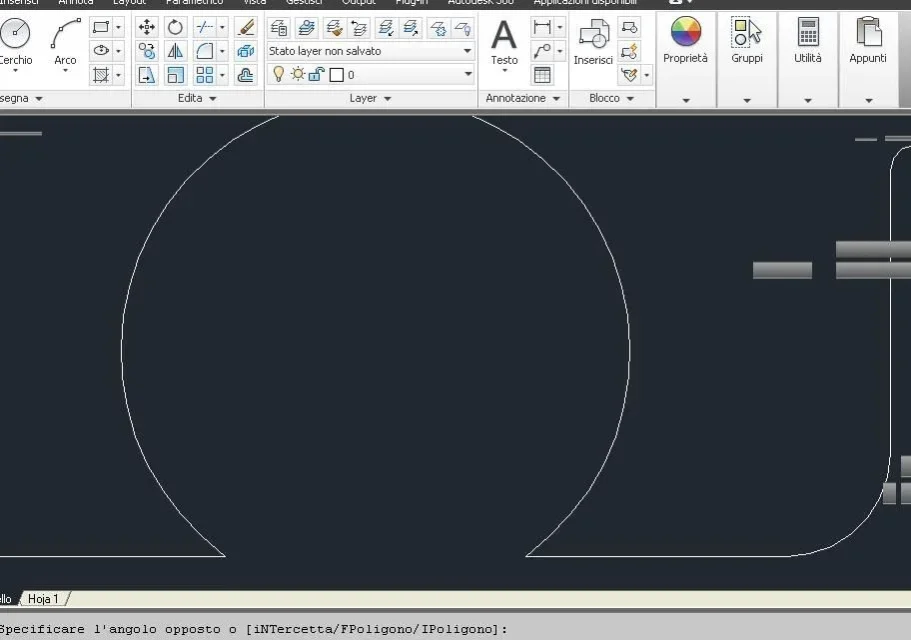
between the intersection line - circle does not seem to be space.. bho..
I attach a couple of photos
2.webp1.webp
 
Join is the first command I told you to use, then since you couldn't use it I suggested polylinear.
basic are similar, the difference is that in polylinea you can give a thickness to entities
both commands work only if the entities are contiguous, I think I have told you seventeen thousand times; it deduces that any interference, for the speech that the circles are managed as a sequence of lines, are due to a graphic issue.
 
Hello Masses,
I have rechecked, in fact I can realize the figure, but without the pedit command, it does not unite anything.. you have to turn into polylinea as you said... You must be with me.
I want to ask you something else. .
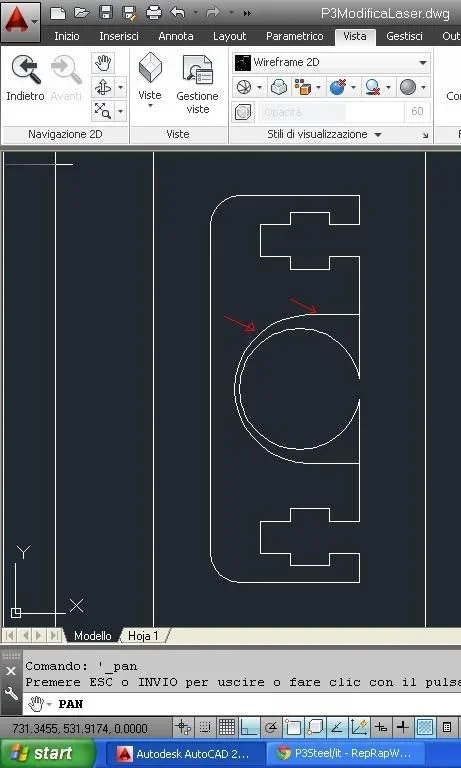
I replicated the figure on another block of the .dwg, the problem now is that I can't delete "part" of the block. (the semicircle indicated by the red darts + the joint to the piece.. Do you have any solutions to recommend me?
Immagine.webp
 
You must be with me
confused with what? If you tell me you've been able to join, I believe you and I tell you I've already suggested it.
then if you said something wrong before it means you didn't check out and you don't know how to use the command because you can do well.
Surely if you keep that file as if it were the map of area 51 no one can ever tell you if you can't because you're incapable or because the design doesn't allow you to do it (which means it's hurt anyway)
then sure to use correct terminologies? You know what a block is?
a block does not replicate it, copy it and change it by entering it and treating entities normally.
the solution is simple: Explode polylinea or blocking, delete or cut whatever you don't need and remake polylinea or blocking.
naturally continues to use the arm program without the basics (which do not serve to know by memory the commands but the logic to use them even when you do not know them) that is more fun
 
@mass
I don't keep the .dwg as if it were the map of area51, in the other topic I posted the.dwg zipped
As for the block, I had already opened the block editor.. I didn't know I could explode, I'll try this too.
(always through block editor I imagine? )
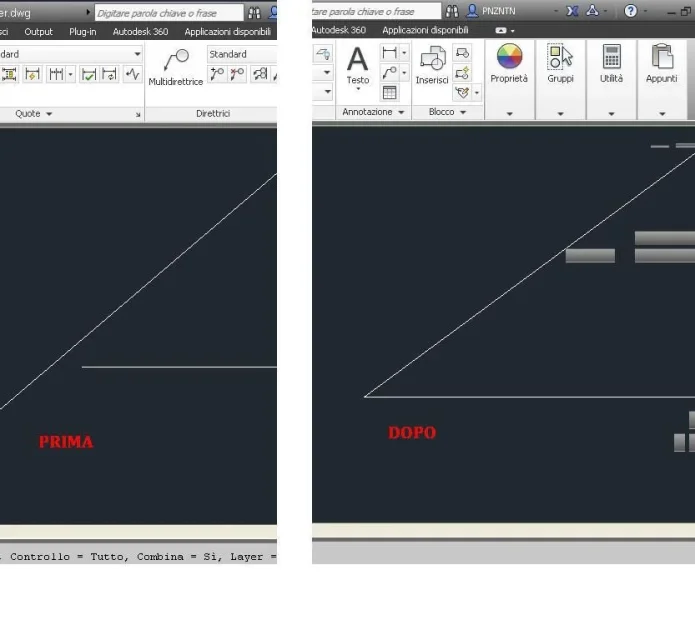
as for joint command... I mistakenly said I was successful.. and it is so but only after using also command pedit... differently if you cut->interseca to join then the circumference "cut" with the remaining lines.. then without using pedit does not unite anything the command "unisci"
 
What topic?
It's something you can't join. It's incomprehensible. Once you cut the entities have nothing special, they will be a simple bow and two lines at its ends.
mail a file, which I certainly do not seek in your messages a post similar to this to be able to deduce that it is the same topic, flanking the two situations, at the moment before making the cut and at the moment after doing it but without joining anything.
as already said once inside the editor blocks the entities behave normally as if they were in the classical design environment. as you do not eliminate those entities indicated by arrows I do not understand, selections and gates, or with size*

*Instead of doing a thousand wonders and options to use the tool quickly cut just give the command and then without selecting anything sending to this point the entities are cut to the first useful entity
two links on tricks e scorciatoiehttp://xoomer.virgilio.it/lwcon/faq/faqcad.htmhttp://www.paint-web.net/trucchi.htm (see point 8)
 
But you realize a person has to look at all the dwg to see where the stuff is? I had put a red circle or something. and already this makes the bales turn.. .
succeeding to find the silhouette I see that they are blocks, that one is a block inside a block and three only blocks of first level, that exploding the blocks I find unified entities, that you did not eliminate the ages indicated by the red arrow in post #23 but those that you said you would join and that they would have formed a kind of omega.
Why make blocks if you turn, or should you do it, polylinear the shape?
 
But you realize a person has to look at all the dwg to see where the stuff is? I had put a red circle or something. and already this makes the bales turn.. .
succeeding to find the silhouette I see that they are blocks, that one is a block inside a block and three only blocks of first level, that exploding the blocks I find unified entities, that you did not eliminate the ages indicated by the red arrow in post #23 but those that you said you would join and that they would have formed a kind of omega.
Why make blocks if you turn, or should you do it, polylinear the shape?
boh... stai parlando arabo per me. . .
 
You're right, this last modification I told you about wasn't saved (I don't know why, since the automatic rescue led him to 5min by 10min that he was..)
the problem however is to cut out part of the block (honestly between yesterday and today I couldn't put myself close to the pc calmly to try, so I can't say anything else for now)

(the other modification is, if you look on the two front bars on the synast.. diameters were increased to 9,9mm and circles cut... (of 4 the first on the upper right is also joined with pedit.. the other 3 no)
 
That automatic rescue isn't what you think. the question that arises spontaneously is: why when you closed the design and was asked if you wanted to save the design you clicked no? multiple jobs of 5 minutes so that every last operation is coincident with automatic rescue (which is not what you believe)?
I did the command merge on the circles on the front bars (you realize what absurd indication is for those who do not have the design.. . I had to reclaim the design to find them*) and problems arise.
I don't know how to tell you so either you get there or amen

* the part in italics I wrote that you had not yet posted the image, I leave it for correctness; the rest in parentheses but keep it in mind when you explain something you put hands on... The others don't know a dry fig.
 
Last edited:
Oh, Mass.
Seriously. . .
I know about patient people, but I think you're gonna get over them.
 
Oh, Mass.
Seriously. . .
I know about patient people, but I think you're gonna get over them.
I agree. But I'm afraid it's one of those "heavy chetes" that when patience loses it, they make a slaughter, so I'm in selfstudent, I'd put myself in line as soon as possible:
 

Forum statistics

Threads
44,997
Messages
339,767
Members
4
Latest member
ibt

Members online

No members online now.
Back
Top