• This forum is the machine-generated translation of www.cad3d.it/forum1 - the Italian design community. Several terms are not translated correctly.

how does the material fit into one part?

  • Thread starter Thread starter opua
  • Start date Start date

opua

Guest
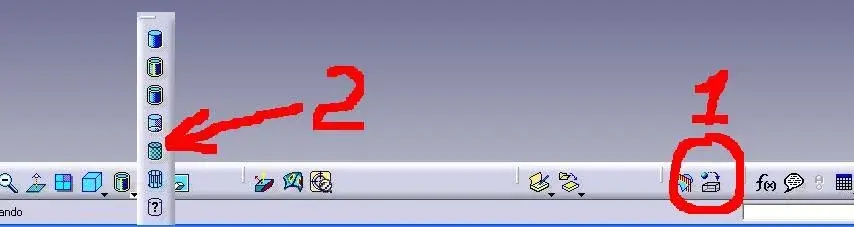
Hello everyone, a simple probable question for many of you, with which command in caia v5 inserts the material to a part?
Thank you.
 
1 to assign it
2 to display it as such
we waved
 

Attachments

  • ima.webp
    ima.webp
    14.9 KB · Views: 66
attention:
1. You need to drag him to the file name. practically you must ensure that the material has not been assigned to the main body but to the whole object.
only if you model a component that has two different materials then attribute to each body the exact material. for example injection parts (plastic + steel).

2. Also make sure you have not activated the connection between the material used in the catpart and the catalog. This connection creates unnecessary traffic of information in the network. Usually the materials in the catalog are not modified and therefore this connection is often superfluous.
 
Good afternoon to all.
I have a little particular need for materials, more precisely on the specific weight that is assigned.
I explain better: I have commercial components that have to take their actual weight, of these I have the model (sometimes only the bulk) and I have to apply a specific weight so that I get the real weight with the volume of my solid.
How can you do something like that? do I have to create a new material and change the density of the same or can you already act in the properties of the part by assigning the density?

Thank you!
 
I don't have much experience but I try to answer. . .

normally apply the material directly from the catia catalog which is quite complete

(the icon with parallelepipedo and blue ball with freccina, if you don't find it, go to the menu/visualize/barre tools/applies the material----- check mark)

if you do not find the suitable material and you have to change the density you can do it, double-clicking on the similar material and modifying it (it also modifies the name so that the original in the library is not altered) unfortunately however the matter gets complicated as you go to change a library and I think you have to export it with the file, in fact when you apply the material there is the option "connect to the file" and sending you carry behind the entire library

You should do some evidence.

Hi.
 
Thank you, I did the tests and came to the solution based on your suggestions.
once the material is applied, just change it from the model tree, it does not remain connected to the library so I check the density that best suits me and get the weight I was looking for

Thank you.
 
I have a doubt about the question of density
if I use one of the materials in standard cat library as well as as assigning the parameter that I also care about a particular aspect. This thing, when I have to do shaded views, is a little uncomfortable because the detail takes the only color of the material. . .
exists a way to create a material "without graphic property"?

Thank you!
 
If instead in one part I have two prisms, for example a parallelepiped on which I extrude a cylinder, can I attribute a material different to each of the elements or do I have to apply one only to the whole part?
Thank you.
 
If instead in one part I have two prisms, for example a parallelepiped on which I extrude a cylinder, can I attribute a material different to each of the elements or do I have to apply one only to the whole part?
Thank you.
it is not possible because it is like in reality
If you model a hammer and the handle you want it wood... are two different catparts that then assemble in a catproduct

instead... with colors then diversify as you want in every body
 
If instead in one part I have two prisms, for example a parallelepiped on which I extrude a cylinder, can I attribute a material different to each of the elements or do I have to apply one only to the whole part?
Thank you.
it is not possible because it is like in reality
If you model a hammer and the handle you want it wood... are two different catparts that then assemble in a catproduct

instead... with colors then diversify as you want in every body
attention:
1. You need to drag him to the file name. practically you must ensure that the material has not been assigned to the main body but to the whole object.
only if you model a component that has two different materials then attribute to each body the exact material. for example injection parts (plastic + steel).
? ? ?

In general, I find myself with what falonef wrote, if the body is different.

or I didn't understand what Algions asked.
 
Last edited:
what does falonef say?
But in my opinion it is not the exact procedure.
each catpart must be single
how do you then with the distinct base manage a catpart with different body with different materials?
 
it is not possible because it is like in reality
If you model a hammer and the handle you want it wood... are two different catparts that then assemble in a catproduct

instead... with colors then diversify as you want in every body
Right, thank you very much
 
what does falonef say?
But in my opinion it is not the exact procedure.
each catpart must be single
how do you then with the distinct base manage a catpart with different body with different materials?
I do not agree with what you say for two reasons:

1) write that one thing "... is not possible." is different from writing "...in my opinion, it is not the exact procedure...", at least if we are in the Italian language.

so increase the confusion of this thread, since falonef, correctly, says that you can do it.
and it's for me too.

there are many functions (e.g. using 3d elements projections in sketches such as references or using the edge fillet command in the surface module only to say 2 randomly) that in many situations are not recommended .

but this does not mean that "it is not possible" or that, more simply, in some limited cases it is not possible to use them.

Among other things, even in v6, they maintained this possibility to assign different materials to different body, a sign that, in some cases, it is useful to have this possibility.


2) "the procedure that goes well" depends on so many things. If, generally, I find myself with your indication of having a structure with a solid parametric and a material for each catpart, all grouped under product, which simplifies the management of bom, this does not exclude that there are other ways of working (which can be more 'marked for some realities') and that they provide, instead, a single capart

This avoids the risk of creating "loop" in the links, for example, because everything "the group of catpart files" points to a single reference, instead of having "ragnatele" of links, where a catpart is linked to another catpart which, in turn, is linked to the catpart that you are trying to change.
 
I do not agree with what you say for two reasons:

1) write that one thing "... is not possible." is different from writing "...in my opinion, it is not the exact procedure...", at least if we are in the Italian language.

so increase the confusion of this thread, since falonef, correctly, says that you can do it.
and it's for me too.

there are many functions (e.g. using 3d elements projections in sketches such as references or using the edge fillet command in the surface module only to say 2 randomly) that in many situations are not recommended .

but this does not mean that "it is not possible" or that, more simply, in some limited cases it is not possible to use them.

Among other things, even in v6, they maintained this possibility to assign different materials to different body, a sign that, in some cases, it is useful to have this possibility.


2) "the procedure that goes well" depends on so many things. If, generally, I find myself with your indication of having a structure with a solid parametric and a material for each catpart, all grouped under product, which simplifies the management of bom, this does not exclude that there are other ways of working (which can be more 'marked for some realities') and that they provide, instead, a single capart

This avoids the risk of creating "loop" in the links, for example, because everything "the group of catpart files" points to a single reference, instead of having "ragnatele" of links, where a catpart is linked to another catpart which, in turn, is linked to the catpart that you are trying to change.
Damn, you've moved me.
I apologize for creating confusion with discordant phrases between them. ;)
What I wanted to say was per me... it's more logical to reason with different catparts than multybody.
My personal advice was dictated by my needs. then everyone evaluates what they think best. I remain of my idea that the hammer is made by an iron head and a wooden handle.. and therefore are two different catparts
 
Last edited by a moderator:

Forum statistics

Threads
44,997
Messages
339,767
Members
4
Latest member
ibt

Members online

No members online now.
Back
Top
