
• This forum is the machine-generated translation of www.cad3d.it/forum1 - the Italian design community. Several terms are not translated correctly.

information about filling out separate table base

  • Thread starter Thread starter Petruz
  • Start date Start date
Okay, all right. to get the totals you have to use the repetitive region function, from a name to the parameter and call it back in the cell you want preceded by &.
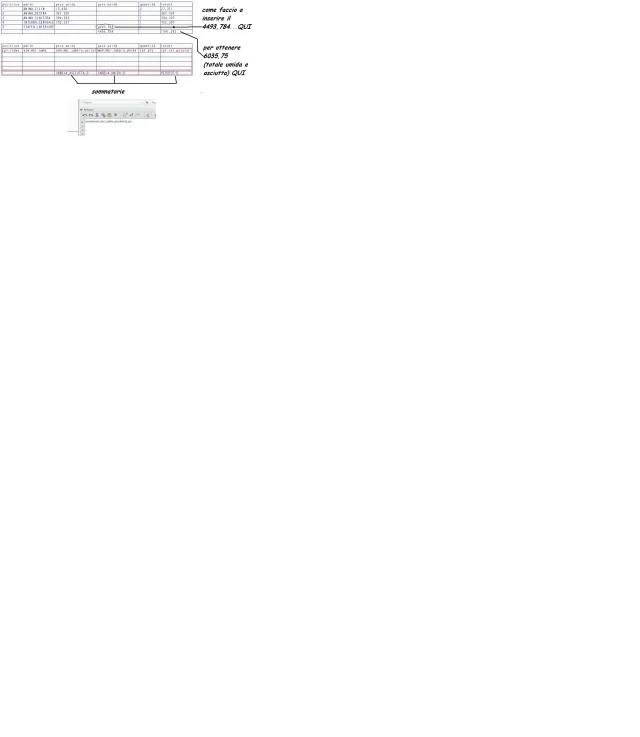
do not disappoint me...the summary always depends on a voice in the region I can not invent it :36_1_4: I modified the attachment with paint is not an exel...
 
I'm sorry to disappoint you. but the summation you can also make of the total column.
as you see from the image (you see also in the previous ones) the sumers are made, my problem is to insert the total of the wet sand together with the dry one.... I hope you have remained a little patience still
relazione2.webp
 
with this image is finally clear what you want to get, even if it is not easy to achieve.
I did some evidence, but with little results. when I find some time I will make other attempts, even if I see it hard, the tables are powerful tools, but not very versatile.
Perhaps it would be worth exporting data and managing it with an excell program.
 
with this image is finally clear what you want to get, even if it is not easy to achieve.
I did some evidence, but with little results. when I find some time I will make other attempts, even if I see it hard, the tables are powerful tools, but not very versatile.
Perhaps it would be worth exporting data and managing it with an excell program.
I thank you anyway for the attention, after your previous discussions in the forum, I solved my first request.. We make it constructive for other members and welcome other interventions. Good life to all.. .
 
You can do it in two ways:
- info > separate base and save the data in txt format which then amounts in excell. of course you must first define in bom_format file
- save the table as .csv file and import it into excell.
in both cases every time you update the project excell files do not update and you have to remember to repeat the data import procedure

I'm sorry if I interfere, but I can't keep myself from hanging on your own business.
Since the tables are easy to manage and are automatically updated to every slight change in the project, I recommend, not to adapt the tables to your project, because it will always jump some problems of not easy solution, but to structure the project in such a way that with a simple table you can pull out all the data you need. For example, you could use under-axioms to insert the various types of sand so that there are no strange calculations, but just point to the weight of the set.
I'm sorry to bold, but I like to give advice.
 
I'm sorry to bold, but I like to give advice.
you can bold as much as you want, your 'curriculum' in the forum is completely respectful. . Others would not make sense of the community...as most companies, many foundries begin to understand the importance of simulations... of casting... of bulking...logistics. ..costi...then more detailed information you provide and the more appreciate the work of 'heating the chair' than many still mischief. That is why I had lost sight of the goal as an attachment, tabella.webp but you're eating...' obvious that optimizing the job imposes research,...continuous to 'smausare' by treasured your advice. Save me the Tuscan hills.
 
I'm sorry if I interfere, but I can't keep myself from hanging on your own business.
an opinion on this solution. . tabled, therefore > tabled by file (the same) >reg.repet>filtri> per element >excluding end.
the same thing I could do to divide possibly dry from wet.soluzione1.webp
 
Hi.
definitely can be a solution.
However, I would see more simple to manage and more complete a project divided into sub-axis that summarize all the totals you want.
In this regard I attach an image of a .drw in which I summarize the weights of the components of a machine, which with a little imagination can look like your case.
 

Attachments

  • Immagine.webp
    Immagine.webp
    28 KB · Views: 11
Hi.

However, I would see more simple to manage and more complete a project divided into sub-axis that summarize all the totals you want.

in practice a table for each part, and as you did to automatically insert the total weight in the cartiglio
 
in the drw I inserted all the necessary models, and then I recalled the respective parameters without having to do strange calculations.
the total weight in the cartiglio is simply the weight of the file together.
 
...so you can insert a relative table in the cartiglio or write it as a keyboard? ...I miss something
I don't understand what you mean by... relative table in the cart...
if you want to insert the total weight in the box, just activate its model, and with &parameter automatically call back the data.
 
I don't understand what you mean by... relative table in the cart...
if you want to insert the total weight in the box, just activate its model, and with &parameter automatically call back the data.
ok all clear
 
Hi.

you could have done so:
- create a (3d) parameter for each part with the same name (e.g. poplar).
- within each part (3d) assign to this parameter (pound) the dry or wet sand value according to the part considered (pound=sand_dry or pippo=sand_bagnata).
- in the last column (2d) insert the relationship in the region of repetition sand_dry_bagnata = rpt_qty*asm_mbr_pippo
- in the lower right corner of the table (2d) insert the sum of the last column.
 

Forum statistics

Threads
44,997
Messages
339,767
Members
4
Latest member
ibt

Members online

No members online now.
ciao
Back
Top