• This forum is the machine-generated translation of www.cad3d.it/forum1 - the Italian design community. Several terms are not translated correctly.

initial orientation

  • Thread starter Thread starter TECNOMODEL
  • Start date Start date

TECNOMODEL

Guest
I created my side template with plan orientation as from imageTemplate.webpwhen I create a new part though using this template opens me with this orientationNuova parte.webpNot that it's a big problem, but I don't understand why he has this behavior.
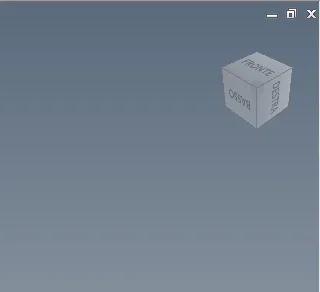
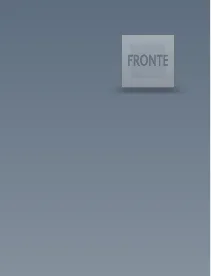
Does anyone have any idea where to set the initial opening of the template?
 
you only have master view...
create another one and direct the cube by clicking on the edge.
then save the template.

ciauz
 
I already had another view beyond the master, for safety I created another one, saved as a model but the result is always the same.

when I create a new part the template always opens with front orientation
 
but if you type f6, how does the model appear?? in the template you only turned it and saved it or you redefine the f6 in the
Your view?
when you do --> new file , will you activate your view by default??
 
If I type f6 the model goes to place, it appears in perspective.
When I create a new part with my template I activate the view I created.

I miss the speech of redefining f6. I create a part, I open the front-oriented blank file. If click f6 it is oriented on perspective. I'd like it to be in perspective since you create the new part.
 
above all I can't understand why if I open the template is right oriented, change orientation when I create a new part with the template
 
do this again:
-open the template and delete all views except the master
- Hello.
-create a new view and make it active (check mark)
- orientate the cube
- Hello.

then try again
 
nothing to do, there is the new view but always opens with front orientation when I create the new part while if I open the template the orientation is prospective
 

Forum statistics

Threads
44,997
Messages
339,767
Members
4
Latest member
ibt

Members online

No members online now.
Back
Top