• This forum is the machine-generated translation of www.cad3d.it/forum1 - the Italian design community. Several terms are not translated correctly.

inventor 2012

  • Thread starter Thread starter davide75
  • Start date Start date
so, today I have heard our supplier and assistance for autodesk products and has taken these possible causes:

1st, however, being a computer inserted within a working network, being connected with a 10/100 hub and not exploiting the 1gbyte line of the hub involves a fairly substantial slowdown for files present on the network.

2nd using on the work pc the vault this involves a slowdown of the whole system as it must keep in communication the work done locally with what is present on the vault.

3° the antivirus could lead to a substantial slowdown as having to check every single file that is opened and created this leads to a substantial slowdown in the machine.

so it confirmed that my initial feeling that my home-built machine can be more prettier and faster than working stations is more than founded.

a proof that I will do tomorrow will be to log-out from the vault, turn off the antivirus and test the machine with these features.

we say that it wasn't exactly the results I wanted to hear myself say since if I was in my owner having spent so much money on a machine that has no performance so exciting it would lead me to switch to a software that requires less hardware to be able to turn.
 
in our company we have been working with vaults for a few years, and I have never had great speed problems, my ws is a hpz400 with 10gb ram and nvidia1800 card, ethernet 1gbit, so nothing exceptional.

I have no particular speed problems, the size of the assembly is comparable, in some cases even larger.

to see if the problem is due to the vault try to work without, explain, download files in your local area, after which fail logout from vault, in all open adsk applications and see, if the speed increases is the fault of the sql queries of the vault, then the problem could also reside in the server hardware.
 
tomorrow as soon as I can do some tests I'll do a test even by logging out of the vault.

Unfortunately also the server is all new, tomorrow I think it will be the test of the nine, also because now I would not like to say a cabbage but with the 2011 version and workstations that were little less prone than the PC assembled that I used now as test the 2011 version turned fluid without any impunity and was not at all slow.. .
 
I have to ask you a stupid stupid question... :rolleyes:
I started working for a few days with inv2012. I installed win7 64bit, first I used inv10 on winxp 32bit.
now in 2012 the zoom with the mouse wheel is much more aggressive, snappy, with a snap of the wheel the image varies a lot, in practice it became unmanageable to work, instead with the inv10 on xp was much more fluid and less snappy.
I tried to change the mouse settings (an original wuorkstation laser hp) by setting rows from 3 to 1, but the result does not change!
How can I reduce the effect of the wheel on the zoom?? ? ?
thank you and excuse for the banal question!:finger:
 
I have to ask you a stupid stupid question... :rolleyes:
I started working for a few days with inv2012. I installed win7 64bit, first I used inv10 on winxp 32bit.
now in 2012 the zoom with the mouse wheel is much more aggressive, snappy, with a snap of the wheel the image varies a lot, in practice it became unmanageable to work, instead with the inv10 on xp was much more fluid and less snappy.
I tried to change the mouse settings (an original wuorkstation laser hp) by setting rows from 3 to 1, but the result does not change!
How can I reduce the effect of the wheel on the zoom?? ? ?
thank you and excuse for the banal question!:finger:
Hi, alby.

Well, so banal is not because it seems that you have to put hand in the register to be able to intervene on the speed of the mouse zoom factor.

I wasn't so much looking, but I found this document in English that explains how to change the smoothness of the wheel.
I didn't try it, so I don't guarantee you anything, however if you want to try, the link is this: http://www.cadforum.cz/cadforum_en/setting-the-mouse-wheel-zoom-factor-in-inventor-tip7835I think it is necessary, but I repeat, I do not know for sure.

p.s.

Then don't come and take it with me if you don't run, eh?:biggrin::biggrin:
 
Thank you! Now I'll study for a second, then I'll also ask the autodesk technician who should come for a course... But I doubt I can help, better than I try myself!
 
Perfect!! Thank you!
I had tried with the indications in the previous link but did not coincide the info on the path to follow, obviously they were not the same operating systems. I followed the procedure of the last link and it works! only difference is that I do not have registryversion12.0 ma ho registryversion16.0, ma funziona!
 
Today I tartax you... other doubt:

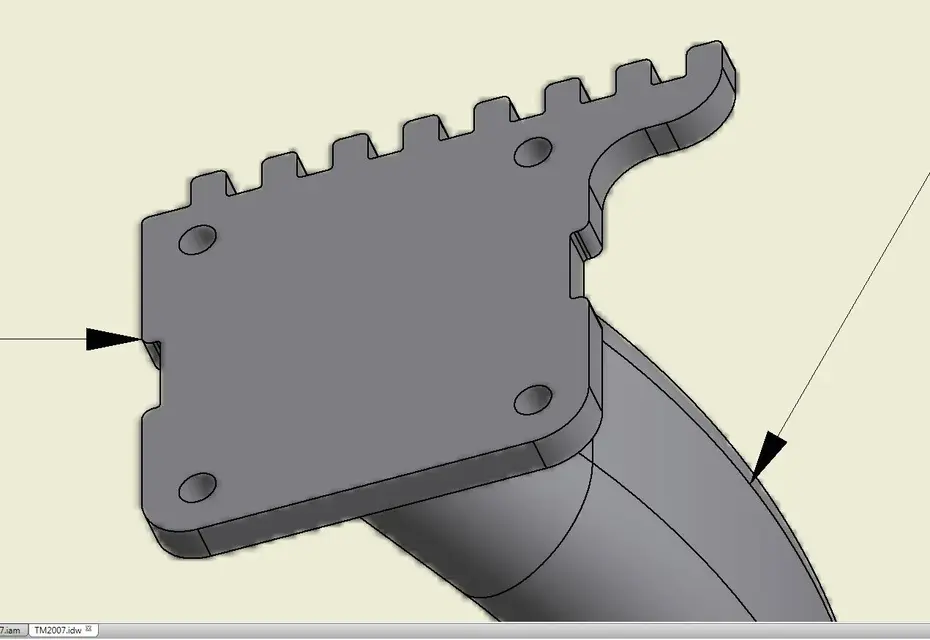
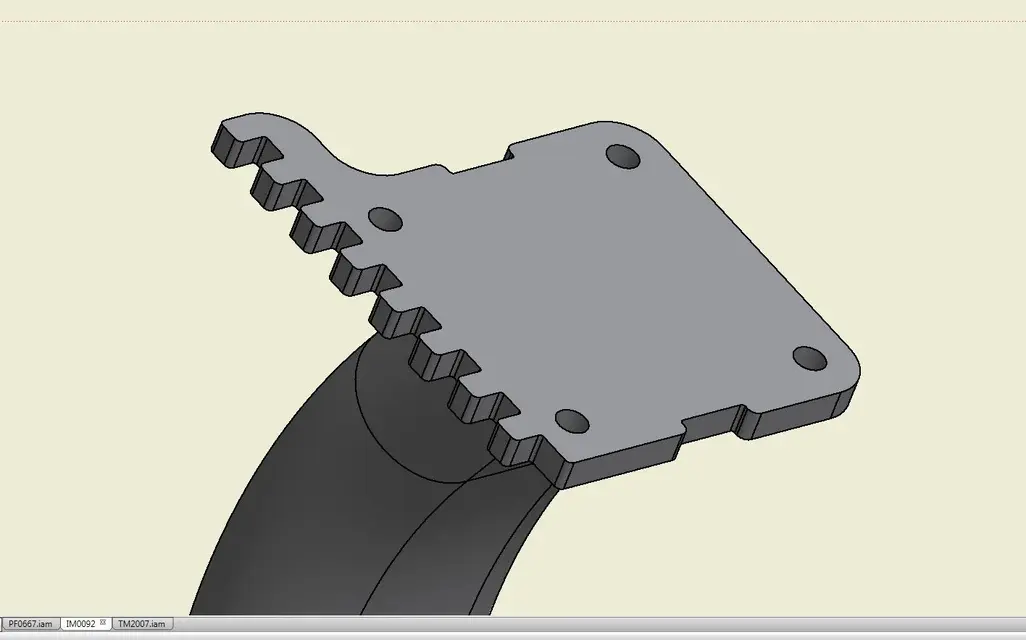
when I open with inv2012 an idw with a shaded view created with inv10, the edge of the view is blurred, instead creating a new view of the same detail directly with inv2012 the edge is regular.
I attach two images to make you understand well. solutions to the problem?
 

Attachments

  • Bordo irregolare.webp
    Bordo irregolare.webp
    35.2 KB · Views: 17
  • Bordo OK.webp
    Bordo OK.webp
    37 KB · Views: 13
could be a bitmap problem.
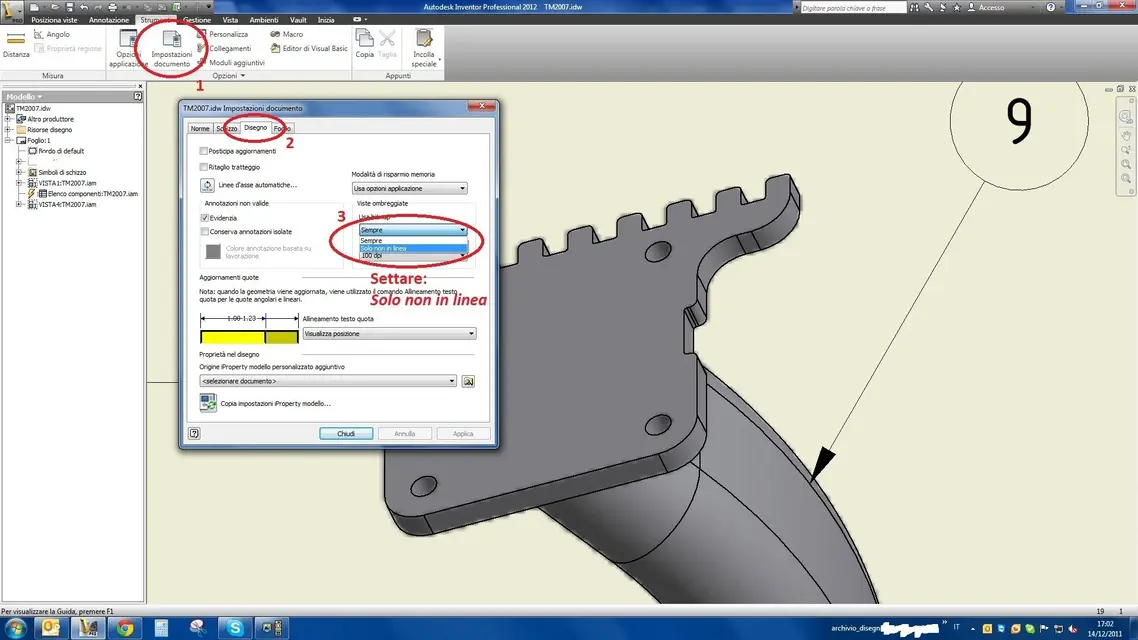
test so , in your idw go to tools > Document options > drawing card > >shaded view

the bitmap item tries to play on voices always/only offline and resolution
 
Perfect! You solved another problem.. Thank you! !
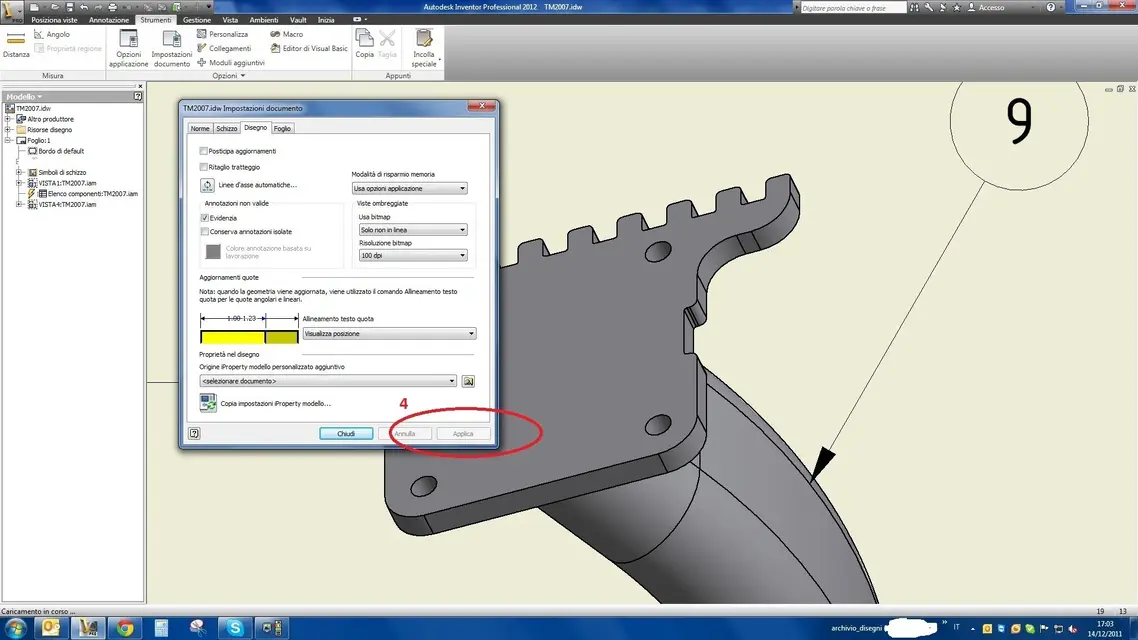
it is enough to set the voice usa bitmap in only not online, instead in the 10 it was set on always. changing the value the edge is regular.
I attach two images, it could also be useful to others.

Thank you again!
 

Attachments

  • 2.webp
    2.webp
    123 KB · Views: 27
  • 3.webp
    3.webp
    110.7 KB · Views: 25
Perfect!! Thank you!
I had tried with the indications in the previous link but did not coincide the info on the path to follow, obviously they were not the same operating systems. I followed the procedure of the last link and it works! only difference is that I do not have registryversion12.0 ma ho registryversion16.0, ma funziona!
Of nothing!:wink:

Yes, I also have the voice "registryversion16". probably number 12 refers to the version of inventor, in fact making a quick account, if the 15 corresponds to 2011, going back to the 12 should correspond to the 2008 version of inventor. sometimes those of autodesk put us to update the help.:biggrin:
 
I ask your help again:
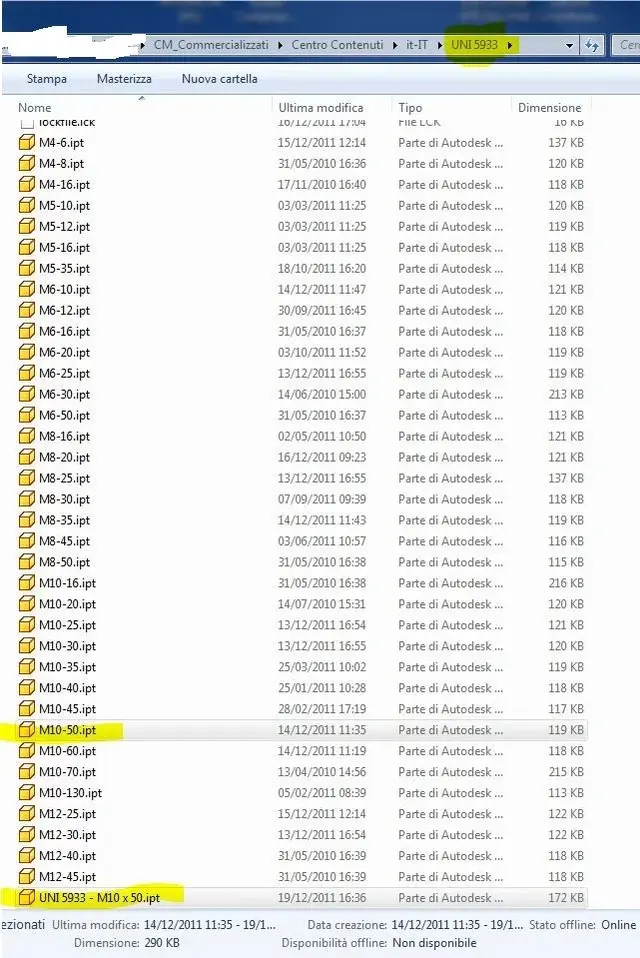
with the old inventor 10 when I entered a component from the contained center the ipt file was generated with a type nomenclature: m10-50.pt, now having installed inventor 2012, inserting the same detail always from the contained center instead of taking the file already created in the past, but generates a new one with the following nomenclature: 5933 - m10 x 50.iptthe problem is that in all files generated in the past I have inserted internal article code, finish (white zinc plated, black galvanized, burnt, etc.), if I go ahead with the 2012 system risk of having to recompile the details all the parts that I insert from the content center! and of bolts we really use a lot of... first every time I recalled a part from the contained center and it already existed, I loaded it into the axieme with all the information saved in the file.

can you set inventor 2012 to use the same nomenclature as the old version? Heeelp!!
 

Attachments

  • Cattura.webp
    Cattura.webp
    99 KB · Views: 14
if no one could help me on how to set inv2012 to generate files with the old nomenclature, according to you is an idea to duplicate all existing bolts in the it-it folder by renameing copies with the new nomenclature?!? It's a hell of a job, but it wouldn't take long, so inventor should put the old bolts in my ass, is that an idea? ? ?
 
if no one could help me on how to set inv2012 to generate files with the old nomenclature, according to you is an idea to duplicate all existing bolts in the it-it folder by renameing copies with the new nomenclature?!? It's a hell of a job, but it wouldn't take long, so inventor should put the old bolts in my ass, is that an idea? ? ?
It's not easy at all, at least as far as I can know!:biggrin:

then when it comes to going to work on files of other people and being part of a company, I feel to go even more with the feet of lead.

However, in principle, I would follow this path:

1 - first, not knowing how to read or write, I would make a nice security copy of my project directory, so that I could go back if something went wrong.

2 - I would start the function "programming operations" that you find in "start\programs\autodesk\autodesk inventor 2012\struments\programming operations and within the selections dialog box "migra file".

3 - Once you complete the migration, you should also find yourself with your custom bookcases in place, but also here I am not sure because I have never tried.
Meanwhile try to read the inventor's help in this link http://wikihelp.autodesk.com/invent...ioni_2108/2114-migrazio2114/2116-migrazio2116 where we talk about the migration of inventor projects to version 2012 keeping the changes to the previous libraries.

I think it's your case. If you want you can try to follow what it says on this page and if you can't, please post your doubts that in the time cutouts we see to solve them.:smile:
 

Attachments

  • migra_file.webp
    migra_file.webp
    57.1 KB · Views: 9
this year all on the cloud!
in addition to access to selfdesk cloud (only for those who are in sub) there is the "autodesk inventor optimization" always based on cloud computing.. .
 
ma quest'anno niente bonus pack??? :confused::confused:
qualcosa sapete?
The only thing you've seen for now is the sub's expiration notice.
punctual like death.... to me expires in mid-April, the notice arrived on 9 January... .

this year all on the cloud!
in addition to access to selfdesk cloud (only for those who are in sub) there is the "autodesk inventor optimization" always based on cloud computing.. .
Well, I don't even know what you're talking about.
 
Who can help me?
I would need to insert in inventor 2012 the normalized for molds and in particular, compasses and columns.
who can tell me if there are already drawn in different forms and sizes and how to insert them into inventor 2012?
Thanks for the help:finger:
 

Forum statistics

Threads
44,997
Messages
339,767
Members
4
Latest member
ibt

Members online

No members online now.
Back
Top