
• This forum is the machine-generated translation of www.cad3d.it/forum1 - the Italian design community. Several terms are not translated correctly.

material style-i can't align materials\colors with the library

  • Thread starter Thread starter Giancesa
  • Start date Start date

Giancesa

Guest
I'm losing my mind about a material update problem. I'll explain. I happen to have to update the density of a specific material, loaded on a dedicated library, all done in the .ipt template. but now opening a component I can't update it with the last modification made in the template: I am forced to enter material editors and change each component the value of density. the same happens to me with the colors assigned to the material: at some point I wanted to change the color of that particular material and I can't update on a piece already shaped. precise that the voice "save" styles is not active but only the voice "update". I don't have permission to update the style bookcases? Also precise that I now adopt the system that to change the material library I go to the .ipt template and I can do everything, but then if I want to align an old file with what I did on the material-color library this I can not do. Thank you.
 
Excuse me, but not having any remarks, perhaps you have not understood my problem or is it a subject that you do not know? Thank you.
 
check that the project is set on reading-writing to the voice styles.
open the template and go to the management tab and select save.
at this point the style is overwritten in the style folder.
from there on all new files will be in place, for old ones if you want to update them just that selections always updates in the management tab > styles and norms
 
from there on all new files will be in place, for old ones if you want to update them just that selections always updates in the management tab > styles and norms
where do you find this setting? in application options I do not find them either in the management tab or in the style editor
 
check that the project is set on reading-writing to the voice styles.
open the template and go to the management tab and select save.
at this point the style is overwritten in the style folder.
from there on all new files will be in place, for old ones if you want to update them just that selections always updates in the management tab > styles and norms
Thank you very much, I managed to do everything. I had an extra problem, that the program didn't let me edit "reading-writing" but extracting from the vault the project file, then I managed. Thanks again.
 
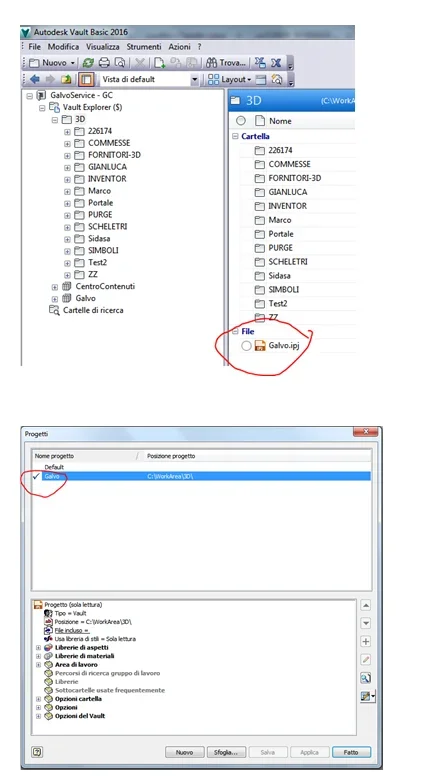
Now I have another problem now. my colleagues have the red ball in the match of the .ipj project file because I extract it to make changes and then reloading it in the vault their file is not updated. if I now update the project file they will also be able to update the style libraries and this I would not want it to happen. I basically want you to be just a person who can change bookstores. how can I do that using the same project file, I can have the possibility to change the library styles and the other two designers no. thanks
 
make two identical projects but with different name. you use one and they use the other.
 
Sorry but I didn't understand, or maybe I have no vault experience, because everything was configured by a person who is now not in the company and I am trying to solve problems. However, how can I make a vault project, which must be shared, with a different name ? from what little I know, I have a single vault project, with a well defined name, with which all (in my case we are in three) work.vault-nome progetto---.webp
 
creates an admin galvo project that is equal to the other but that has bookcases in reading and writing, then you use that and others use galvo.
alternatively, you put bookcases in read-only and archives and everyone uses galvo, when you need to change some styles, change styles, put it in read-only and archives.
 
I don't know the vault well, but at this point, maybe working for users, in the sense that from the vault manager you have to set permissions in reading/writing of the various users. not knowing it, however, I do not know if you can give read-only permissions for someone and read/write for others, to the style library.. .
 
I don't know the vault well, but at this point, maybe working for users, in the sense that from the vault manager you have to set permissions in reading/writing of the various users. not knowing it, however, I do not know if you can give read-only permissions for someone and read/write for others, to the style library.. .
depends on whether libraries and even templates manage them from vault or outside.
 
Yes, but in fact I answered without seeing your last answer and aware that I am very ignorant in vault;-)
We'd miss... If you want a tip try installing/installing the free one (which you already have in the inventor package) and then you will see that you do not go back, it was also just to rename a file that you wrong to type it.
 
We'd miss... If you want a tip try installing/installing the free one (which you already have in the inventor package) and then you will see that you do not go back, it was also just to rename a file that you wrong to type it.
quoting in full
 
We'd miss... If you want a tip try installing/installing the free one (which you already have in the inventor package) and then you will see that you do not go back, it was also just to rename a file that you wrong to type it.
I have another pdm for inventor and autocad of third parties, for that I do not use vault, otherwise I would have already incorporated it ;-)
In fact, I would no longer do this unless it is fundamental to me.
 
Sorry again, but what is the correct procedure to copy/create a project file. Thank you.
 
I was wondering. Since you are only in 3, it is no easier if you extract the project file, put the styles in reading and writing, make the changes you have to make, re-print the styles in read-only, archive the project file, do you download it from the two colleagues?
In this way the file is unique and you, while working, do not run the risk of overwriting a style without wanting it.
Then if you want, I'll teach you how to make a new project file.
 
I was wondering. Since you are only in 3, it is no easier if you extract the project file, put the styles in reading and writing, make the changes you have to make, re-print the styles in read-only, archive the project file, do you download it from the two colleagues?
In this way the file is unique and you, while working, do not run the risk of overwriting a style without wanting it.
Then if you want, I'll teach you how to make a new project file.
I have already tried and it is a bit elaborate, because we are at the beginning of the use of inventor in the company and often happens that I modify the libraries (not only mattresses but also table components, etc.), so if you teach me how to make a new project file, it would be better. Thank you.
 

Forum statistics

Threads
44,997
Messages
339,767
Members
4
Latest member
ibt

Members online

No members online now.
Back
Top