
• This forum is the machine-generated translation of www.cad3d.it/forum1 - the Italian design community. Several terms are not translated correctly.

monometric asonometry

  • Thread starter Thread starter Takeda
  • Start date Start date
... however I mention the delivery that the professor has provided... "drawing, with measures to please, the orthogonal projection, the section and the monometric asonometry of the figure "t" attached "
but the professor only wants the 2d? No 3d?? You don't understand well.
We draw everything strictly in 2d ... as if we were drawing on paper (the old way).

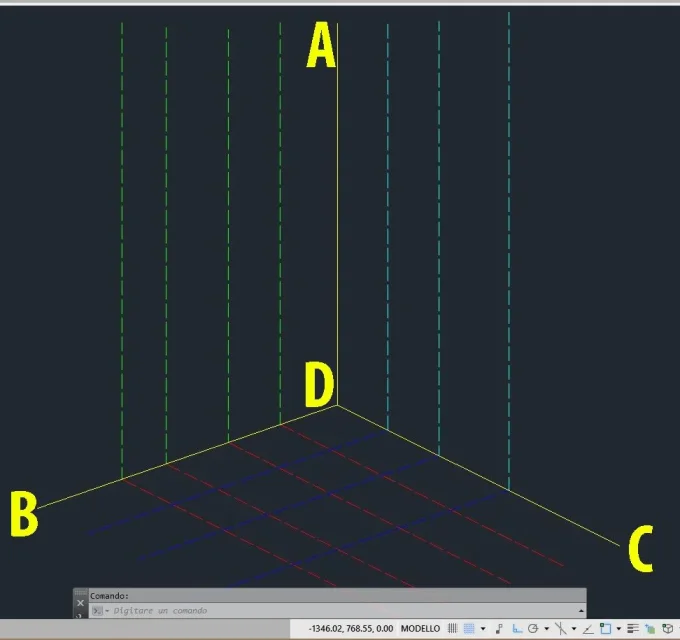
draws the 3 xyz axes. Let's help with the image I posted below. I press that I belong to the old school so I make great use of the keyboard). by keyboard type the command "snap" and press Enter. immediately after prizes r and then sending newment (r stà per rotate... in the snap command you will not see the r but rub it, which is so much there). the snap command with the r option will require you a point, you give the b point, then it will ask you a second point and you give the d (use the end point when you select these points). at this point the cursor will align with the b-d line. this will serve you to track the lines that start at the d-c axis parallel to the b-d axis.
finished tracking the lines (in the image are blue colored) back the snap command with the r option, selecting the c and d points this time draws everything from the b-d axis parallel to the d-c axis.
and so the plant is drawn.
now we return the cursor as it was before typing snap, r, and typing 0.0 (zero comma zero) sending and again 0 as angle. the cursor will return as it was initially.
now draws all vertical lines, reproducing the design. the vertices of the solid will be identified by the intersection of 3 lines. it will be enough to make the appropriate rotations of the snap (as outlined above) to pull all the lines we need to locate the solids.
They taught me how to do this. I don't think we're going different today.
Anyway, everything is needed to practice.. .
 

Attachments

  • 5.webp
    5.webp
    30.3 KB · Views: 4
I completely dissociate myself from what you write.
This is a barbaric way of using autocad. in autocad 2d you draw 2 projections and then copying and rotating one of them draws the third.
I want to see how to make a complex design, how could it be a wagon or a building, making projections with semicircles. . .
Yes, why then to what is reduced the exercise in question, designed all in 2d? It is reduced to a series of lines to be drawn together with the rotation of snaps. It's very simple.
It's always practice, but for those approaching autocad for the first time it can be uninspiring because used in this way it seems that autocad does not want to meet the needs of the designer.
 
Last edited:
Hello.
takeda asks for lumens on how to make with autocad l monometric assonometry of an object.
with pure autocad that assonometry si si design design design (only in 2d) using the cad as an electronic tecnigraph, as if he drew on paper with pencil, team and compass. this because I place the axis z vertical axes x e y (which usually define the horizontal plane) must maintain an angle of 90°.

I can't believe
by force of things it is necessary to rotate the snap, which would equal to placing the 2 teams so that, identified a line to use as a reference, sliding the other you create lines parallel to the first
 
Hello.
I do not understand the perplexity; the monometric acenometry that is, on the network there are dozens of tutorials.
then, just wanting, there is always the makeup to (almost) get it from 3d, but it does not seem the case.

I can't believe
 
I have prepared a fast video, just to see what could be a possible approach to the problem by using autocad. You learn more easily from videos.
It's quite simple, it's about taking advantage of the image to go over it. then align the cursor on the lines depending on the need, a little like when working with the teams.
I also used the "alline" command applied to the imported image, this to have the original design always at your fingertips and exploit it accordingly.
I use the keyboard a lot (when the program allows it) so check the command line down to see what I type. I just sketched the design by making a draft of the plant and a projection. for the other projection you will need to work with the same system (snap rotation and image alignment).

ps, the mouse wheel for zoom is lost...
 

Forum statistics

Threads
44,997
Messages
339,767
Members
4
Latest member
ibt

Members online

No members online now.
Back
Top