
• This forum is the machine-generated translation of www.cad3d.it/forum1 - the Italian design community. Several terms are not translated correctly.

name distinct cut elements

  • Thread starter Thread starter tanticapelli
  • Start date Start date

tanticapelli

Guest
Bye to all,
I'm very, very much. .
I would like to understand how to make sure that in the separate cut of welding profiles did not put me as folder names "elements list1" but perhaps only a dry number without "elements list", or maybe even "type1".
said in other words, is there any way to parsonalize the wording so that it automatically gives the name but with a word from me set?
I hope I explained.

Why does it seem to be in a hurry? ? ?

thanks cmq...

so many hairs
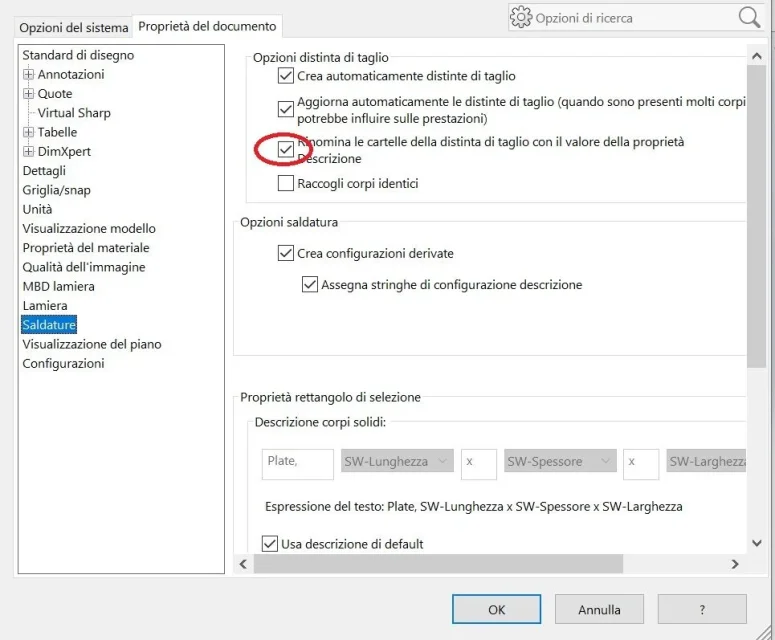
 
If you want to give him a specific name from you wanted to.
if you want to reduce the name from elemental cast1 a elements1 Perhaps, it is only a vague hypothesis, it is possible through equation in the drawing cutting distinct
in the options of model to the welding page There is something about it, but I have no way to verify
ok I have seen that it is possible to make recall the value inserted in the field description of the cut distinction, but should also be inserted by hand?
Yes, unless there is a macro that fills them automatically.
But doing it by hand is not long as process; if you notice in the properties of the cutting distinct there is a second tab called tab summary properties, from this you can select a specific property and view all folders, at this point you are a moment to fill all folders

I will leave you guide pagesI expect you to close this discussion
 
I forgot that in the document options you can set that folders take the name of the description.
in this way you have an eye on what you are working on without having to control the properties
 
I expect you to close this discussion
OK for me is closed
 
ok I have seen you can also put an empty description cmapo. . .
I don't understand that. the description field is empty by default, save for the structural elements duly compiled.
further thing I forgot:
If you start from a separate cut without field description and should insert it into each folder you can do it in a single move like this: above the functions you have the weld icon, right-click properties and enter the fields you want which will then be propagated to the folders. you can also enter a value, such as type in the description field, so that when you go to fill out the descriptions of the individual folders you will only need to enter the progressive number behind the word type
 
I don't understand that. the description field is empty by default, save for the structural elements duly compiled.
further thing I forgot:
If you start from a separate cut without field description and should insert it into each folder you can do it in a single move like this: above the functions you have the weld icon, right-click properties and enter the fields you want which will then be propagated to the folders. you can also enter a value, such as type in the description field, so that when you go to fill out the descriptions of the individual folders you will only need to enter the progressive number behind the word type
Well, that's great, the one move was just another thing I wanted to know.
the empty description field thing I used it because I saw that it automatically puts a very useful progressive numbering when I put drawing bubbles
 
You're too much a genius, just put the prefix as you said, anything, and then add the suffix of the progressive and unique number. certain provided you have enabled the option as in figure (but you already wrote it).
all with a few clicks (and when there is so much stuff in the cut list trust that it is a manna from the sky... )
 

Attachments

  • Proprietà Descrizione distinta taglio.webp
    Proprietà Descrizione distinta taglio.webp
    57.4 KB · Views: 23
at this point as I am in a productive trance not indifferent thanks to this forum to say little providential, I wonder how you can make to call in somehow within the separate cut the type of profile that generated a body...
I don't know if I explained. . .
 

Attachments

  • Articolo profilo distinta taglio.webp
    Articolo profilo distinta taglio.webp
    63 KB · Views: 20
Fill it inside the profile file.
of this already mentioned, however since you praised me in the previous post you earned the right to repetition.
in the sldlfp profile file that you use to create the structural element that fills in the file properties is propagated to the cutting distinct.
then open the profile file, go to the file properties and create the description item, type, profile or what you want and fill it; qunado you will insert that profile you will have in the separate cutting property description compiled automatically
 
Fill it inside the profile file.
of this already mentioned, however since you praised me in the previous post you earned the right to repetition.
in the sldlfp profile file that you use to create the structural element that fills in the file properties is propagated to the cutting distinct.
then open the profile file, go to the file properties and create the description item, type, profile or what you want and fill it; qunado you will insert that profile you will have in the separate cutting property description compiled automatically
I apologize for not seeing this in the debate already resolved.
 
Okay, I get a new question:

we have more continuous facades (multibody parts) of various separate façades of a single yard.

Once applied all the necessary processing we want to bring together the various prospectuses in a single file in order to send everything (all prospects) in production simultaneously also in the interest of optimization and therefore of the reduction of waste.

what would be the best strategy to adopt to gather everything in one file?

I would take this road and wish you would tell me if it is better:

procedure

1) except for each prospectus (which will be very heavy to load if all processing is active) as a new part through the command saves by name;
2) I insert each new part generated in point 1 in a new and unique file of part asking to import for each file the properties of separate cut;

observations

1)note that it does not seem possible to create the "delimitation picture" for each folder of the cut distinction;
2) the names of each folder (which follow the criteria described in this post) are not propagated to the bodies in it contained, so that by "saving bodies" and "automatic assignments of names" the names are not those of the folder.
3) the bodies do not suffer from the updates of the original part: Maybe I should have put part by side in a new part without first exporting each part to a multibody part (I would want to cry but I can't) but I'm pretty sure that would explode my pc.

I made it all wrong or it's about fixing some small adjustment or.. .

I am open to any consideration.

Thank you very much

so many hairs
 
Maronnabenedetta...
Let's see if I understand:
you from a set consisting of multiple multibody parts want to get a unique part file.
starting from this assumption, that if it is wrong you will do all the reasoning, first of all there is no way to transform a file together in a file of part keeping the association.
comment you have proceedings and comments
1) except for each prospectus (which will be very heavy to load if all processing is active) as a new part through the command saves by name;
In this way you lose the association with the father file.
2) I insert each new part generated in point 1 in a new and unique file of part asking to import for each file the properties of separate cut;
with the command enter the presumed part. in this way you get the association to the imported file, but that, for the previous comment, did not mean since the source file died at the first step.
1)note that it does not seem possible to create the "delimitation picture" for each folder of the cut distinction;
That's weird. I think he doesn't just do it for the structural elements, but I'm not sure. Still about the original file right?
2) the names of each folder (which follow the criteria described in this post) are not propagated to the bodies in it contained, so that by "saving bodies" and "automatic assignments of names" the names are not those of the folder.
the bodies take the name of the function that generated them. I don't know how to help you here.
I usually carry them as they are called or putting only a progressive, then with a program (antrenamer, does not require installation) I rename them in block
3) the bodies do not suffer from the updates of the original part: Maybe I should have put part by side in a new part without first exporting each part to a multibody part (I would want to cry but I can't) but I'm pretty sure that would explode my pc.
I understood little.. Please reply
 
you from a set consisting of multiple multibody parts want to get a unique part file.
In reality the starting files are parts generated by "flying" welding profiles on 2d or 3d sketches, depending on the case, and medified by numerous library functions (the maggiir part tied with external referents through specific flag) applied and repeated linearly according to different criteria. it goes by itself that files of part of this genus become very slow in the phase of reconstruction, so much weight if inserted as they are together with others in a new file of part. so doing the new side file should keep links with the original parts but it would be a hallucinating slowness.
from this comes the choice to carry out an intermediate rescue of each part in a part that shines in everything and for all the bodies, but without the burden of an ultrafaced featuremanager and ahimè the loss of the association with the father file.

Then for each of these new files I can activate the welding function and get the recognition of identical bodies and also create the selection rectangle for each folder if I want it.
After that it is only necessary to take these new parts (decisely more slender than the originals) and to insert them into a new part, which, however, suffers from the limitations referred to in the observations of my previous intervention, but allows me to recognize if and how many identical bodies there are on all the yard.

I hope I've explained a little better.
 
you really didn't say if from a set consisting of multiple multibody parts you want to get a unique part file, but it doesn't seem like that.

I propose to you two solutions that maintain the relationship with the oyrginal part, but which should be evaluated at the level of time and performance.
1 do what you have already tried, i.e. insert the part in one part though blocking (not interrupting) the references. In this way, I think, it should behave like a part with imported bodies and therefore be leaner.
2 save all individual bodies that will then be inserted into the new part. maintains the association with the original file, but being there an intermediate step should not affect the performance; But this means having to insert dozens of bodies into one part, which could prove to be long and tedious.

otherwise if you have to lose the association with the original files so much it is worth inserting all the parts into a set and saving the latter as part
 
you really didn't say if from a set consisting of multiple multibody parts you want to get a unique part file, but it doesn't seem like that.
Yes it is not so because they are several independent multibody parts that have never been inserted into a single set.
otherwise if you have to lose the association with the original files so much it is worth inserting all the parts into a set and saving the latter as part
here, in fact if I do so the selection box is generating, not as I did.

However, I would like to try the way of blocking external references and then insert everything in one part.

see that you finally gave me two chances.

We hope my brain is quite agile to manage them. . .
 

Forum statistics

Threads
44,997
Messages
339,767
Members
4
Latest member
ibt

Members online

No members online now.
Back
Top