
• This forum is the machine-generated translation of www.cad3d.it/forum1 - the Italian design community. Several terms are not translated correctly.

parametric relationships and use of macros

  • Thread starter Thread starter cersil
  • Start date Start date

cersil

Guest
Hi, it's a little bit that doesn't feel it, but now, since the coronavirus made us available more time, I wanted to get into a field I barely know. I would be making hexagonal but parametric screws, that is I realize a screw m3 then changing only a quota I can get all those I want m4, m5, m6, m8...
This can be done if there are precise relationships between the various dimensions. I make an example a dado m3 has a diameter of the hexagon pairs to 5.5 mm and a height of 2.4 mm, now if we pass to a m4 we will have respectively diameter 7 height 2,93 unfortunately the relationship between these two sizes is not constant in fact in the m3 the height is 0.4363 of the diameter while in the m4 the height is 0.44185 of the diameter. If this ratio is always equal and constant (e.g. 0.5) it would be easy to parameterize by setting the height value of 0.5*diameter and we will have the possibility, changing the diameter, to have the correct height automatically. Unfortunately, there is no constant relationship. Then I thought if it was possible, as you do in all programming languages, to create an array where I can store the corresponding value for each diameter of the height of the nut, always a little different, and in the equation that I would insert in the height quota go to write that this will have to be equal to the corresponding value in the array to the value of the dimeter. in other words I wanted to know if there is a macro language in solidworks that allows me to do this. I thank you warmly for the help you want to give me. Hi.
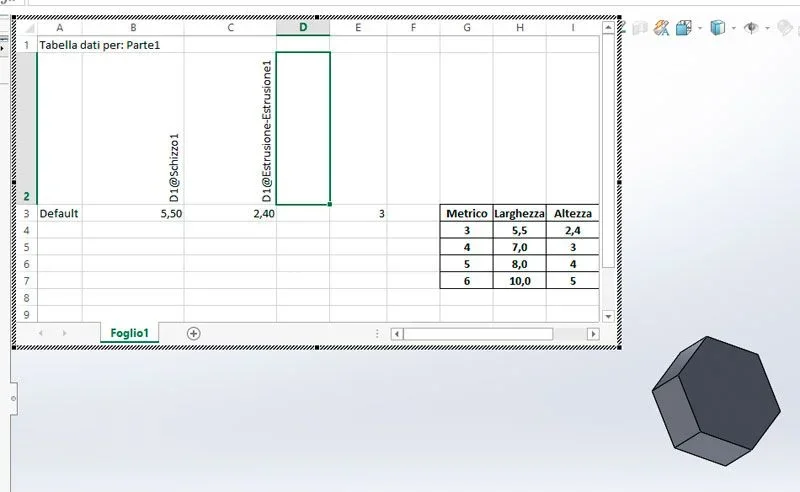
 
you can do it through the data table using the potential of excel.
otherwise, if you do not want to use data tables, you have to build an equation by inserting the if function, but using it very little I do not guarantee success
 
I'm looking in the manual maybe I can understand. Give me some time then I'll let you know. Thank you.
 
then I understood in line grades how the data tables work but ahimè the function that in excel works well and that it did to my case =cerca.ver() in the data tables is not active. I tried to create an external excel file and then import it into solidworks but while in excel it works once imported it returns to not work. if you avoid using excel functions the import works correctly. I don't understand why the formulas that even put me in when I send are transformed into text and therefore do not work as formulas. tried also the statement if that works but you have to do a tedious nesting especially if you want to insert many data. but sin to be able to use the computing potential of excel would have been very effective. Who knows if there is another way. Bye-bye soon
 
the data table is created with the cells formatted as text, but just change formatting because the table functions
 
Unfortunately I have not made any progress. I had folded as saying about the use of if, even if improposable. Now that you gave me this straight I will try to change the formatting and see what happens. Thank you.
 
then another step forward. now, changing formatting from text to number accepts formulas. the objective to be achieved is to create a hexagonal screw m3 (metric with a nominal diameter of 3 mm) that according to the rules iso has a wide head 5.5 and 2.4 but to parameterize it so that if I insert in a global variable "metric" another value for example 10 the screw automatically modifies me in a m10 (wide head 17 and high 8). with one screw, I could have a whole hardware. if there was a constant proportionality between the width and the height the thing would be trivial, unfortunately there is not every bolt has a different height and not proportional. I was thinking of solving the problem by making a matching table where at each nominal value they correspond to the related other data. this in excel can be done easily with the use of the search.ver() function. Since in solidworks there are data tables... then I create a nut that has a diameter (or rather the distance between two parallel faces) and a height, I create a global variable "metric" that initially imposed to 3 (vite m3) .tabella-dati.webpto create a data table I put the width quota (d1@schizzo1) and extruded (d1@extrusion-extrusion1). I automatically create the data table that will show me the values I set then I go to change. I create a table of correspondences
table of 3 columns and 3 rows (the one on the right), in the b3 box I insert the following function of excel =cerca.ver(e3;g3:h7;2;false) which is to mean look for the value of cell e3 (which is 3) in the first column of table g3:h7 and report the corresponding value in column 2, as exact correspondence (false). and in fact as seen in b3 we have 5.5. in the cell c3 I insert instead =cerca.ver(e3;g3:h7;3;false) and in c3 we have 2.4. the formula works perfectly.
now to close the ring I should, and I don't know how, in the e3 box let us enter the value of the global variable "metric". if you succeed you open new horizons. Thank you.
 
why do all this confusion when with the data table you create how many configurations you want without using global variables
 
be the motivations are two: the main one is to be able to understand how to exploit the potential of the tables by using excel functions that gives you a calculation power not indifferent that will be able to serve you for a thousand other things, then you want to put that I go in the equations insert a single value e.g. 12 (for m12) and I finished. In the other case, I should run a list of configurations along a Lent to get what it does for me. You have no idea how many types of bolts exist. I mean, when I can't do something, I have to turn it around. What do you say? If you help me. I'd be grateful. Bye.
 
anything I write in place of equations gives me error saying that the name of the function is not valid, but to what function it refers to. Shouldn't the name of the global variable be enough?
 
to put that I go in the equations I enter only one value e.g. 12 (for m12)
in this manuiera you will have only one screw per part model and the data table does not need to do this, but to automatically create various configurations
 
if you want to change the equation value directly in the template file the data table is useless.
the correct wording is as follows:
$value@name of the variable@equations
 
now not from more error but still changing the value of the metric variable in the table nothing changes the value does not update!?
 

Forum statistics

Threads
44,997
Messages
339,767
Members
4
Latest member
ibt

Members online

No members online now.
Back
Top