• This forum is the machine-generated translation of www.cad3d.it/forum1 - the Italian design community. Several terms are not translated correctly.

problem precision intersection

  • Thread starter Thread starter Roberto377
  • Start date Start date
except for the case that mathematics has not become an opinion, if the text of the exercise, which is not known what it is, reports as diagonal 5.32 instead of 5.31507 (attention that is this 7 final that rounds to the upper digit instead of the lower one) means that it has rounded the figure to 2 decimals. As a result the size results from a construction with this measure cannot be detected with 3 decimals because they will never be corrected. Is it clear to you the concept of the thousandths at stake? Have you seen the image that I attached in the previous post or read only what is convenient to you?
we are at the #18 post is you have not attached the file to see the construction and analyze its possible problems, the video does not explain anything about how you built the rectangle and you see only a line and a flicker, you call into question an exercise that many have read without citing it or reporting it... seems to read the arguments of the landplants and similar.

to me it makes sadness to see users who pout and make free vittimism because it has been pointed out that they are wrong, users who have been widely helped, even by the undersigned, and have not complained until you have settled them
as I am trying to perform I am blessed exercise that includes sides from 3,50 x4,00 and as diagonals 5,32 possible that you can not perform correctly by making roundings with a program like autocad, then what you want me to tell you since you do vittimism ,sbagli etc etc, if you want to close the post
 
I didn't understand the problem. What do you mean by the prospect of a room? Are you building the room with autocad based on measurements taken in "campaign"? (type I mix the sides and the diagonals and then carry the relief on autocad? If so, you can't expect the triangulation to close to perfection. in these cases the point placed in the center of space delimited by the intersection of the 3 circles is taken as a good point. Let's talk about mm... we can do it, even because it would still be impossible to close the triangle to perfection.
but not the thing is much simpler, I'm just doing an exercise, to practice triangulation, and then to make real measures, strange that with autocad you can't round, it would be impossible to make measurements of a room and put the thousandths of millimeters, to make certain things you use the meter not the caliber
 
with a rectangle of 4.00 x 3.50 will come out a diagonal with a number of decimals.
We admit that it is 25 decimals after the comma. If you want a hit with autocad, use all 25. copy them with the mouse and paste them when you want to assign a length to the diagonal one.
 
if you want to decrease the decimals displayed go to menu format>units (or command line _units) and impose as many decimals you want to see.
for quotas instead you have to change the style of quota
This means that you will see to video the value with the decimals set, but if a line is 1,666666666666 long that will be its real value.
 
if you want to decrease the decimals displayed go to menu format>units (or command line _units) and impose as many decimals you want to see.
for quotas instead you have to change the style of quota
This means that you will see to video the value with the decimals set, but if a line is 1,666666666666 long that will be its real value.
hio massive thanks finally managed to solve I'm problem was how simple it was enough to change the decimals as you explained to me , I apologize in case I was rude , have patience after a day of hard work under the sun trying to study and put into practice something in the evening is not easy, autocad is a very useful program but sometimes it makes me a nervous, in some parts it is very complex,
 
What are you studying?
I'm asking you because I think you're taking it from the wrong way.
if your walls form an angle of 90° precise, the diagonal (as it says mass) is not 5,32 as the book says, but 5,31507 as it says massive.
on the planet earth, there is a triangle that has cateti 3.50-4 and 5.32, but the corner in the center will not be 90° accurate (so if you close the rectangle, the other side will not be 5,00 but slightly longer).
What you're talking about, it's called approximation. and on the field will be aggravated by error.
the error can be instrumental (the meter is clustered, or is too wide to enter the corner)
can be coarse (you took a chant, you read 5,47 and you noted 4,57)
it can be methodical (not to be perfectly horizontal to measure a distance, to measure with a strip that for just the weight just assumes the form of chainring etc).
And you're worried that you're missing four-tenths of mm out of 5m?
on the field you will see that the "acceptable" error is around 1% (5m=5cm).
more than 4 tenths of mm.

different speech is the accuracy of experience (1986-> nowadays) I tell you that autocad does not make mistakes. If you don't find anything, check where you made the mistake.
as someone wrote here a while ago, if you put me on the computer... What do you think can get out of it?
 
What are you studying?
I'm asking you because I think you're taking it from the wrong way.
if your walls form an angle of 90° precise, the diagonal (as it says mass) is not 5,32 as the book says, but 5,31507 as it says massive.
on the planet earth, there is a triangle that has cateti 3.50-4 and 5.32, but the corner in the center will not be 90° accurate (so if you close the rectangle, the other side will not be 5,00 but slightly longer).
What you're talking about, it's called approximation. and on the field will be aggravated by error.
the error can be instrumental (the meter is clustered, or is too wide to enter the corner)
can be coarse (you took a chant, you read 5,47 and you noted 4,57)
it can be methodical (not to be perfectly horizontal to measure a distance, to measure with a strip that for just the weight just assumes the form of chainring etc).
And you're worried that you're missing four-tenths of mm out of 5m?
on the field you will see that the "acceptable" error is around 1% (5m=5cm).
more than 4 tenths of mm.

different speech is the accuracy of experience (1986-> nowadays) I tell you that autocad does not make mistakes. If you don't find anything, check where you made the mistake.
as someone wrote here a while ago, if you put me on the computer... What do you think can get out of it?
hio crystal I'm studying architectural relay and graphic return ,cmq I solved as it said mass I modified the units of measurement , before it was the last long side 3,515 i.e. a centimeter and a half more, adhered is affixed
 
before I was the last long side 3,515 i.e. a centimeter and a half more, adhered to
first read 3.515, now read 3.52. but the real size is always 3.515 (and other decimals still).
This is the hard part to make you understand
 
I'm studying architectural reading and graphic return
in your case you were looking for absolute precision and you learned how to manage decimals with autocad and their possible roundings. as exercise is fine.
the architectural rlievo is a field that from satisfactions. I speak of relief of existing artefacts or land extensions. while once could result in a little exciting work and the times complicated and frustrating... today with photogrammetry is all more facilitated and gives satisfaction.
with a good camera and some measurements in the countryside for a match you can detect everything and with excellent precision, to the point that often you can do without laser instrumentation.
In any case, the cloud of points (scaturita from laser instrumentation or photo processing) is then managed with a cad program.
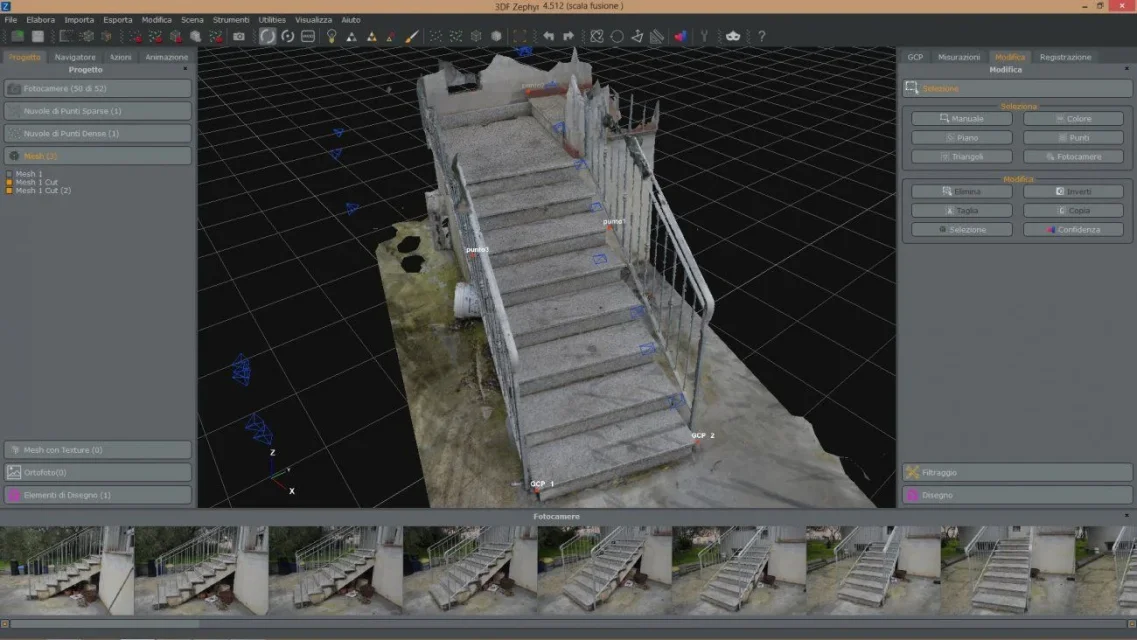
I suggest you take a look at this program. zephir 3d (but there are several of the same type). in the free version you can process up to 50 photos to get a cloud of points. I have tested it a lot, and for the architectural relief it is of fundamental help.
 

Attachments

  • 1.webp
    1.webp
    124.4 KB · Views: 15
  • 2.webp
    2.webp
    126.5 KB · Views: 15
  • 3.webp
    3.webp
    123 KB · Views: 16
  • 4.webp
    4.webp
    118.9 KB · Views: 18
autocad is a very useful program but sometimes it makes me nervous, in some parts it is very complex.
autocad is as accurate as all cad programs have to be. as they have already explained to you before, the diagonal between its 4mt and 3.5mt catets is 5,315073. autocad can't ignore this measure and pretend it's 5.32. he can just display it on screen or on print by writing it with 2 or more decimal, rounding them (but only on video or on print) this to meet you when quoting the diagonal to prevent you from writing the measure with all decimals. even if you, when quoting the diagonal, read 5.32... for autocad the measure of that diagonal will always be 5.315073. All the cads are like that, it's not just autocad

so when you build the circle to find intersection with other measurements, you will not set the radius at 5.32 but at 5.315073 (if you want absolute precision).
by hand, in the old way... Let's talk about tenths of mm. How would you estimate 1 tenth of mm in a team?
 
Last edited:
just for completeness of information, it is not that autocad is "precise" but they are the mathematics and geometry to be precise (less bad I would say).
the same calculation can be done by trigonometric way and I would get a value with a number of decimals.

in practical applications then as said, roundings into the calculations and all uncertainties of measurement if I leave from reliefs.

banally approximate the value of lazy to 3,14 is a approximation often acceptable but depends on which scope we are evaluating
 
hi to all I was drawing a prospect of a room through trilaterations, as a method to insert the sides and the diagonals I used of the circles, unfortunately I noticed that the design is not accurate, enlarging it is seen that when I create the line is not taken the intersection of the circles but an intersection close them, and this creates problems with the square of the walls
so roberto377 writes at the beginning and attaches a video (not naive) in which the attempt is distinctly seen, repeated, to hook with a snap activated one point but the cad hooks another.
What's the problem? can be that:
- roberto377 is wrong, it is confused with snaps, with the calculation of diagonals, with decimals etc.
- or, as well as some way it means, autocad is not accurate;
- or it is just a question of visualization that is resolved by regenerating the view;
- or...

Since it does not attach the file as required and does not provide other useful elements it seems that the significant demand for its interest is the initial one.

if so were the answer could be: As the cad, for obvious reasons, when drawing a circle represents it with a segmentation (definable) it occurs that drawn a circle of x-ray and then drawing from its center some segments of a radius of size equal to the given radius, zooming to the maximum until the limit where the cad admits the graphic verification, it is observed that (unless the fortuitous case in which the extremity of a segment affects the circle other in any of these cases what is the intersection point of the segment with the circle? certainly the extreme of the segment/route, while the point of graphic intersection is false and regenerating the view nothing changes. of course the same will be for intersections between circles.

therefore designer will have to take into account these situations.

I can't believe
 
if so were the answer could be: As the cad, for obvious reasons, when drawing a circle represents it with a segmentation (definable) it occurs that drawn a circle of x-ray and then drawing from its center some segments of a radius of size equal to the given radius, zooming to the maximum until the limit where the cad admits the graphic verification, it is observed that (unless the fortuitous case in which the extremity of a segment affects the circle other in any of these cases what is the intersection point of the segment with the circle? certainly the extreme of the segment/route, while the point of graphic intersection is false and regenerating the view nothing changes. of course the same will be for intersections between circles.

therefore designer will have to take into account these situations.

I can't believe
if even the cad graphically approximates the circle to a hexagon when I take a point on the circumference the cad calculates the odds correctly. the designer should not worry if the graphic approximation makes him see a point lying on one of the sides of the hexagon that sees video or in that around.
of course this applies until too approximate graphics can not determine input errors in the selection of the correct point (if I have for example many close real intersections and because of the graphics these are no longer properly arranged I can be operator that in the selection of a point I could be "sold" and take the wrong intersection with the snap
 
so roberto377 writes at the beginning and attaches a video (not naive) in which the attempt is distinctly seen, repeated, to hook with a snap activated one point but the cad hooks another.
apart from the videos disappeared, roberto does not hook another one, hook the correct one only that for the accuracy graphics the circle seems distant. to overcome the problem or increase the accuracy of the representation of the circles (variable of system viewris) or when approached sufficiently, before launching the command you make a regenerate all (regenall control).
If you had read all the discussion you would have understood that roberto was encapsulated to draw diagonals with wrong values because the exercise used a rounded measure and managed to metabolize this simple fact.
Since it does not attach the file as required and does not provide other useful elements it seems that the significant demand for its interest is the initial one.
no is the first time you require files to help it solve problems and by response you get videos.

the graphic representation of the circle is a polygon, but its definition is that of circle. autocad is precise and if you draw a line of the same length of the circle radius its extreme will correspond geometrically to the circle, it can not be otherwise.
to make sure it is enough to do the reverse test; you draw a circle with 8 decimals (the maximum allowed) and then a line that from the center coincides with the perimeter, with the measured command you detect the length of the line and you will see that it is equal to the radius of the circle.
 
if even the cad graphically approximates the circle to a hexagon when I take a point on the circumference the cad calculates the odds correctly.
the graphic representation of the circle is a polygon, but its definition is that of circle.
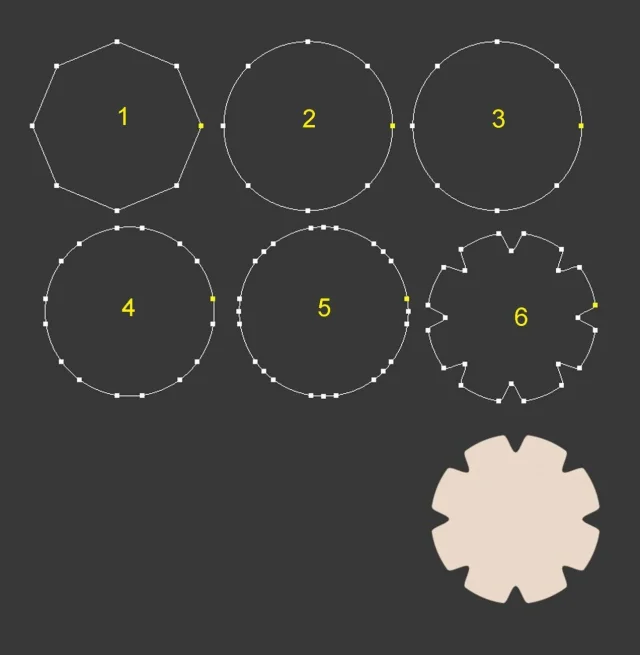
Sometimes, depending on what you want to draw, it can be useful to build a regular polygon and educate the cad to consider it a circle. the top of the polygon, in these cases, serve just to break the circumference in a number of equal arches. a little as it happens with the divid command of autocad. the video circle will be considered by the program as a regular polygon, only it is displayed as a circle.
(by the way, a lisp may be useful, after the command divides or measures to break the segments so obtained, making them independent from others).

with 3dsmax you can get that very quickly. For example, in case you want to build a toothed crown it is enough to build a regular polygon that has as number of sides the number of teeth of the crown and after adding other points, select them and place them at the same time, using as center the center of the circle, quickly getting the crown. with autocad is not a problem to build a toothed crown, but it is not possible to use the method I described.
 

Attachments

  • 2.webp
    2.webp
    37.4 KB · Views: 13
But it is not possible to use the method I described.
It is not that I have understood so much, in all cases with autocad a crown like your you build it mooooolto faster, with the right commands, that are
polar array of one of the gorges with center in the center of the circle (even with throat deborting the circle).
bpoly (round) in the area representing the crown.
with only 2 commands and 3-4 information you have a polygonal crown.
with 3ds you don't.
 
with 3ds you don't
I said that with autocad it is not a problem to build a toothed crown, with the method you described well, but with 3ds max you can adopt another method, like what I described earlier. If the crown is complex with teeth of a particular shape, then it is best to use the method you described. It's the same method I would use with 3ds max, i.e. build splines and use the polar array. but for the design of a simple crown, the method I indicated is very fast.
 

Forum statistics

Threads
44,997
Messages
339,767
Members
4
Latest member
ibt

Members online

No members online now.
ciao
Back
Top