• This forum is the machine-generated translation of www.cad3d.it/forum1 - the Italian design community. Several terms are not translated correctly.

problem redundant constraints

  • Thread starter Thread starter Salcip
  • Start date Start date

Salcip

Guest
Hello everyone,
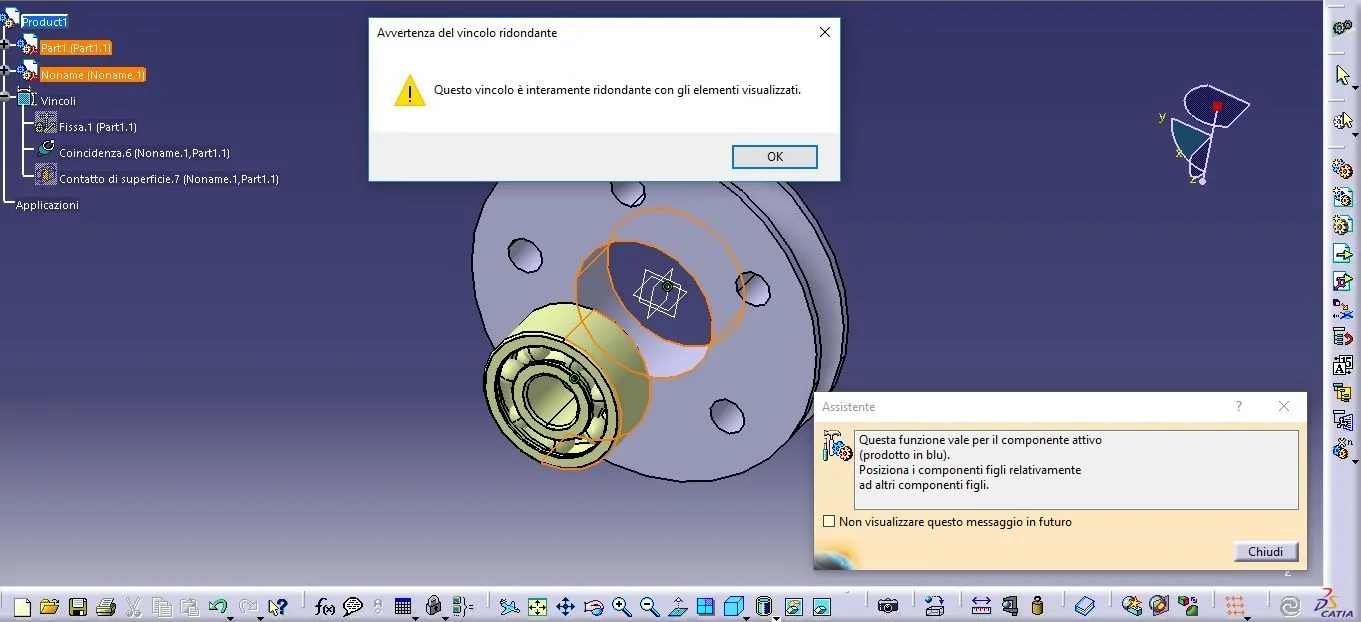
I'm trying to make a set but I have a serious problem with constraints and I can't figure out where I'm wrong. in particular I would have the need to insert a bearing inside a hole coaxially practiced to a pulley.
in the assembly environment I carry out the following operations:
1) Load the pulley (from me drawn);
2) Load the bearing (loaded from the skf site);
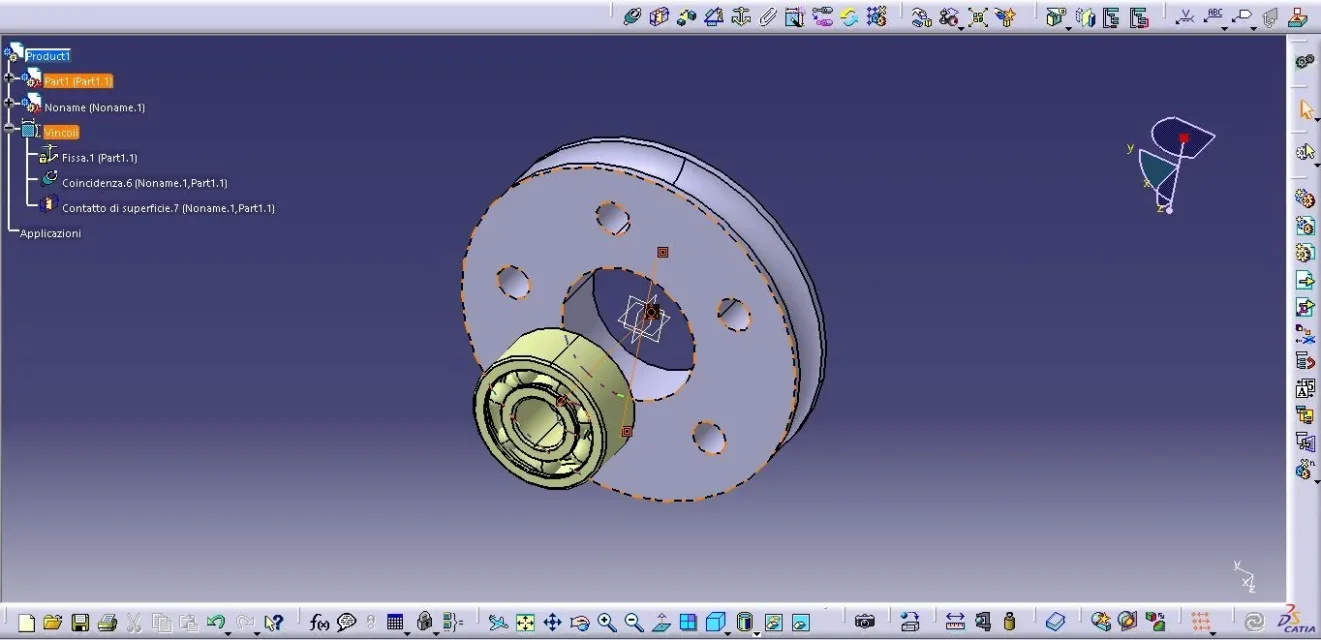
3) I impose the fastening bond on the pulley;
4) I impose the bond of coincidence between the symmetry axis of the pulley and that of the bearing;
5) I impose the contact bond between the outer surface of the bearing and the inner surface of the hole practised in the pulley.

The problem I'm facing is redundancy. I am aware that the two constraints are redundant and even ignoring this notice the assembly does not happen properly.
I would like to understand where I'm wrong and how to properly bind the two parts.
I attach screens to better understand the situation.Cattura3.webpCattura.webpCattura2.webp
 
but is your bearing a pure iges? try to insert a cylinder created by you and see that it will work. then the problem is the buffer file. probably decide to convert it to solid or help you with auxiliary elements with axis plan points etc.
 
He's right, falonef.
the system fails to identify the geometries of the iges, and you are giving the same bond, first of coincidence of the axes, in the second one with a hole and instead of the flat part of the bearing, takes the outside ie again the axis.

delete the second bond, enlarge the bearing a lot and make sure the cursor selects the plane. if it's not slow, do as falonef said
 
Thanks for the answer, I made the test with the cylinder created by me and unfortunately the result is always the same. the bonds of coincidence and contact are redundant. I don't really know how to fix it. in the first message I forgot to write that I use the v5 student version, could this be the problem?
 
He's right, falonef.
the system fails to identify the geometries of the iges, and you are giving the same bond, first of coincidence of the axes, in the second one with a hole and instead of the flat part of the bearing, takes the outside ie again the axis.

delete the second bond, enlarge the bearing a lot and make sure the cursor selects the plane. if it's not slow, do as falonef said
Could it be a rescue problem? before importing the iges into the assembly I opened it individually and saved. to get a catpart I have to do some other operation?
 
the trial version has nothing to do with it: the selection of geometry is wrong.

erases all constraints and starts again.

the contact is not appropriate as it tries to mate the faces, uses offset and then gives the zero value. if necessary instead of coincidence from the opposite verse
 
the trial version has nothing to do with it: the selection of geometry is wrong.

erases all constraints and starts again.

the contact is not appropriate as it tries to mate the faces, uses offset and then gives the zero value. if necessary instead of coincidence from the opposite verse
I started again from the beginning as you told me by putting the offset bond (laxing a photo) and then the axes coincidence bond and it worked. I tried to move the object by respecting the constraints and actually there are no degrees of freedom for the bearing. What I don't understand is why it didn't work with the coincidence bond, did I not select the right surface or only work for flat surfaces?Cattura.webp
 
read the catia guide that shows the list of geometries that can be used divided according to the type of constraints, and is an interesting table because it makes understand (as falonef suggested) that elementary geometries are those with which the best usable constraints are obtained.
to make an example to bind pin and hole with a contact between the surfaces is not very good, better use the constraint between the respective axes, since if the two diameters are not equal because of a game between the parts (or change them later) everything does not work well.
If in a solid you perform a feature hole, its implicit axis is recognized and while you put the bond becomes explicit, vice versa a feature pocket performed with a sketch that is still a diameter, it may not express it and you have to create it.
the surfaces then where a hole consists of two semi-faces sometimes is of stumbling to be explicit (which we can recognize) during the bonding operations.

Hi.
 
by experience I make a contact bond quais always with the offset function and then use the value 0. Perhaps it is a bad habit but I got the best results and for practicality issues if necessary with a double click I change the distances without having to edit and change the bond.

as it seems to me that he also explained gianni55
 
read the catia guide that shows the list of geometries that can be used divided according to the type of constraints, and is an interesting table because it makes understand (as falonef suggested) that elementary geometries are those with which the best usable constraints are obtained.
The table you told me about is the one shown here: http://catiadoc.free.fr/online/cfyugasm_c2/cfyugasmrf0103.htm, from this table it seems to me therefore to understand that the problem is the fact that the model cad of the bearing downloaded from the skf site has a cylindrical surface consisting of two semi faces for this the only solution was that of the offset.
as in the same together I have to realize a connection between the cup and its pin, and as also the cup is always constituted by two semi-faces instead of a single cylindrical surface, I would ask you if the way n which I worked is correct, if it is too twisted and therefore if it is possible to solve the coupling in a simpler way.
1) Starting from the terna of planes of reference of the pin I built a plane parallel to the axis of symmetry of the pin itself passing for the hole to accommodate the cup, so that it was tangent to the surface (in practice first I created the passing plan for the axis and then I created another one with the offset);
2) same reasoning for the cup;
3) I set an offset between these two floors equal to 0 to give the idea of the "contact".
I leave a screen attached to make better understand:ùCattura.webp
 
not always the semi faces do not lead to a cylinder, but sometimes it happens.. .

I would have created an axis in the center of the pin hole and an axis at the center of the semidiameters of the cup, binding them with coincidence, while the depth would have managed it with points or plans and offset bond until optimized penetration.
 
not always the semi faces do not lead to a cylinder, but sometimes it happens.. .

I would have created an axis in the center of the pin hole and an axis at the center of the semidiameters of the cup, binding them with coincidence, while the depth would have managed it with points or plans and offset bond until optimized penetration.
the bond of coincidence already put it. Fortunately the axes were pre-existing (both pin and cup are models found on the net). Following your advice I also solved the contact with the offset by eliminating all those plans and axes that created only confusion. I leave an attachment to confirm the correctness of the bond.
Thank you for your help and thank you also falonef!Cattura.webp
 

Forum statistics

Threads
44,997
Messages
339,767
Members
4
Latest member
ibt

Members online

No members online now.
ciao
Back
Top