• This forum is the machine-generated translation of www.cad3d.it/forum1 - the Italian design community. Several terms are not translated correctly.

project line on solid cubic to create grooves

  • Thread starter Thread starter lalla
  • Start date Start date

lalla

Guest
Bye to all,

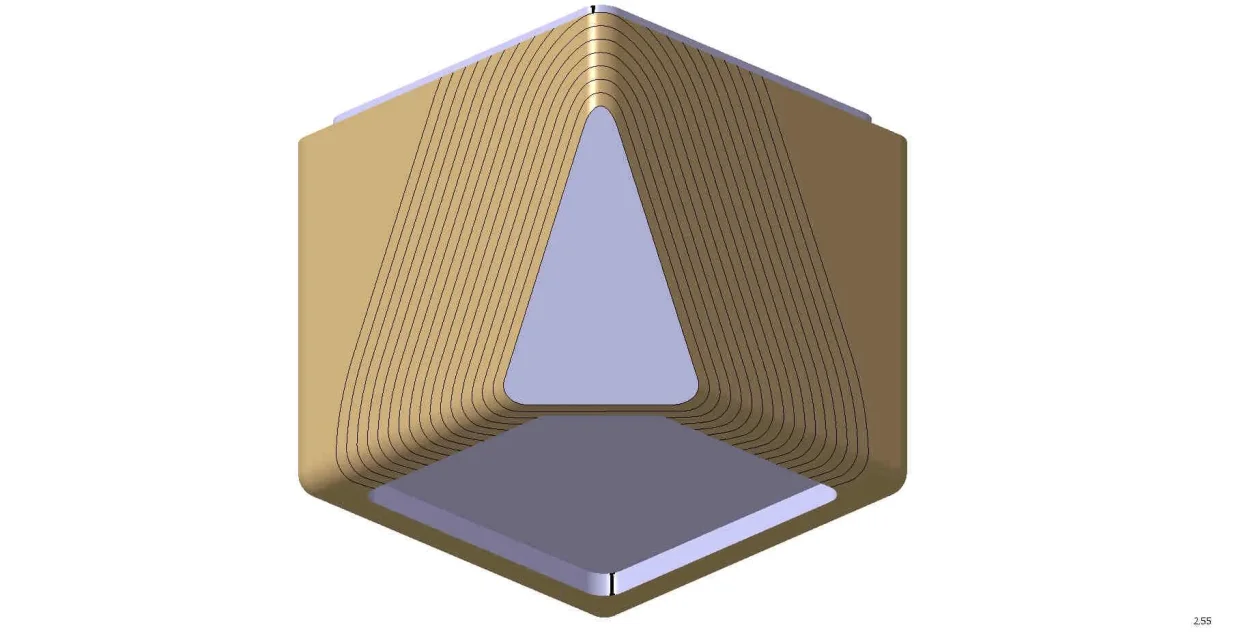
apologize for any inexperience, I do not use catia at the engineering level so forgive any incorrectness or inadequacies to espire concepts. I should create tubular offset grooves starting from the orange shape of the attached image, I have to dig the cube surface at regular distance starting from its edge on the whole body only in the outside. I can not use bump or textures as it is a wooden model that will be printed with a cnc. How can I do?thanks in advance
 

Attachments

  • 1.webp
    1.webp
    25.1 KB · Views: 11
Hi.

If I didn't understand correctly, do you have to create curves parallel to the selected profile (orange)?

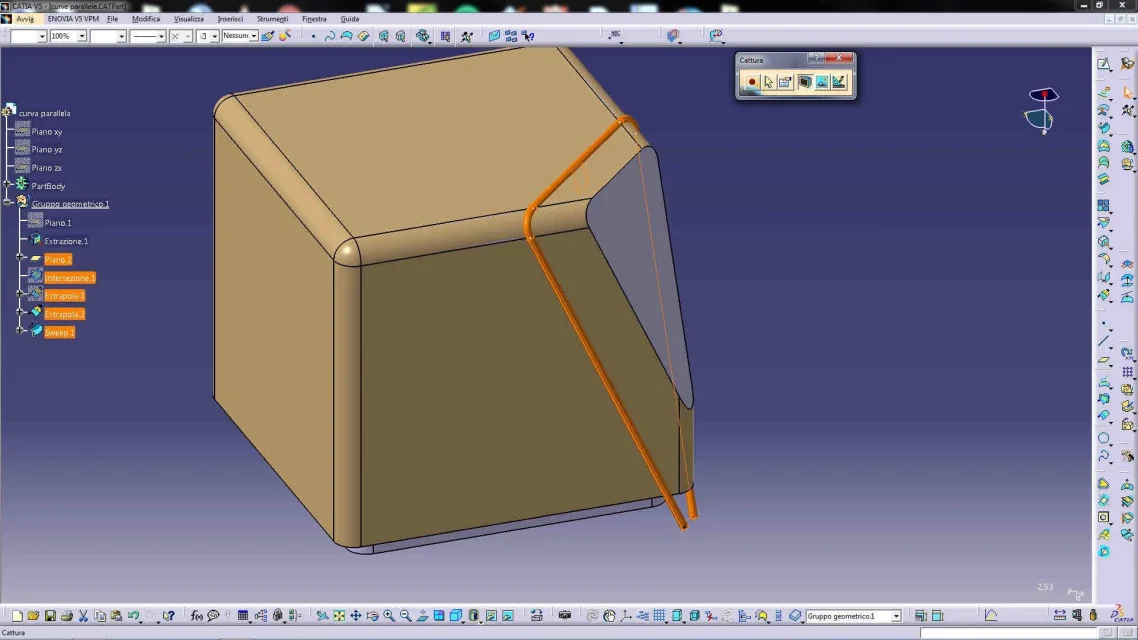
you need to use the surface form, generate shape design, then with the foreign command (insert/operation/extremist) extract the orange edge, then extract the surface you want to dig, then with the parallel curve command (insert/wireframe/ parallel curve) select the edge and the surface, indicate the offset and with the repeat check after the ok create how many curves you need.
then return to the part design select the curves do the grooves.

Let me know.

Hi.
 

Attachments

  • Capture_005.webp
    Capture_005.webp
    92.6 KB · Views: 6
hi gianni, you understand exactly what I need, only thing I don't get back is that I was looking for the "parallel curve" command in insert/wireframe and I don't find it, possible I don't have that command or miss something?
Meanwhile thank you for the straight!
 
I didn't find the command, I wasn't in the right form! At the moment it gives me other issues the command (I don't know it) and I can't make it work, maybe it has problems the curve, but I'll catch you as soon as I can! thank you a thousand!:)
 
perfect!resit!thanks a thousand gianni55!!!m' you solved a nice problem!!!gentilissimo!:)
 
the same thing you can do in a different way
create plans by offsetting your plan
and then make an intersection between the floors and the surface
( joint + extract) of the solid of your interest. .
to get good curves
You could eventually smooth the curves.
to the
 
the same thing you can do in a different way
create plans by offsetting your plan
and then make an intersection between the floors and the surface
( joint + extract) of the solid of your interest. .
to get good curves
You could eventually smooth the curves.
to the
exact alpole, I had also thought of this after the suggestion of gianni because the curves were not super precise to me. Thanks for the tip:)
 
another inerent question, but if I wanted to do the same by repeating grooves already cut in the same mode? so that you do not have to reconstruct for each time the row, the section, the surface and the cut... Can you tell me what command I should use?
 
the same thing you can do in a different way
create plans by offsetting your plan
to the
Hello,
with parallel planes, you do not get exactly the same thing (see white curve image obtained with parallel curve is 3mm constant and magenta curve obtained with parallel plane, it is at the bottom 9mm), as the intersection curve depends on the angle with which the surface intersects with the plane accordingly the distance is not regular.

certainly at lalla may also go well, although for me his sentence: "I must dig the surface of the cube to regular distance starting from his edge," he made me think about the use of the parallel curve.

Hi.

years ago
 

Attachments

  • Capture_006.webp
    Capture_006.webp
    113.4 KB · Views: 8
The curves were not super accurate
how are they not accurate?
another inerent question, but if I wanted to do the same by repeating grooves already cut in the same mode? so that you do not have to reconstruct for each time the row, the section, the surface and the cut... Can you tell me what command I should use?
you can do (I think) with a power copy, but it is better if you still send some images of what you are processing and what you want to get.

Hi.

years ago
 
ciao gianni,
how are they not accurate?
Yes, the type of curves I wanted to achieve were in fact more similar to those generated by intersection between surface and plane, as from your design in fuxia, than from those obtained with the parallel curve command (I called them nn accurate because on the radius they were not straight), but I hoped there was a faster command of the intersection we say to get them.
but question you have redesigned all the object from my screenshot with even pockets and cuts?what patience and what good!:)
you can do (I think) with a power copy, but it is better if you still send some images of what you are processing and what you want to get.

Hi.

years ago
I attach two images with example of the dig that I would like to reproduce on the rest of the solid, it is the same concept of the line (obtained with intersection) to reproduce on all the outer surface of the cube, I wonder if there is a command that directly repeats the groove on the whole body extracted or if I have to redesign one for a section line plan and do the groove. to get what I want.
I don't know the power copy, what is it?

Thank you for your help

Laura
 

Attachments

  • 2.webp
    2.webp
    50.5 KB · Views: 10
  • 3.webp
    3.webp
    40.2 KB · Views: 10
Hi.

Now that I understand better what you need, we can proceed.

We don't really use the power copy but something like that. . .

I would do like this:

1) I remove the surface which I must dig
2) I create a plan (offset from the existing plan)
3) I create intersection between plane and extracted surface
4) extract the first and second side of a few mm
5) I create a sweep (insert/surface/sweep/type profile circle/type secondary center and radius

In this way I will get a surface with which I will cut the solid

Now just select from the tree the faeatures executed (only points 2,3,4,5) copy and paste them.

done this, with a double click on the plan copy return to the command and change the offset, so changing the origin (the plan) all the features will be updated accordingly.

I repeat the copy and paste many times how many grooves I need.

Just cut the solid with each surface. . .

If you do not want to use the sweep, use this method:

1) I remove the surface which I must dig
2) I create a plan (offset from the existing plan)
3) I create intersection between plane and extracted surface
4) extract the first and second side of a few mm
5) I create a normal plane at the curve placed on one end
6) I create a circle on the ends (with reference the plane)

I make copies (only points 2,3,4,5,6) and move offsets

use circle and guide curve for grooves (solid features)

Let me know.

Hi.

years ago
 

Attachments

  • Capture_007.webp
    Capture_007.webp
    111.7 KB · Views: 8
  • Capture_008.webp
    Capture_008.webp
    138.1 KB · Views: 8
thanks gianni, I have performed the steps as you have suggested (first solution), we say that I would normally proceed also in the way that you have recommended me, my problem comes now, I can't copy the actions, it touches me to give them one by one, "it tells me the new feature can not be copied", I think there is a way to copy things quickly (like I seem to understand the power copy) that I don't know, or maybe it is. how do I copy a group of actions (as you see in the middle of history because I had already done other jobs) without telling me you can't do it?
 

Attachments

  • 4.webp
    4.webp
    88.5 KB · Views: 6
Maybe it's about putting things in geometric groups
Hi.

It's just so, it doesn't make you do it because working in hybrid mode, the "superfici" features inside a body, respect different rules.

It is enough that you create all surface operations in a geometric group, then when you have finished, for solid (cut) operations activate the body concerned.

power copy as well as copying operations, can make some editable geometries, or re-selectable and make them usable in other parts, you may also try it, but I wouldn't want to confuse you too.

Let me know if you can.

Hi.

years ago
 
Hi.

It's just so, it doesn't make you do it because working in hybrid mode, the "superfici" features inside a body, respect different rules.

It is enough that you create all surface operations in a geometric group, then when you have finished, for solid (cut) operations activate the body concerned.

power copy as well as copying operations, can make some editable geometries, or re-selectable and make them usable in other parts, you may also try it, but I wouldn't want to confuse you too.

Let me know if you can.

Hi.

years ago
At the end of the day I did it in the geometric group, I tried to see for the power copy but it is as complex as you say, especially for this operation, however so it works... I'm sorry because if I decide to change a radius for example, I have to repeat the operation for each copy... or even the distance between the plans... But it's okay... I thank you so much for your time!
 

Attachments

  • 5.webp
    5.webp
    94 KB · Views: 6
If I decide to change a radius for example, I have to repeat the operation for each copy... or even the distance between the floors...
is feasible, but you have to use the formulas. If you really need it, we'll deal with it.

(you have a m.p.)

Hi.
 
lalla, gianni
I attach the file with pwc
easily editable in the circle parameter
you could further automate everything
but using either a loop or a knowledge pattern.. .
in any case more complex features.
to theCube.webp
 

Attachments

lalla, gianni
I attach the file with pwc
easily editable in the circle parameter
you could further automate everything
but using either a loop or a knowledge pattern.. .
in any case more complex features.
to theView attachment 43900
hi alpole, unfortunately I can't open the file, it gives me error, maybe for the version of cad, I have v5r19
 
yes the file is with the r20 version
by "loop" I mean the feature of knowledge advisor
which allows the repetition of pwc, as in this case,
o udf using "lists" to automate the instance
the same
bypassing manual installation, and thus allowing
the number of instances
to a variable parameter. ...
If I have time, I'll give an example
to the
 

Forum statistics

Threads
44,997
Messages
339,767
Members
4
Latest member
ibt

Members online

No members online now.
Back
Top