Andrea_Marconi
Guest
good morning to all users of the forum and more precisely the attendants of the solid edge.
I am as I said some time back in my messages a novello of this sw but I want and quickly grab the instructions given when I don't understand something.
I have tutoriald all the program on youtube, on this forum (which is a manna from the sky for me...!!!) and up and then down, but what I ask you today is a question to which I did not find an answer using the search button first and not even around I put it here.
work currently on a set that was created 4 years ago.
is located inside a folder that was given to me by a supplier... the folder of course has as many inside and inside the various are all the files that make up the asm.
inside this asm working it I created new parts that I saved in my own folder and so far all right.... .
I am now going to want to save all parts in a new location to allow me to have them all available, thus eliminating the old folder from where they came from. . .
I come from an environment (the music) that has nothing to do with the logic of these types of programs and I understand it alone, but I just can't figure out how to do a sort of save everything by name and give it another location.
I would not want to take and make a copy and paste of every single file:frown:
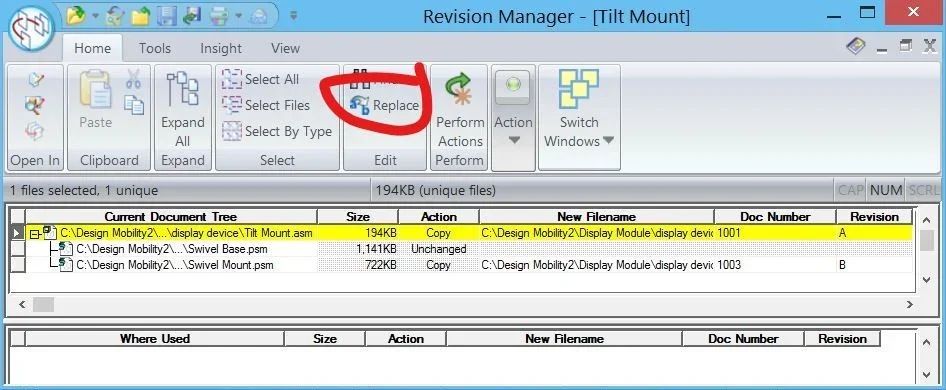
I also tried now to make a rescue by name but there's a type error that the asm is interrupted....usa revision manager... and I don't understand where to find this revision manager.. .
Do you have solutions?
thanks for the attention. .
I am as I said some time back in my messages a novello of this sw but I want and quickly grab the instructions given when I don't understand something.
I have tutoriald all the program on youtube, on this forum (which is a manna from the sky for me...!!!) and up and then down, but what I ask you today is a question to which I did not find an answer using the search button first and not even around I put it here.
work currently on a set that was created 4 years ago.
is located inside a folder that was given to me by a supplier... the folder of course has as many inside and inside the various are all the files that make up the asm.
inside this asm working it I created new parts that I saved in my own folder and so far all right.... .
I am now going to want to save all parts in a new location to allow me to have them all available, thus eliminating the old folder from where they came from. . .
I come from an environment (the music) that has nothing to do with the logic of these types of programs and I understand it alone, but I just can't figure out how to do a sort of save everything by name and give it another location.
I would not want to take and make a copy and paste of every single file:frown:
I also tried now to make a rescue by name but there's a type error that the asm is interrupted....usa revision manager... and I don't understand where to find this revision manager.. .
Do you have solutions?
thanks for the attention. .