
• This forum is the machine-generated translation of www.cad3d.it/forum1 - the Italian design community. Several terms are not translated correctly.

revit no longer starts!

  • Thread starter Thread starter ChIP_83
  • Start date Start date

ChIP_83

Guest
just start the application, after the initial splash screen (with a slightly slower loading than usual) gives me this error:
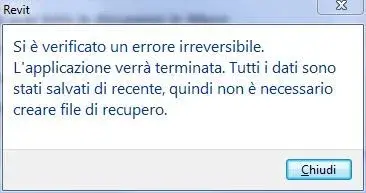
an irreversible error occurred. the application will be finished. all data have been saved recently, so you do not need to create recovery files.
after which the program closes (or better not even starts).

the file journal, or rather the files, since it creates one every start is this:
' 0:< thrashing monitor is off.
' 0:< initial vm: avail 1884 mb, used 45 mb, peak 45; ram: avail 2258 mb, used 56 mb, peak 45
'c 18-sep-2010 23:29:55.070; 0:< started recording journal file
' build: 20100326_1700
dim jrn
set jrn = crsjournalscript
' 0:< options::loadoptions: m_strdatalibrarylocations=metric library=c:\programdata\autodesk\rac 2011\metric library,metric detail library=c:\programdata\autodesk\rac 2011\metric library\componenti di dettaglio (defaultlib==\library)
' 0:< delta vm: avail -42 -> 1843 mb, used +15 -> 60 mb, peak +15 -> 60 mb; ram: avail -23 -> 2236 mb, used +21 -> 78 mb, peak +21 -> 78 mb
'c 18-sep-2010 23:29:56.255; 0:< ->initinstance
' 0:< delta vm: avail -190 -> 1653 mb, used +79 -> 140 mb, peak +80 -> 140 mb; ram: avail -105 -> 2131 mb, used +103 -> 182 mb, peak +103 -> 182 mb
' 0:< untimely construction of manager receiverrbssystemproperties
' 0:< delta vm: avail -119 -> 1535 mb, used +28 -> 169 mb, peak +31 -> 172 mb; ram: avail -43 -> 2089 mb, used +35 -> 218 mb, peak +38 -> 220 mb
' 0:< dbg_info: non-revit resource or bad type fragment: line 495 of .\resourceselector.cpp.
' 0:< delta vm: avail -35 -> 1500 mb, used +34 -> 204 mb, peak +69 -> 242 mb; ram: avail -30 -> 2060 mb, used +23 -> 242 mb, peak +31 -> 251 mb
' 0:< exception occurred
'c 18-sep-2010 23:30:06.197; 0:< exceptioncode=0xe0434f4d exceptionflags=0x00000001 exceptionaddress=753d9617
' 0:< system (mb) [Available / Total ] [Revit Memory Usage (MB) ] ' 0:< ram statistics: 2060 / 3327 242=inuse 251=peak
0:< vm statistics: 1500 / 2047 204 = 242=peak
' 0:< taskdialog "an irreversible error occurred. the application will be finished. all data have been saved recently, so you do not need to create recovery files. "
'commonbuttons': close
'defaultbutton: close
0:< delta vm: avail -18 -> 1483 mb, used 204 mb; ram: avail 2060 mb, used +1 -> 243 mb
'c 18-sep-2010 23:30:18.443;
I tried everything, I don't know what to do. .
I also restored the system at a time when revit went (2 days ago) but nothing, does not want to know.

of course I also reinstalled the program, cleaning all registry keys and residual folders, and then reinstalling it.
I tried restoring from revit setup.
I also tried to install the update 1, nothing.

the version is 2011.

help :)
 

Attachments

  • revit.webp
    revit.webp
    11.3 KB · Views: 14
already tried to contact your dealer?
No, I prefer to solve these problems like that which plague my pc.
and then I doubt that I can give me some indication different from reinstalling the program completely and reinstalling it (which I have already done).
 
I throw them because I don't know the product but, being of the same family as inventor, it could be afflicted by the same problem.
half week win started with updates and the day after inventor no longer started.
the culprit is excel requiring a new registration.
in fact, immediately after having done so, everything has departed.

Bye.
 
I throw them because I don't know the product but, being of the same family as inventor, it could be afflicted by the same problem.
half week win started with updates and the day after inventor no longer started.
the culprit is excel requiring a new registration.
in fact, immediately after having done so, everything has departed.

Bye.
Can you tell me more about what the mistake was?
I mean, he gave you the same mistake he gave me? (you can see it in the image of the first post).

What do you mean by new recording?
What version of excel did you have?
because I recently installed 2010 (before I had 2007), maybe that's...
 
Can you tell me more about what the mistake was?
I mean, he gave you the same mistake he gave me? (you can see it in the image of the first post).

What do you mean by new recording?
What version of excel did you have?
because I recently installed 2010 (before I had 2007), maybe that's...
My excel is registered 2002, I only need it because inventor requires it and if it is not activated, it bursts.
Since this I have, with its beautiful box, this use, although the last inventors would require more recent versions.
last week, opening inventor both 2009 and 2010 and 2011, the result was always a dry closing, not with the screen you attach, but with the autodesk sending window of the crash report.
Since it is not the first time that happens, before retrying, I simply launched excel who again requested to accept the contract and everything is broken as if nothing happened.

I hope your problem is similar, even if it would really bother me.
openoffice is fine and does the same thing as excel, why do I have to buy the second to use a cad program that I already pay a few thousand hard?
Is it not capable, the above-mentioned cad programme, to make some alcohol too?
beyond all, when I go to work on the parameters of geometries, it does not let me use the formulas with the simplest excel operators, so I wonder what to add so necessary the use of that spreadsheet (if not € or $ in the pockets of microsoft ).

Bye.
 
My excel is registered 2002, I only need it because inventor requires it and if it is not activated, it bursts.
Since this I have, with its beautiful box, this use, although the last inventors would require more recent versions.
last week, opening inventor both 2009 and 2010 and 2011, the result was always a dry closing, not with the screen you attach, but with the autodesk sending window of the crash report.
Since it is not the first time that happens, before retrying, I simply launched excel who again requested to accept the contract and everything is broken as if nothing happened.

I hope your problem is similar, even if it would really bother me.
openoffice is fine and does the same thing as excel, why do I have to buy the second to use a cad program that I already pay a few thousand hard?
Is it not capable, the above-mentioned cad programme, to make some alcohol too?
beyond all, when I go to work on the parameters of geometries, it does not let me use the formulas with the simplest excel operators, so I wonder what to add so necessary the use of that spreadsheet (if not € or $ in the pockets of microsoft ).

Bye.
Unfortunately, I think it's not that.
I tried to uninstall completely office but it doesn't change.

uff, I'm out of ideas... I don't know what to try anymore. . .
and it's a strange thing, even taking away everything continues unclean with that mistake.
It also gives it in temporary mode.

And then he did it white without doing something special.
 
update/solution:after millions of trials, waste of time, etc... I found the solution.
checking in the windows log the file that gave the error was "wscommcntr2.exe".

so I just had to go to "c:\program files\common files\autodesk shared\wscommcntr\lib" and rename the file in "wscommcntr2.ex_".

now revit starts perfectly.

I hope that this will serve someone else who will have my own problem.
 

Forum statistics

Threads
44,997
Messages
339,767
Members
4
Latest member
ibt

Members online

No members online now.
Back
Top