• This forum is the machine-generated translation of www.cad3d.it/forum1 - the Italian design community. Several terms are not translated correctly.

select multiple parts, suspend and create simplified config with suspended parts

  • Thread starter Thread starter reggio
  • Start date Start date

reggio

Guest
hi, I have more and more often the need to get a simplified configuration (which then I carry in step or iges) for customers.

I usually create a copy from which I suspect the parts to hide, but this system I like little because I find myself running 2 files and if the original changes, I must also remake the copy.

I thought then to use the configurations, only that every time they give me problems and turn out long to create, because, as I do, I must select a piece at a time, go into property, and indicate that piece is suspended only for the customer configuration, then go out and repeat everything for each part to suspend ... :frown: (poi punctually when I return in normal configuration, I realize that some piece was suspended by mistake also there: sgrunt:
exists a happier and faster method or explain the step-by-step procedure to select more components and suspend them only in the customer configuration? (always possible ...)
 
I throw it there while I think of something else
You tried creating folders where you put the parts to stay. then suspend the folder with one shot only
 
I throw it there while I think of something else
You tried creating folders where you put the parts to stay. then suspend the folder with one shot only
hi massive, good idea, already tested, has at least 2 problemoni that I couldn't solve:

1) in the folder you can only put the robes out of subassiemi (I can not/I want to explode them)
2) the selection to put in folder is painful: does not take me selections from the click+maius or ctrl model but you have to select from tree and this in ns case stretches a lot of selection
 
a method to streamline management could be to hide instead of suspending parts
These allow you to avoid opening the property card and use the only tab button (by placing the cursor over the part in the graphics area) or using the toolbar icon together.
If you have so many parts with the same code, such as bearings, just write the code or part of it in the window above the feature manger to display only those parts then with a window selection (autocad style) in the graphic area select them all and use the display/hidden command of the toolbar.
to do with the active customer configuration.
export to step is asked if to restore hidden/suspended parts and just select no to export only that to video.
I did a couple quick tests and it worked. to you the ball
http://help.solidworks.com/2014/ita...s/c_controlling_the_display_of_assemblies.htm
 
a method to streamline management could be to hide instead of suspending parts
These allow you to avoid opening the property card and use the only tab button (by placing the cursor over the part in the graphics area) or using the toolbar icon together.
If you have so many parts with the same code, such as bearings, just write the code or part of it in the window above the feature manger to display only those parts then with a window selection (autocad style) in the graphic area select them all and use the display/hidden command of the toolbar.
to do with the active customer configuration.
export to step is asked if to restore hidden/suspended parts and just select no to export only that to video.
I did a couple quick tests and it worked. to you the ball
http://help.solidworks.com/2014/ita...s/c_controlling_the_display_of_assemblies.htm
:wink:
more than good!! !

... I was convinced that in export he only asked for the suspended parts, for this I was pointing to that ... instead I was wrong!

more than good!!! Thank you.

ps: now you just have to find the way to simplify / "taste" the whole together as I walked in the bottom of this post... https://www.cad3d.it/forum1/threads...ti-o-fornitori?p=389969&viewfull=1#post389969
 
exists a happier and faster method or explain the step-by-step procedure to select more components and suspend them only in the customer configuration? (always possible ...)
Sometimes the menus of the top bar are useful, because they contain commands that you do not have in the contextual.

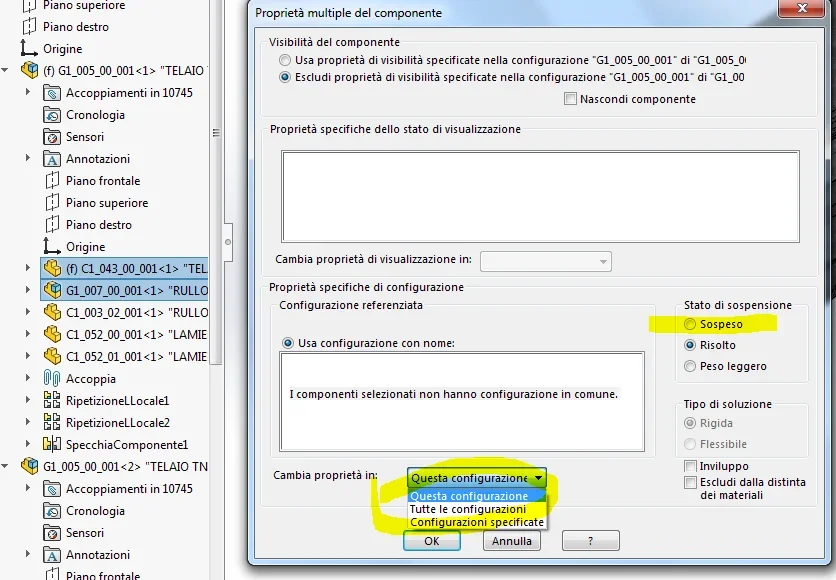
to do what you ask, you must:

  1. JizzBunker feature manager and not, I repeat not, from the graphic view the components you want to stay holding down the ctrl key.
  2. in the menu bar go on: edit/suspend/configurations specified and in the dialog box that opens go to select the configuration in which those components must be suspended.
  3. from the ok and you find everything configured suspended in one blow only
see the attached image where I highlighted the same commands in yellow to show hides etc.
sospendi config.webp
 
ciao marcof :d
  1. JizzBunker feature manager and not, I repeat not, from the graphic view the components you want to stay holding down the ctrl key.
probably you do also from the contextual
sospendi1.webp
sospendi2.webpbut as I said the selection from fm to me is almost impossible because I have more sub-assisted stuff...
2) the selection to put in folder is painful: does not take me selections from the click+maius or ctrl model but you have to select from tree and this in ns case stretches a lot of selection
is there no real trick to select from graphic area?

ps: I invite you to say yours here too... https://www.cad3d.it/forum1/threads...ti-o-fornitori?p=389969&viewfull=1#post389969
 
:wink:
more than good!! !
ahhhhhh! :mad:
spoken too soon, swx enjoys making jokes, he does not know what happened but now passing from one conf to another is all the same, all hidden ...
"may" center something the display status I never understood... :frown:

I'm too tired, I'm going home with swxes, pulling all their female kin into the ball, the avi, all the saints and the venerable of all until I get home: tomorrow you will see ...

Bona evening
 
is there no real trick to select from graphic area?
The way is there.
I only forgive you because inventing new blasphemies to insult sw must have prostrated you beyond measure.
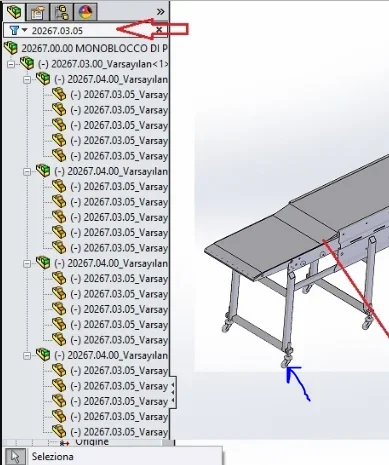
I had already written that you can use the search by component code.
in the figure that I attach you there is the axieme of that infamous thread, (see stamp on the top right) where I searched only a specific roller through the code (see red arrow) and only those remain visible (see big graphic area). Now just select them and hide them.
Of course if of the same code something you have to keep it and nothing else is complicated, but between one method and another something good can happen.
not to overlook also the selection by characteristics (on the left) found in the filter barImmagine.webp
 
:Mad: tomorrow you will see ... uff ...
Yes, it seems that the display status that in this case "bate" the configuration: Selecting both customer config and customer vis (and remaking as a boss...) now I can switch from one state to another - I think that in this case the config does not serve a bat, it would be enough (saper) to set the display states
He must have prostrated you beyond measure.
"prostatato" :wink:
I had already written that you can use the search by component code.
seen and used, but as I explained it is useless in this case.
e.g. Imagine having to hide the screw of this wheel (not another wheel)
I should remember not only the name of the wheel .. ruotina ... rotella ... ruotuccia .. but also of the screw but then also loose the "vitina per ruotona1" from "vitina per ruotona2" from "vitina per ruotona121" ... extreme example but stockingfiltro.webpObviously if the screen selection worked, it would be all simpler and logical ... and that's exactly why home sw did not create it:wink:
do not neglect also the selection by characteristics (on the left) that you find in the filter bar
the "election by characteristics" is that stuff, considered by useless me, that always appears to me by mistake when it is not needed and it is blasphemed before finding the way to remove it from the middle..
However in this case I would like to try if with a model selection + "filter select part" you could select the model parts instead of fm
... of course if I activate the "surface" filter, that "under" does not appear to me: Can you tell me how to turn it off?
 
the "election by characteristics" is that stuff, considered by useless me, that always appears to me by mistake when it is not needed and it is blasphemed before finding the way to remove it from the middle..
However in this case I would like to try if with a model selection + "filter select part" you could select the model parts instead of fm
... of course if I activate the "surface" filter, that "under" does not appear to me: Can you tell me how to turn it off?
Filter selection is also active with code search.
you must have visible the selection filter bar though. I use classical mode and not ribbons (and yes, I am old and boast...) so I work with toolbars.
with this method if you create a specific item in custom properties (e.g. customer=si/no) you can discriminate a bit of stuff. you can also color the parts in question so that at a glance you can distinguish.
the link to advanced selection http://help.solidworks.com/2016/italian/solidworks/sldworks/r_search_criteria_advanced_selection.htmIt is not a job recently and if you have the same part that in some cases serves and in others it does not become a cosmic casino.
Maybe with a pdm would be easier, but I've never seen it use and I don't know if it is so
 
ciccia, also tried with the filter, selects but then does not allow to hide, suspend, create configurations, .. in one shot only .. but not in two or three or four shots ..

pdm? we have, it does not help...

Thanks for everything, next!
 
last solution.
absolute a hitch and send it to the ds to motivate them on the implemation of a streamlined and functional models:36_1_15:
 
hi, I would say I received a discreet suggestion that I want to share: add to your preferences.
allows to make multi selections of parts even from different subaxis, select whole subaxis then with
dx+shift key you select in preference, from there you can select them again and create a folder with add a new favorite folder that
1) "duplicate" parts descriptions and subass
2) Favorites and folder are always high in feature manager (not scattered around... )
at this point you can make transparent, suspend, change color to the contents of the preferred folder

allego video of my proofhttps://youtu.be/jcueik3e7fk[youtube]jcueik3e7fk[/youtube]
... eat if embedda yt quì?? non era (youtube)jcueik3e7fk(/youtube)) with the quadre to the post delle tonde?
 

Forum statistics

Threads
44,997
Messages
339,767
Members
4
Latest member
ibt

Members online

No members online now.
Back
Top