
• This forum is the machine-generated translation of www.cad3d.it/forum1 - the Italian design community. Several terms are not translated correctly.

set basic couplings

  • Thread starter Thread starter Sp4rk0
  • Start date Start date
I resume the theme on pre-set couplings. I would also like the drag to be placed as it happens in routing environment, but I don't know why I don't work. I set the mating rules I would like for the bolt example I attach. I tried the example of a and b of mass and that works, also inserting part b in another environment. but not mine, do not recognize the holes when approaching it
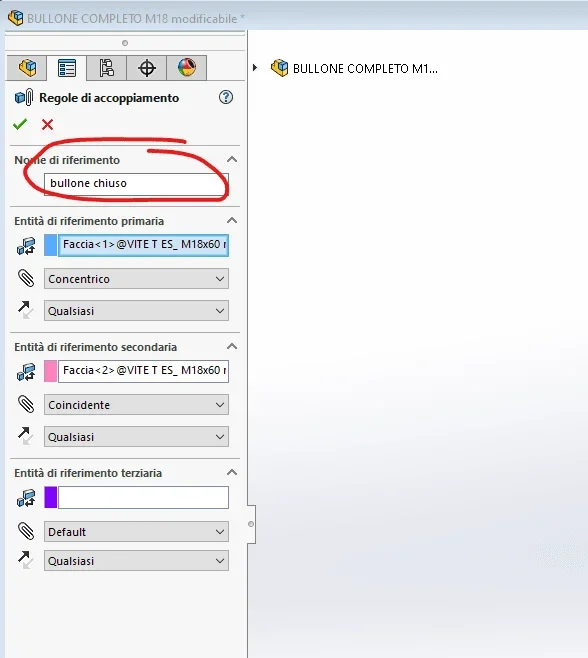
to me it does not recognize holes with that system only when the coupling part is a body or holes are made with the cutting command, so it does not recognize the feature reference hole.
 
I read a bit again in the solid guide and it seems that the method is to set the mating rules both for the component to be coupled, and for what will have to "coup" the coupling. so it seems useless to me, because at the point it is worth doing the couplings manually and away.
However, leaving the guide, the parts that attached massive work and only one of them has a mating rule.
I can't get out of it. I trained them, if some good soul understands something.. .
 
1602685103557.webpthe error lies in the name you have to leave "default" so that you tie to all files, try hello
 
Hi, I tried, but unfortunately not so. I rearrange the file with the coupling left named "default".
I also tried to leave the pairings of the default faces, without specifying concentric or coincidence, but nothing even that way
 

Attachments

matings also work with normal holes even with sheets.
I have no way to see your files, but only one pair is enough to make coincidence and concentricity.
the reference name is irrelevant, probably only serves to identify it in case the component has more than one rule; as primary reference entity select the edge of the face in support.
verified with 2014
 
I am watching various videos and in all I have seen that in the case of multiple references (for example in the case of a face screw and concentric diameter) the mating rule is also set on the receiving file.
if, with multiple reference, it does not also act on the receiving file at the time of insertion in the axieme is inserted only the first coupling
 
the first reference to concentricity would be good, but in reality it does not take anything. does not even orientate the piece in the proper concentric axis to the hole of interest. I also tried with the edge as you had done in your file that works (what you do), but nothing
 
as I can't open yours you can put some screenshots of:
mating rule creation
insertion of the part into the axieme

or a short video?
 
proof togliendo la rotation of the components inserted in the assemblies in 2014 is not present and I cannot check if that is the problem, but I see nothing else that can affect
I attach video (I to make camstudio video use that a portable program that does not require installation); as you see in the bolt assemblies there is only concentric coupling; in the final axieme is created only concentric coupling, the others you see are rimasugli of another proof that I forgot to cancel
 

Attachments

I tried deflecting rotation and nothing even so... you want to see that the 2014 version is better than 20
 
You wrote that with my files it works, use them to remake the process from scratch.
if it works there is a problem on your files, if it does not work there is a software problem and maybe try to feel the assistance
 

Hi.
I tried with your files and it didn't work, then I removed the connection on the edges and it seems to work. I attach the modified pieces. You're the one
 

Attachments

I saw the radius, but I didn't think it could be the problem.
In fact it is a useless element, commercial products should be as simple as possible
 
so it works! I never would have come!
Thank you all for your help. I ask you one more thing, you know if you can keep the input mode open component so that you can insert x numbers with how many clicks you want? I've got to put one in and then it closes, then I have to remake "insert component"
 

Attachments

  • Cattura.webp
    Cattura.webp
    44.9 KB · Views: 9
on the top left after the green and red tick there is the design dot, mercilessly press it
 

Forum statistics

Threads
44,997
Messages
339,767
Members
4
Latest member
ibt

Members online

No members online now.
Back
Top