
libra86
Guest
Good morning.
I would like to create a command button that goes to set my default print settings in the drawing;
I'll explain better. as I open many designs that were created by others, these report their printing settings. to print with my currently I simply go to select "previous press" from the print window and then click on "apply to layout" before printing. Finally save to keep the print settings.
the problem is that if I have to print many drawings I use the command "public" but if I don't have all the drawings with its correct printing settings, this doesn't print them. I should before the "public" go manually to correct the settings of all the drawings then print, but you understand that it is a workmanship.
so I would need a button that once acted goes to set my print settings.
currently mold with these settings:
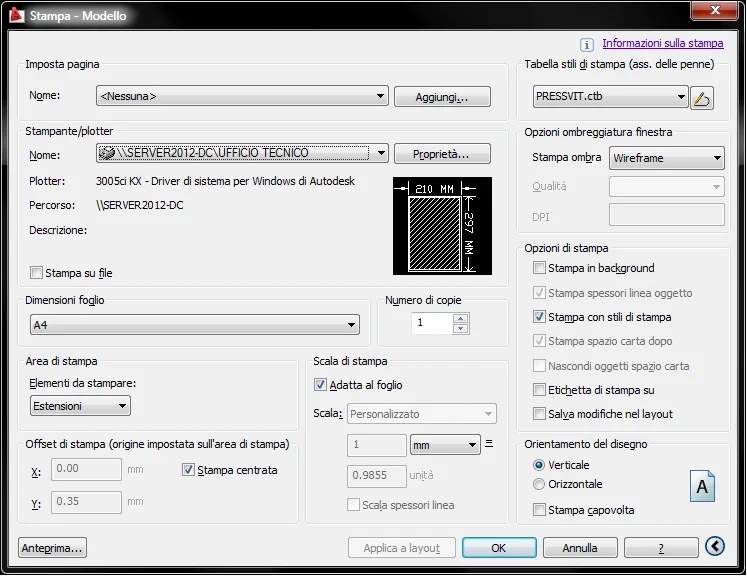 Thank you in advance.
I would like to create a command button that goes to set my default print settings in the drawing;
I'll explain better. as I open many designs that were created by others, these report their printing settings. to print with my currently I simply go to select "previous press" from the print window and then click on "apply to layout" before printing. Finally save to keep the print settings.
the problem is that if I have to print many drawings I use the command "public" but if I don't have all the drawings with its correct printing settings, this doesn't print them. I should before the "public" go manually to correct the settings of all the drawings then print, but you understand that it is a workmanship.
so I would need a button that once acted goes to set my print settings.
currently mold with these settings:
Thank you in advance.