• This forum is the machine-generated translation of www.cad3d.it/forum1 - the Italian design community. Several terms are not translated correctly.

sheet metal development in a set

  • Thread starter Thread starter m_arquati
  • Start date Start date

m_arquati

Guest
Bye to all,

I created a sheet, and assembled other sheets on this. Now to fix the other plates I have inserted threaded pins (which I modeled as parts) using the function-driven repetition and as a function I used those of the holes of the other plates.
all in one together. I have therefore the knuckle pins stick on the base sheet and are concentric with the holes of the others that are above it.
It's okay!

but when do I have to make the table of the only base sheet with the position of the pins and the development?

have you already found a solution?

Thank you so much!
Mar
 
Bye to all,

I created a sheet, and assembled other sheets on this. Now to fix the other plates I have inserted threaded pins (which I modeled as parts) using the function-driven repetition and as a function I used those of the holes of the other plates.
all in one together. I have therefore the knuckle pins stick on the base sheet and are concentric with the holes of the others that are above it.
It's okay!

but when do I have to make the table of the only base sheet with the position of the pins and the development?

have you already found a solution?

Thank you so much!
Mar
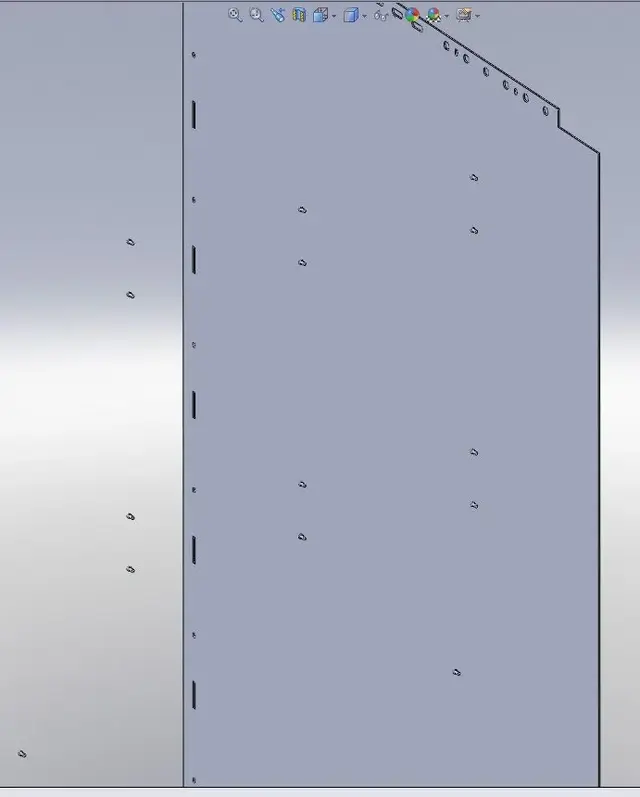
I work with sheet music every day, but I don't understand your problem.
post the file or image.. .

I don't understand if you're able to do the other plates.
as you have trouble tracking the position of the shot grains.
 
Hi.

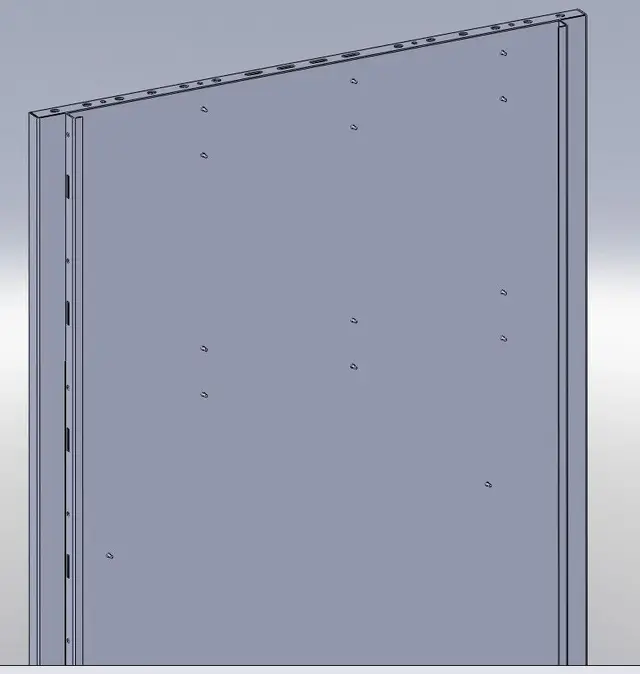
My problem is not to position, but to make sure that, putting the developed sheet into the table, see the shot pins!
the pins are parts and I inserted them into the axieme (together with the sheet that you see in the image).
Now, to make development, I have to open the part (sheet) and develop it.
but being a part (which does not contain the pins), I do not see the position of the pins and rightly even the pins themselves!
I used to do some extrusions on the sheet to simulate the pins, but I can't make it distinct.. .

Thank you.
Hi.
Mar
 

Attachments

  • LamieraConPerni.webp
    LamieraConPerni.webp
    40.9 KB · Views: 35
Hi.

My problem is not to position, but to make sure that, putting the developed sheet into the table, see the shot pins!
the pins are parts and I inserted them into the axieme (together with the sheet that you see in the image).
Now, to make development, I have to open the part (sheet) and develop it.
but being a part (which does not contain the pins), I do not see the position of the pins and rightly even the pins themselves!
I used to do some extrusions on the sheet to simulate the pins, but I can't make it distinct.. .

Thank you.
Hi.
Mar
you must act by doing it with a configuration in which you activate the pavement of the folds concerned.
logically you have to "take" the together and not only the sheet for the
table.
 
Fuck! ! !

Do you have to do a set for each sheet with pins fired?

I tried to insert them into the sheet metal part (creating a mltibody part) and using the sketch-driven repetition for positioning... It works perfectly... but when developing the sheet, the pins do not follow the plans of the open sheet but those of the folded sheet... then remain in the position where they would be finished and undeveloped (image). . .

I think I'm going back to extrusion!


Blue!
 

Attachments

  • LamieraChiusa.webp
    LamieraChiusa.webp
    10.7 KB · Views: 12
  • LamieraAperta.webp
    LamieraAperta.webp
    9.3 KB · Views: 13
Fuck! ! !

Do you have to do a set for each sheet with pins fired?

I tried to insert them into the sheet metal part (creating a mltibody part) and using the sketch-driven repetition for positioning... It works perfectly... but when developing the sheet, the pins do not follow the plans of the open sheet but those of the folded sheet... then remain in the position where they would be finished and undeveloped (image). . .

I think I'm going back to extrusion!


Blue!
before inserting (shaping) pins as multibody parts distendi your sheet; then "spair" the pins, do all the operations (pure, repetition etc.) you need and quidi you can ricocheting sheet metal.
I am pointing out all the pins hold their position both in the folded and in the flattened (also in the table) and everything works.

greetings
Mar
 
mythical method, but...

You know it doesn't work! !

I have the pin part m4x10 and posiziono after the flat repetition function in the features tree.
He asks me to do a derivative part and starts the displacement dialogue where I impose constraints as if I were in a set... so I tell him that the base of the pin goes on the face of the sheet and that the center must be concentric with a point of a sketch lying on the face itself. everything ok until I disave the flat repetition: it folds all but the pin remains in position of when it was wounded.. .

Something missing?
Thank you.
 

Attachments

mythical method, but...

You know it doesn't work! !

I have the pin part m4x10 and posiziono after the flat repetition function in the features tree.
He asks me to do a derivative part and starts the displacement dialogue where I impose constraints as if I were in a set... so I tell him that the base of the pin goes on the face of the sheet and that the center must be concentric with a point of a sketch lying on the face itself. everything ok until I disave the flat repetition: it folds all but the pin remains in position of when it was wounded.. .

Something missing?
Thank you.
I tried your file and the system that I told you works great... But I didn't understand how you put the pin. I took it off and I did it back "to my way":biggrin:
But wait:
you don't have to use flat repetition, but just the command distendi to open it and do the work (insert pins, features various etc.) and then fold to close it when you're done. in the feature manager are called to explain and bend (and in your feat man were not there).

I rearrange your file with the pins inserted (I put one and the others with repetition, always with the open sheet):View attachment Lamiera 01.rarHello
marco
 
... so I tell him that the base of the pin goes on the face of the sheet and that the center must be concentric with a point of a sketch lying on the face itself.
Then why do you buy your life with a sketch lying on your face?.>?
I simply gave concentricity to the pin with the hole, do not need "support" sketches.

greetings
Mar
 
Thank you!

See, but I have to put them on the forged face of the box.. .
at the base, since it is the base face even in the fold operations, nothing happens and even the pins always remain correct because the base face never moves... are the others who suffer the folds!

in the file I have attached I have already placed the pins in the correct points using as a base points of a sketch.
When you bend and explain the position changes bad!

in the base, instead, I agree with you that it is not necessary because you can use concentricity with holes!


Thank you again!
Mar
 

Attachments

Thank you!

See, but I have to put them on the forged face of the box.. .
at the base, since it is the base face even in the fold operations, nothing happens and even the pins always remain correct because the base face never moves... are the others who suffer the folds!

in the file I have attached I have already placed the pins in the correct points using as a base points of a sketch.
When you bend and explain the position changes bad!

in the base, instead, I agree with you that it is not necessary because you can use concentricity with holes!


Thank you again!
Mar
You're right, sorry. I thought you'd prepare the sheet with some drills for the pins. so that "from the real" shooting them "autophora", but here in the program you would have internetration of material without the hole. and then in reality the pins put them before the bending? Otherwise it would not be more likely to make a set with the finished fold and the pins inserted later?

if the pins instead of inserting them as part models them directly into the part on the face of interest (always with the explained sheet) then it works. but also the support sketches you have to do them on the face with the open sheet.

greetings
Mar
 
....
if the pins instead of inserting them as part models them directly into the part on the face of interest (always with the explained sheet) then it works. but also the support sketches you must make them on the face with the open sheet.. .
... and you have to "join the results." In short, it cannot be a multibody, and until 2009 it is normal that it is so seen that the sheet does not handle the multibody.
I am sorry; Can you do the same in this way?

look at the changes that now really works (maybe:biggrin:):View attachment Lamiera 02.rargreetings
Marco:smile:
 
... can you do the same in this way?
..maybe not, because it's true you wanted the distinct.
but then you return to the asses and the pins insert them there as separate parts (as they actually are).
for the positions in the single sheet you could do as I told you before the pre-holes or put only axes like "center plates".

greetings
Mar
 
thanks marco for the interest!!! All too much!:finger:

Yes, first I modeled the pins directly in the part, but I did not have them in distinct and above all being unique body, in the passing cutting operations, if the cut meets a pin the saw... or cut it off all or cut off pieces or leave die... that if you are not careful, then go to the laser that instead of the shot pins makes holes with strange shapes!!! !

inserting them together means making a subaxis for each sheet...:frown:
when cominici to have 100 different sheets with 50 pins each one are cabbage to manage. . .

here is the reason for the request.. .

I try as you told me to do the support sketches on the open sheet... even if I don't understand why when you "move" the part does not follow it.

other method is: add the pins as part (not to model them all the time) and with the command pair them join the part... the result is the same...


Thank you so much, again!
Mar
 

Forum statistics

Threads
44,997
Messages
339,767
Members
4
Latest member
ibt

Members online

No members online now.
Back
Top