• This forum is the machine-generated translation of www.cad3d.it/forum1 - the Italian design community. Several terms are not translated correctly.

slow dwg problem for text styles in use

  • Thread starter Thread starter jim78b
  • Start date Start date

jim78b

Guest
I have a design only lines but I see that I have a lot of text styles that slow but I can't eliminate them as I do?

 
_purge is not going?
If not, it means that somewhere in the design there are (a block even if not inserted, a layout, a layer turned off... )
 
_purge is not going?
If not, it means that somewhere in the design there are (a block even if not inserted, a layout, a layer turned off... )
In the end I became mad

I made save as dxf a purge and settled in dwg.erano text styles not erasable
 
the problem is not text styles, which at most can be annoying to see.
Just starting from the names of text styles, very long and with a pile of $, it can be assumed that it was made some mess with xref or that the design comes from another program that converted them.
these styles are contained within existing blocks but resident in the file memory.
if you look at the attached image you will see that instead of putting view Deleted Items ho selezionato view undeleteable objects. similar objects are in each design because they are loaded by default (text styles, lines styles, table styles....), but in this case under the item blocks there are an infinity like line styles... inheritance of a xref perhapsImmagine.webpto erase these elements exist This is what I have*; in your case I used the acad_dgnlinestylecomp and acad_mlinestyle voices
that eliminate respective blocks and line styles.
after which the file has passed from 4.5 mb to just less than 1 mb.
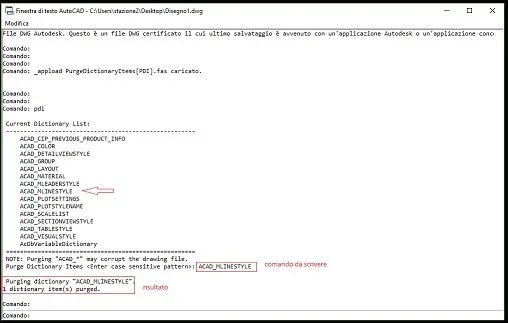
There are other things, wanting, to be eliminated but I think I made the concept clear.for operation of the lisp:
-load the lisp
- launch it with pdi command
-select a voice from the list you are shown and copy it at the bottom of the screen
 
Well what to say you are the best really!thank you!but the lisp x other files is ok tomorrow I try. But do I have to cancel one name at a time?
 
the lisp is a lisp. upload it and drop it, why shouldn't it work on other files?
If you read the link of the script there is a shortcut for similar suffixes, but you should be careful and delete one thing at a time and check that you do not burn at least the first times until you are sure what you can delete and what is not said that all you see is just useless. maybe doing a security copy of the file before using the lisp.
 
hi I prvato but in text styles there is a text with written $$ bad shape... What command does it delete?
 
Listen I have another 10 mega file if the place gives me an eye I can't with the lisp to stream it and it's very slow!

I have the problem in this if I issue a block and I go out it takes a life to get out!!! I'm going mad.
 
hi I prvato but in text styles there is a text with written $$ bad shape... What command does it delete?
probably, as I have already written, is a style derived from xref.
those do not delete them directly, but if they are contained in other entities such as blocks.
is definitely not what weights the file
 
now the file of yesterday is correct thanks again!!! last thing I posted this very heavy to edit the blocks! but with the lisp nothing happens or maybe I do not act on the correct parameter
 
Listen I have another 10 mega file if the place gives me an eye I can't with the lisp to stream it and it's very slow!

I have the problem in this if I issue a block and I go out it takes a life to get out!!! I'm going mad.
post it, but you probably don't use the lisp well
look in the image the result you have to get. the string you can write it or make a copy and paste then from the sending, if you do not appear the writing below you have wrong somethingImmagine.webp
 
I'm sure he's leaving me like that, except he doesn't. to get out of a legacy block in place it takes a lot
 

Forum statistics

Threads
44,997
Messages
339,767
Members
4
Latest member
ibt

Members online

No members online now.
Back
Top