
• This forum is the machine-generated translation of www.cad3d.it/forum1 - the Italian design community. Several terms are not translated correctly.

structure creation (in assembly) with my profiles

  • Thread starter Thread starter 19marco77
  • Start date Start date
bè insert multiple points of reference in addition to the origin of the sketch so while entering the member you can select "identifying profile" and go to reposition according to those points and rotate it on the axis or mirror it according to your needs.
 
what I understand.
a clear display of the requests for help is essential not to lose the desire to post to those who could give this blessed help.

It is clear that you did not place the problem of "exploring" the functions related to the "saving" toolbar, if not you would not post this last event; but maybe your solidworks installation doesn't work well and you don't have the online guide. :mad:
It is not my intention to waste time or patience mike. I read it yesterday when you advised me to switch to that method.

Thanks for the help, I think it will only take me time to learn how to use this command best.
 
It is not my intention to waste time or patience mike. I read it yesterday when you advised me to switch to that method.

Thanks for the help, I think it will only take me time to learn how to use this command best.
if in the starting profile you go to save add points where you want you anywhere, then in the structural element command you can use that point as the starting point of the profile, as it was already written... I don't know what you have to do or how you work, but you bought the license of a program, and learning to use it is the basic thing to be able to work on it, there are many ways to do everything, but there is always a better one.... first you can make changes in case you need much more easily, save a lot of time in completing each structure. I highly recommend you to learn how to use the soldering bar, if your job is to do profile structures. . .
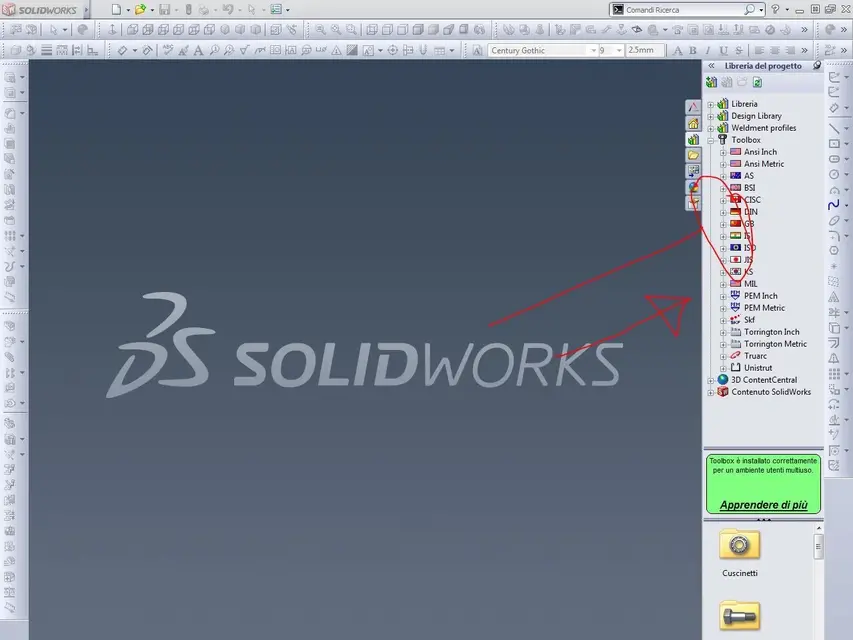
for the toolbox I don't know how to help you if nothing comes out with the right button.
 
if in the starting profile you go to save add points where you want you anywhere, then in the structural element command you can use that point as the starting point of the profile, as it was already written... I don't know what you have to do or how you work, but you bought the license of a program, and learning to use it is the basic thing to be able to work on it, there are many ways to do everything, but there is always a better one.... first you can make changes in case you need much more easily, save a lot of time in completing each structure. I highly recommend you to learn how to use the soldering bar, if your job is to do profile structures. . .
for the toolbox I don't know how to help you if nothing comes out with the right button.
He doesn't leave anything because maybe he clicks in the wrong place.
Mine is just a guess.
I'm putting video, maybe it's starting. (although I disagree with that method
work).
[youtube]0l44ygjy-rw[/youtube]
 
He doesn't leave anything because maybe he clicks in the wrong place.
Mine is just a guess.
I'm putting video, maybe it's starting. (although I disagree with that method
work).
[youtube]0l44ygjy-rw[/youtube]
thanks for the video mike. but in the 2011 version, on the page of personlization does not let me add folders or anything. I don't even have the flags to select for the components. I only have them on the first page.

However I have imposed myself on trying to do what I need as you say with the structural elements. I was hoping only you could decide (with a quota) directly on the profile extruded the length or distance from other profiles. instead you have to do changing the sketch of guide.

Thanks again to everyone.
 
thanks for the video mike. but in the 2011 version, on the page of personlization does not let me add folders or anything. I don't even have the flags to select for the components. I only have them on the first page.

However I have imposed myself on trying to do what I need as you say with the structural elements. I was hoping only you could decide (with a quota) directly on the profile extruded the length or distance from other profiles. instead you have to do changing the sketch of guide.

Thanks again to everyone.
You'll see that when you get your hand and you understand everything you can do... You will be able to do everything in your mind.
 
without having to change any sketch. . .
I try to explain my doubts (which will certainly be c.....and immani for you :p

If I refer to an extrusion 1 edge (and I would have the same size between profile and sketch) then it is not automatic that the profile marked (2) is the measure I need. I will have to do anyway the subtraction of the thicknesses of the material to obtain n° 2 of the measure necessary to me. Am I wrong?
 
thanks for the video mike. but in the 2011 version, on the page of personlization does not let me add folders or anything. I don't even have the flags to select for the components. I only have them on the first page.

However I have imposed myself on trying to do what I need as you say with the structural elements. I was hoping only you could decide (with a quota) directly on the profile extruded the length or distance from other profiles. instead you have to do changing the sketch of guide.

Thanks again to everyone.
in 2011 the procedure is this:http://www.youtube.com/watch?v=dgkgrpbqf4w
 
I try to explain my doubts (which will certainly be c.....and immani for you :p

If I refer to an extrusion 1 edge (and I would have the same size between profile and sketch) then it is not automatic that the profile marked (2) is the measure I need. I will have to do anyway the subtraction of the thicknesses of the material to obtain n° 2 of the measure necessary to me. Am I wrong?
see that you can make new group in the function? the starting points of the profile may vary for each group :biggrin:.
 
here is your file as I think you want it, if you look below you can see profile identifier if you use that command you can select from which point in the profile profile profile profile profile profile profile you have selected in the group.
 

Attachments

you can make multiple groups in the structural element function at the limit you can also use the short/extended command.. .
 

Attachments

  • telaio_1.rar
    telaio_1.rar
    179.2 KB · Views: 1
  • TEL.webp
    TEL.webp
    23.1 KB · Views: 5
here is your file as I think you want it, if you look below you can see profile identifier if you use that command you can select from which point in the profile profile profile profile profile profile profile you have selected in the group.
:( does not open.. I think you have a later version of mine
 
you can make multiple groups in the structural element function at the limit you can also use the short/extended command.. .
I tried that command, too. but what I ask is if the measure (for example) of the 2 short vertical profiles is determinable externally to the guide sketch or if I already have to calculate the 2 measures to get to the center of the 2 profiles above and below?
 
I tried that command, too. but what I ask is if the measure (for example) of the 2 short vertical profiles is determinable externally to the guide sketch or if I already have to calculate the 2 measures to get to the center of the 2 profiles above and below?
on the bottom of the function identifies profile snaps that, then select a point in the profile that comes out and the profile starts from the point that you select.
 
thanks for the video mike. but in the 2011 version, on the page of personlization does not let me add folders or anything. I don't even have the flags to select for the components. I only have them on the first page.

However I have imposed myself on trying to do what I need as you say with the structural elements. I was hoping only you could decide (with a quota) directly on the profile extruded the length or distance from other profiles. instead you have to do changing the sketch of guide.

Thanks again to everyone.
I bet you didn't try to create a new folder where I put you in the attached image !!! :biggrin:
 

Attachments

  • Cattura.webp
    Cattura.webp
    71 KB · Views: 4

Forum statistics

Threads
44,997
Messages
339,767
Members
4
Latest member
ibt

Members online

No members online now.
Back
Top