• This forum is the machine-generated translation of www.cad3d.it/forum1 - the Italian design community. Several terms are not translated correctly.

various anomalies in autocad 2011 and disable the "open" pane

  • Thread starter Thread starter roberto
  • Start date Start date
are you confirming that in these conditions it is better to postpone the use of autocad 2011 in favor of the latest version 2010... who has the time to lose? and then, all these improvements are palpable or will you have to strive to find them and put them in use?

service pack n. 1 ...
 
In my opinion they do not consider them true anomalies, because the problems are with certain types of files that in theory do not cause you error if you insert them with versions of advanced autocads, i.e. --civi, map, raster design-, have not corrected the problem of the plotting times of that type of images es ctr, with activated transparencies, correct this which do not consider it a problem?
of the improvements that I will make intensive use and that I was looking for are the transparency in percentage in the layers, option that was in illustrator, in vectorworks and many other vector software, so I will endeavour to use it, return to a previous version and for me it is a very previous one, I consider it unacceptable
 
other anomaly found. does not store the deactivation of the grid. at every start of autocad is always active.
to you?
 
other anomaly found. does not store the deactivation of the grid. at every start of autocad is always active.
to you?
you have a nice grill at every start

a little exoso of memory, xrif with 14 vector ctr 10 mb, and 1 igm tif from 150 mb, has some memory problemuccio :biggrin:
considering that I only have xp and 3 giga ram
 
I also confirm that it does not retain the setting of the grid as the last setting of the program.
Fortunately it turns out to me (perhaps because it has migrated so since 2010)

But also 2010 does not save me the last on/off view of the "flight" grid, that is, without saving the design. saves it in the design and is read also since 2011.

I believe that by default it is stored in the prototype design (acad.dwt).

more confirmation, just open a drawing, without pressing only f7 (grill) and at the exit the program asks if to save the changes.
 
I deleted the post because I reiterated what you had written in your speech, that is, that the setting (gridmode) is saved in the dwg/dwt.
 
I carry the solution for the osnap box sent by autodesk. I haven't tried yet. .
1: open autocad
2: set apbox to 1
3: set osmode to 1
4: draw some lines and notice that the aperture box is displayed as it should
5: cancel the line command
6: set osmode to 0
7: now draw some lines.
- even with osmode set to 0 the o-snaps still work
8: hit f3 and the o-snaps are finally disabled

tradotto in termini pratici significa che se si toglie ad uno ad uno tutte le impostazioni di snap ad oggetto il riquadro appare.
se invece si disattiva lo snap ad oggetto con l’apposito tasto nella barra di stato o con il tasto veloce f3, il riquadro non compare piú, come richiesto.


:confused: uhhmmm... vedremo. :smile:
 
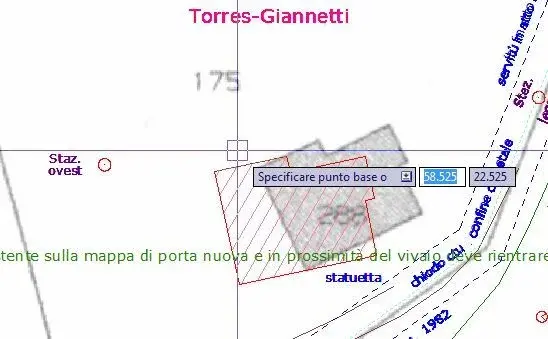
But you're talking about the open box, which is the square at the crossroads of the slider even when no command is on?
if yes, I, small, I have always lit it, and it changes little in size between mode' selection and modalita no command (I hold it to 4)
 
what you say is the pickbox (my is value 6) and is always fixed, the other panel, value 10, only snaps (not in 2011 that there is always if you do not delete it completely with apbox to 0), when you use a help function. I have commands already set with the help, e.g. copy from midpoint to int etc. because I can't stand the fixed setting of more functions, as it happens with revit... only that when you really use the pane is a help, when you don't ask, it just bothers.
 

Attachments

  • aut2011-riquadro-osnap-presente-ma-non-richiesto.webp
    aut2011-riquadro-osnap-presente-ma-non-richiesto.webp
    26.6 KB · Views: 16
that under the dex cursor is the dynamic input that I disabled to closed eyes.
The open box, it's the square that appears to you at the crosshairs, the one in the field of which autocad looks for the osnap.
the display of that square (in the command phase) is managed by apbox (on/off). the size is managed by "open"

The same square without command, it's by default in acad. You can't take it out that I know.

the pickbox is the square that appears to you when an object selection is requested (when the cross viewer disappears)
 
hello to all Cadists!! !
I present to you my problems that I find very annoying. .

1. If I double-click on a retino, the retini window will no longer open but the property window.

2. If I do the command questions a very annoying window comes out... and I find boring the procedure to get out of the command.. .

3. every time I want to put a retino (selected on the side palette) it always makes me preview how the retino will come....and takes too much time. .

is it possible to find a remedy to these boring "improvements"?
 
1. If I double-click on a retino, the retini window will no longer open but the property window.I have not found (for the moment) specific variables, you can solve with the command which --> double click actions --> deduction, assigning the macro editaretino instead of _properties

2. If I do the command questions a very annoying window comes out... and I find boring the procedure to get out of the command.. .You mean the text window, the one that can be activated with f2?

3. every time I want to put a retino (selected on the side palette) it always makes me preview how the retino will come....and takes too much time. .
hpquickpreview = 0
 
You have to find the variable, I don't know if it's "filedia", which disables these functions.

I agree with you that certain improvements are a terrible pippa, a bit like windows instead of dos, can help but also take away a lot of time, not from 11 anyway. . .

I don't agree with hate. to me for many years gives the opportunity to work great and therefore to be able to survive. I'm sorry if it's little. :rolleyes:smile:
 
roberto the filedia command disabled other windows like "open and save", not that of the restraints.
for the nik hateautocad, could do without it, there are many other cads even better than autocad, the autodesk representatives do not point the gun to the temple to buy it, (although from the price applied and to pay there is a little truth):biggrin:
 
Hello everyone!! I also have problems as described by hateautocad!
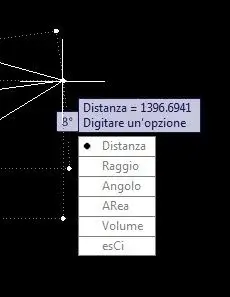
known that the command "interrogation" has become more ostic to manage/output...I attach an image of the window to which I am referring hoping that someone of you will help me not to view it anymore and make the result appear only in the command line! !
 

Attachments

  • finestrella.webp
    finestrella.webp
    6 KB · Views: 8
Hello everyone!! I also have problems as described by hateautocad!
known that the command "interrogation" has become more ostic to manage/output...I attach an image of the window to which I am referring hoping that someone of you will help me not to view it anymore and make the result appear only in the command line! !
instead of using the new measuring commands use the dist command...certain that you are strange :biggrin: they give you the caterpillar to dig and you continue to prefer the old and dear vanga! It's true that the cat must know how to "pilot" but you want to put it when you took your hand...
 
Okay, thank you, what I was looking for!

I would have preferred the first sentence instead of all the reproach to follow... it would have been more appreciated. . ! !
 

Forum statistics

Threads
44,997
Messages
339,767
Members
4
Latest member
ibt

Members online

No members online now.
Back
Top