
You are using an out of date browser. It may not display this or other websites correctly.
You should upgrade or use an alternative browser.
You should upgrade or use an alternative browser.
giging
Guest
I don't open the annex. Did you insert it? I ask you why the system these days makes the bizzes to fit them. .
Sandra_ME30
Guest
There's...
and opens...
and opens...
sampom
Guest
There's a folder. download, save, disappear zip.. but at the end it is emptyThere's...
and opens...
 There's nothing.
greetings
Marco:smile:
Sandra_ME30
Guest
Okay, thanks sampom!
I report the problem on the thread dedicated to attachments! !
(I open it and I find myself three rar: neon-1.zip neon-2.zip neon-3.zip and now that I have tried and clicked on the singles makes me "zompare" from one rar to another!)
I report the problem on the thread dedicated to attachments! !
(I open it and I find myself three rar: neon-1.zip neon-2.zip neon-3.zip and now that I have tried and clicked on the singles makes me "zompare" from one rar to another!)
reggio
Guest
sampom
Guest
Okay.again
ps: why not let the native swx files load?
Now he's here.
greetings
Marco:smile:
sampom
Guest
Is that what you wanted to get? :Hello, would you tell me why this neon does not emit the blue light I set from the center of the neon to the outside?
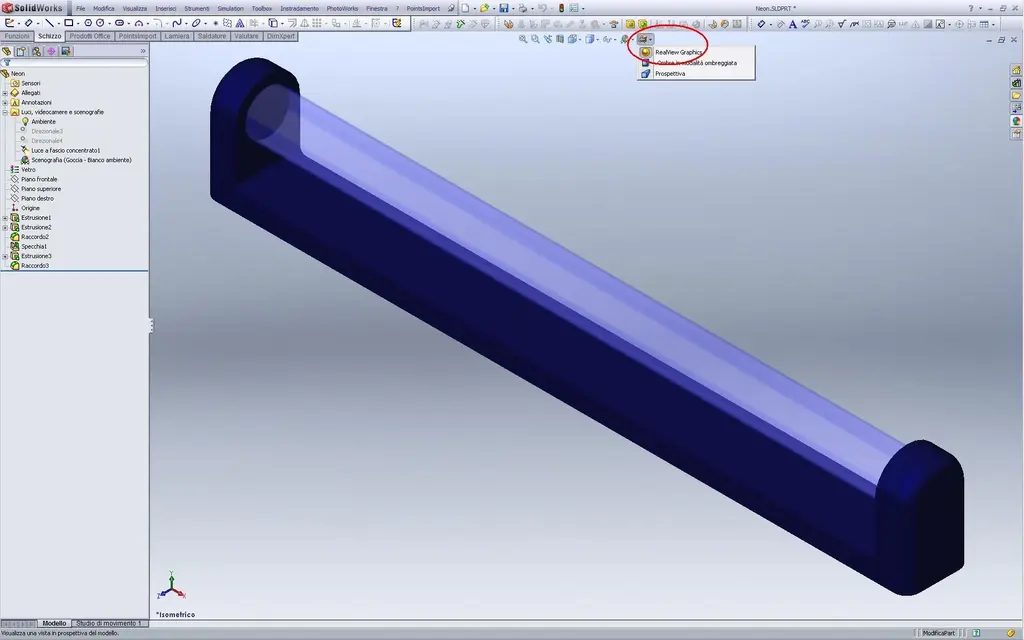 to show it you have to activate realview(at least, I from your file did nothing but that).
but in order to do it you must have certified opengl graphics card (envidia quadrifx or ati firegl).
greetings
Mar
reggio
Guest
hi, I would say yes, in practice now I have to put it inside a sheet box on which I practiced a spacing based on a text (logue) and I wanted to see the light effect coming out of the box. .Is that what you wanted to get? :View attachment 12883to show it you have to activate realview(at least, I from your file did nothing but that).
but in order to do it you must have certified opengl graphics card (envidia quadrifx or ati firegl).
in my pc I don't have such cards, but I expected that at least in rendering I would show it... :
re_solidworks
Guest
keep in mind that they are not rare tabs and necessarily very expensive. a 580 picture costs around 200 euros, while one 1800 over 450.
Ivan1990
Guest
in search I found this old post that treats my problem a bit, graphics card I have a picture 1800, yet I try to insert led appearance or manually put a color and going to change in color settings the voice brightness, but it does not give me any light effect of the neon that I would like in solidworks or rendering. I wanted to know if anyone can help me thank you.
Mike1967
Guest
change the light intensity, parts from 30.00 w/srm^2.in search I found this old post that treats my problem a bit, graphics card I have a picture 1800, yet I try to insert led appearance or manually put a color and going to change in color settings the voice brightness, but it does not give me any light effect of the neon that I would like in solidworks or rendering. I wanted to know if anyone can help me thank you.
Attachments
xxfast
Guest
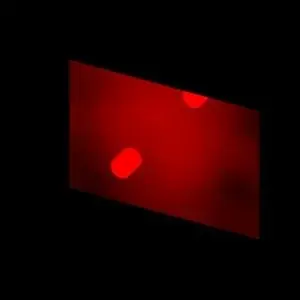
View attachment 24525You wanted something like that?Hello, would you tell me why this neon does not emit the blue light I set from the center of the neon to the outside?
Mike1967
Guest
I'm sorry, but I didn't see this discussion. . .
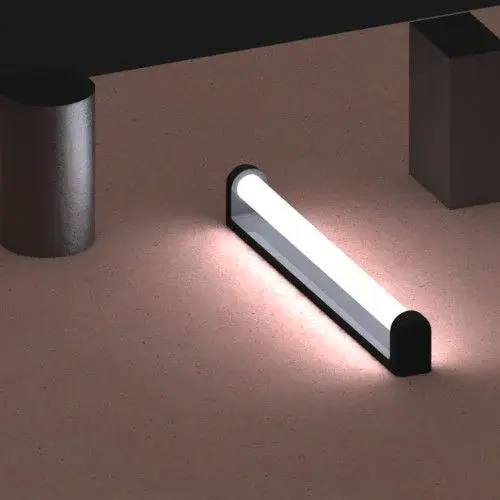
I don't know if you've solved (commit no... :biggrin but this is what
You want to get?
for the record, not even with the real view activated you see light shining, you see it only in rendering, as well as in preview.
I don't know if you've solved (commit no... :biggrin
but this is whatYou want to get?
for the record, not even with the real view activated you see light shining, you see it only in rendering, as well as in preview.
Attachments

Ivan1990
Guest
I put 100 as a value of brightness, but in rendering I don't see it anyway... Do I have a problem? ?I'm sorry, but I didn't see this discussion. . .
I don't know if you've solved (commit no... :biggrin
You want to get?
for the record, not even with the real view activated you see light shining, you see it only in rendering, as well as in preview.
Mike1967
Guest
Can you post the file?I put 100 as a value of brightness, but in rendering I don't see it anyway... Do I have a problem? ?
Ivan1990
Guest
reggio
Guest
I know, I say you neglect me... ;I'm sorry, but I didn't see this discussion. . .
I don't know if he's solved (I bet not... :biggrin
(fast/mike- yes I wanted something like this)...but then you provoke me, huh? but then my efforts not to intervene until I had responded tolast my request :redface: They're not appreciated, huh? ... but then I have to start, huh?You wanted something like that?
I admit it...I couldn't. :frown: ... but only because the indications were not accurate... at the millimeter...
So now... explain to me where the hell I come from "change the light intensity, parts from 30.00 w/srm^2".
... nò post the files of the examples I say it!!! Is it not possible that you always lay the stone and then hide your hand? Please. .Can you post the file?
so in the meantime I try to cuff and repeat the vs result... Then I will try to apply it to mine, as you see in the image, the neon would be to be placed inside a case of sheet and opaline (lexan semi-transparent), with swx I would have wanted to give a realistic idea of the finished result....
... and now, below with vs 2011 files (and precise indications) :biggrin:
Attachments
Mike1967
Guest
begins to set a suitable environment, dark black.
then lighten the shades of blue, logical that if you put too dark
He will not illuminate anything, as in relalty.
how counterproof you can give a clear color and see that actually
It lights up.
Try and tell me.
then lighten the shades of blue, logical that if you put too dark
He will not illuminate anything, as in relalty.
how counterproof you can give a clear color and see that actually
It lights up.
Try and tell me.
Ivan1990
Guest
look I gave you a fast file to see the problem, but I have already tried to put it in a dark dark environment pesto and with white light, me the result is that I see the body of color, but I do not see effect of the light that propagates in the environment, soppratutto that touches the other surfaces, mintra I clearly remember that in the 2010 version I could, even in 2011 before the passage to windows 7.begins to set a suitable environment, dark black.
then lighten the shades of blue, logical that if you put too dark
He will not illuminate anything, as in relalty.
how counterproof you can give a clear color and see that actually
It lights up.
Try and tell me.