• This forum is the machine-generated translation of www.cad3d.it/forum1 - the Italian design community. Several terms are not translated correctly.

sculpt tread with catia

  • Thread starter Thread starter oro987
  • Start date Start date
Yes! Yes! :finger: we have provided that the surfaces I have highlighted in the attached image are normal to the support surface. only after that I can tilt with a tot angle of stripes.
Hi.
hi...the surfaces that you highlighted me, I would say of the bottom of the excavation, are in this example, a constant 5 mm offset, of the outside of the tire. .

tvi71
 
hi...the surfaces that you highlighted me, I would say of the bottom of the excavation, are in this example, a constant 5 mm offset, of the outside of the tire. .

tvi71
I wasn't referring to the 5mm offset but to the excavation walls that must be
normal to the outer surface of the tire. i.e., if you've made them with the "task" command, the direction must be normal to the outer surface of the tyre. Can you confirm?
Thank you.
 
Bye.
no ... in the example, to do before I did not make them normal to the outside surface, but I used the normal direction to the floor of the sketch in which I realized the profile to "v" of the solid that I go to dig the tire.
in any case it is not complicated to make them normal....just project the profile on the surface... then create normal surfaces and then close them in solid... or cut the surface and create a solid surface with thickness etc...

tvi71
 
In fact, the difficulty lies in the second solution. ie not project the sketch tread but develop it (map it) on the surface, then pull up the walls normal, then close it solid, then complete the tread with bi and tritangenti fittings. In conclusion, I understand that I should model with solids and surfaces. Of course, given my little experience in the cayenne I could only work with solids given the potential.
Thanks again for the attention.
 
draw the baptistry with all the sforms on the plane and only in the end to act all over the superfice of revolution (pneumatic).
 
Is it possible to do this?? I saw him do it with...... first he drew a perfectly horizontal chain and then wrapped it around a pinion and a crown
 
Hello flavio, sorry I'm late. I managed to see your video and I have to say that if instead of the cylinder there was toroid as the wheel of your car is, it would be a great result. and if from the experts of catia of this forum give me a confirmation and a straight to begin, I am ready to dive into this adventure and to post auditions.
Thanks again
 
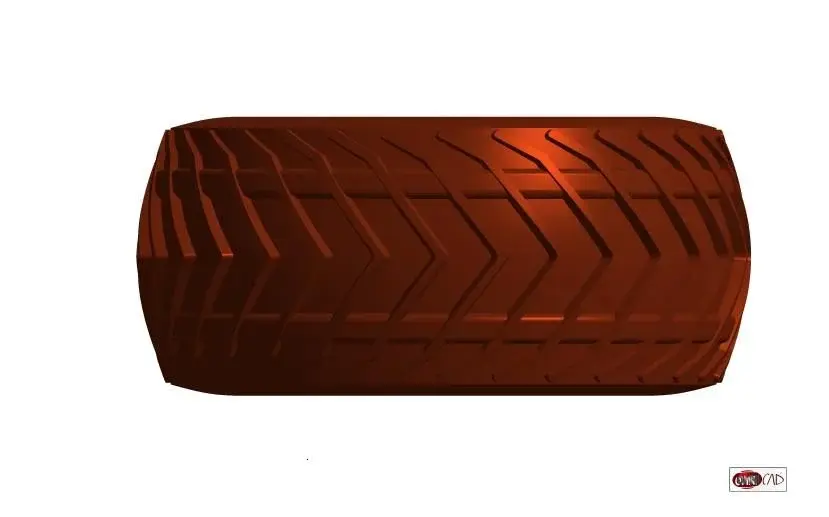
the final result must be as in enclosed photo.
It's just an example of old software.
 

Attachments

  • complessivo 222.webp
    complessivo 222.webp
    42.5 KB · Views: 19
Hello flavio, sorry I'm late. I managed to see your video and I have to say that if instead of the cylinder there was toroid as the wheel of your car is, it would be a great result. and if from the experts of catia of this forum give me a confirmation and a straight to begin, I am ready to dive into this adventure and to post auditions.
Thanks again
arrival surfaces can have any shape
 

Attachments

  • pneumatico.webp
    pneumatico.webp
    12.9 KB · Views: 17
  • pneumatico2.webp
    pneumatico2.webp
    12.7 KB · Views: 15
I would say it is a great result:finger:
Can you tell me how you did it?
Thank you.
Consider that I don't know how to model a pnematic, so for any errors in the above operations :)

1) tire size.

2) carry the sections developed on the floor

3) design only one part then repeat it n times

4) Extrude 2d profile with sform angles

5) I build a flat linear surface that fades corners

6) cut and stay with the interested part

7) I adapt everything to the surfaces that make up my tyre.


Obviously being parametric, in this specific case it was enough only to say that the section was not the line that created me the cylinder but it was a different section.


ovviously once the tread is drawn you can always resize it automatically depending on the size of the tyre
 
Consider that I don't know how to model a pnematic, so for any errors in the above operations :)

1) tire size.

2) carry the sections developed on the floor

3) design only one part then repeat it n times

4) Extrude 2d profile with sform angles

5) I build a flat linear surface that fades corners

6) cut and stay with the interested part

7) I adapt everything to the surfaces that make up my tyre.


Obviously being parametric, in this specific case it was enough only to say that the section was not the line that created me the cylinder but it was a different section.


ovviously once the tread is drawn you can always resize it automatically depending on the size of the tyre
Excuse me, on point 4) if I understand correctly you extrude it i.e. give it the third dimension in z so you already have a 3d tread model.
Can you confirm?
 
Excuse me, on point 4) if I understand correctly you extrude it i.e. give it the third dimension in z so you already have a 3d tread model.
Can you confirm?
I confirm (form and cut according to another surface, always linear, to shade the edges, so I have a z not constant)
 
I confirm (form and cut according to another surface, always linear, to shade the edges, so I have a z not constant)
How does your model behave with the rake effect? that is, if my design in 2d (i.e. on the floor) was a rectangle, after having "developed" it
how does it appear on the rubber model obtained? I explain better, the closer I approach the center of the toroid, the more you feel the rastremation effect, that is from a rectangle in plan I get a trapeze in 3d.:biggrin:
 

Forum statistics

Threads
44,997
Messages
339,767
Members
4
Latest member
ibt

Members online

No members online now.
Back
Top