• This forum is the machine-generated translation of www.cad3d.it/forum1 - the Italian design community. Several terms are not translated correctly.

fuse

  • Thread starter Thread starter panormus
  • Start date Start date
Thanks marco, I haven't tried yet. I'll let you know.
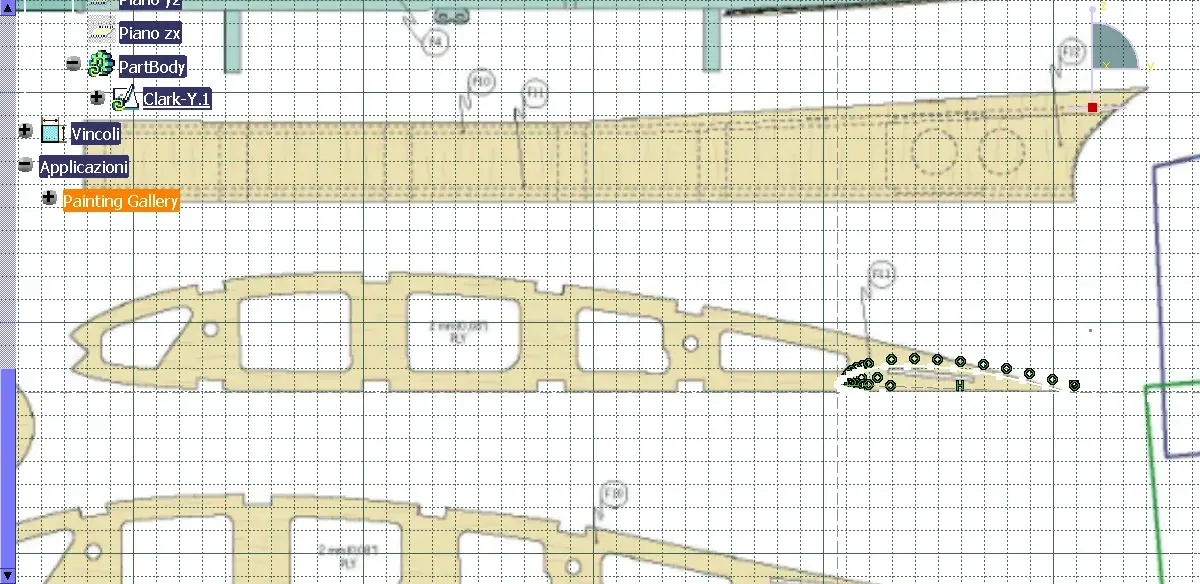
In the meantime, I would need to know how to make the scale of a sketch (profile alare clark y) and if there is a way to directly import the profiles into the caychean and then scale them properly. :finger:
 

Attachments

  • clark-y in scala.webp
    clark-y in scala.webp
    144.3 KB · Views: 22
  • sezioni-fusoliera.webp
    sezioni-fusoliera.webp
    74.4 KB · Views: 17
climbing them is not a problem, in the "operation" command menu there is the scale command.
the problem is to import it; which type of file do you have? if you have a paper design you have to ask for help from a more experienced than me (I believe that some system is there, digitize in dxf and import into the cat)
Mar
 
climbing them is not a problem, in the "operation" command menu there is the scale command.
the problem is to import it; which type of file do you have? if you have a paper design you have to ask for help from a more experienced than me (I believe that some system is there, digitize in dxf and import into the cat)
Mar
the clark profile is made in a sketch created in 2 different sessions percui if you call with special command I scale only part of the profile.
How do I scale all the sketch? :confused:

I saw part of the video... Would it help me to scale with a casket?
 
Hello panormus
I think the most logical thing is the following:
1- open sketch -tracer
2- you start product- add a new part
3-entri in the sketch environment, amounts drawing
as well as the original, using cutting functions
positions on multiple floors profiles
4-exists within the sketch environment the possibility
to place the sketch with a pivot that you
allows subsequent length set
So, if you're careful, applying the measures that
you need it, when you "recalc" the sketch with lines and
curves, these should already be automatically
scaled-
5- if you have multiple profiles,as in our case, if you care to place them in
same origin, maintaining the same constraints
distance, all profiles will be automaticmnete
scaled-
(ps) in the help of catia sketch tracer you will find exhausting explanations

6- or import sketches worrying about giving only the common original,
make sketches, build shape and then eventually
the stairs

to the
 
the clark profile is made in a sketch created in 2 different sessions percui if you call with special command I scale only part of the profile.
How do I scale all the sketch? :confused:

I saw part of the video... Would it help me to scale with a casket?
even if you have made the two sketches separately, you just have to copy the elements of one within another.

or open a new sketch and project within it the elements of the other two, after which steps the latter.

Hi.
 
bye panormus

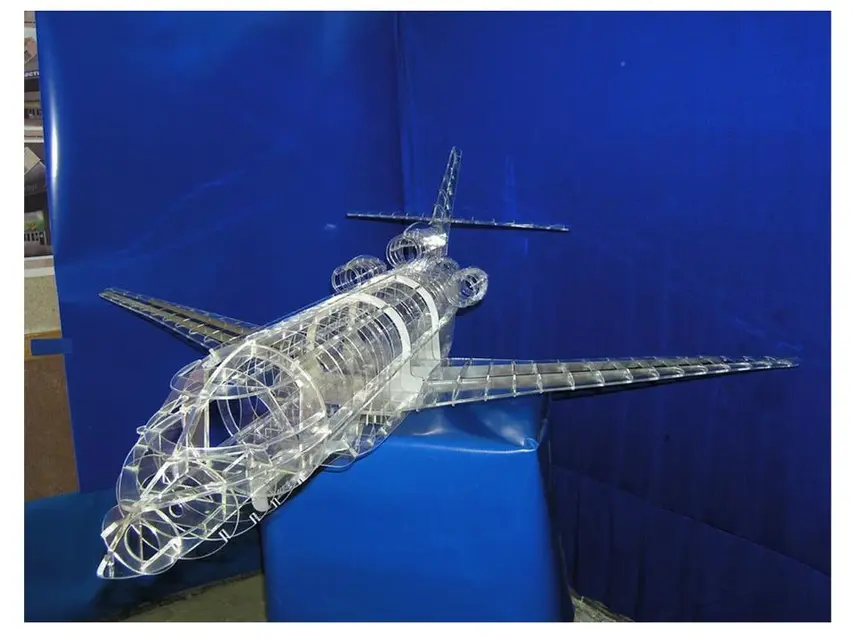
falcon 7x

if you can help place the images made by a modelling enthusiast, who then played it in acrylic modelling scale you can take tips:biggrin:
 

Attachments

  • 1.webp
    1.webp
    58.1 KB · Views: 27
  • 2.webp
    2.webp
    73.7 KB · Views: 28
even if you have made the two sketches separately, you just have to copy the elements of one within another.

or open a new sketch and project within it the elements of the other two, after which steps the latter.

Hi.
Hello, girl.
the project you see in the attachments has been used in sketch tracer environment as mentioned above, I am already building in scale with the simple technique of "ricalco", then providing to the positioning in space.

rather than recalculating the section of a centin with lightening holes and recesses for the alar longherons I would prefer to realize with precision the clark y profile and from there to realize the internal structure (you know that the wing is fundamental and I should cut it then with a numerical control machine).
I created the clark y profile, although I think it's very approximate and I can't:

- climb what I have, which has been realized by building a rope of 100 units and reporting the height of extradox and intradox according to the percentage length. I should pass the rope from 100 to a length x now. How to do that? with scale I can't repeat.

- or to import the profile accurately.

greetings
 
bye panormus

falcon 7x

if you can help place the images made by a modelling enthusiast, who then played it in acrylic modelling scale you can take tips:biggrin:
Is the acrylic not a type of water paint?
Is there also plastic material?

Interesting.. :smile: and beautiful.
Who's the guy?
 
even if you have made the two sketches separately, you just have to copy the elements of one within another.

or open a new sketch and project within it the elements of the other two, after which steps the latter.

Hi.

ok ho capito scusa. :finger:
 
Since you are a lover of modeling like me I send you this link of models in perfect scale 1/4. I built the albatross, motor 40cc bicylinder, fantastic.http://www.proctor-enterprises.com/
marco
thanks marco, nice site.
However, I must avoid dispersing and focus on the goal: design and manufacture a scaled cub piper.
at the moment I am about to buy a 1/6 scale to see some things as they work, after (who knows how much) with holy patience I will start the adventure.
At the moment I ask your help to achieve the goal catia project so I hope in a generous and numerous availability you.
:finger:

do you know how I can create or import profiles in catia v5? in particular clark y?
 
I add the following question to the previous post:

Why, after climbing (4,5:1) the profile in the sketch, in the same environment now I see only the profile building points and out of the sketch I also find the smallest starting profile?
allego 2 images that should clarify.
 

Attachments

  • nello sketch.webp
    nello sketch.webp
    92.3 KB · Views: 13
  • fuori dallo sketch.webp
    fuori dallo sketch.webp
    28.1 KB · Views: 10
I add the following question to the previous post:

Why, after climbing (4,5:1) the profile in the sketch, in the same environment now I see only the profile building points and out of the sketch I also find the smallest starting profile?
allego 2 images that should clarify.
I attach my version of the wing profile derived from the coordinates I took from the site you signaled.
the excell file contains a macro that realizes points and curves from a set of coordinates.
if you are looking for the site you also find the original macro that I have attached several times.

as you will see you find two profiles, where the second is the scale of the first one that is 1 millimeter long, so you have to apply the correct coefficient of scale.

Hi.
 

Attachments

I attach my version of the wing profile derived from the coordinates I took from the site you signaled.
the excell file contains a macro that realizes points and curves from a set of coordinates.
if you are looking for the site you also find the original macro that I have attached several times.

as you will see you find two profiles, where the second is the scale of the first one that is 1 millimeter long, so you have to apply the correct coefficient of scale.

Hi.
thanks ferrezio, I imported the cat file with the geometries from excel but do not find the profile :rolleyes:
 
I attach my version of the wing profile derived from the coordinates I took from the site you signaled.
the excell file contains a macro that realizes points and curves from a set of coordinates.
if you are looking for the site you also find the original macro that I have attached several times.

as you will see you find two profiles, where the second is the scale of the first one that is 1 millimeter long, so you have to apply the correct coefficient of scale.

Hi.
ok ferrezio, I found the profile (set dx and click on center :) )
I do not ask you how you created the profile (maybe you will explain it to me later), but I ask you rather how I can work the profile with it is neither a sketch nor a body (if I go in part design, I select the two scales related to the wing profile, I click on the prsima to create a neutral thick solid gives me an error: "the profile is not a body"; if I don't remember badly).

how can I use the profile to create a surface or a solid?
 
ok ferrezio, I found the profile (set dx and click on center :) )
I do not ask you how you created the profile (maybe you will explain it to me later), but I ask you rather how I can work the profile with it is neither a sketch nor a body (if I go in part design, I select the two scales related to the wing profile, I click on the prsima to create a neutral thick solid gives me an error: "the profile is not a body"; if I don't remember badly).

how can I use the profile to create a surface or a solid?
I try to respond quickly, for a more detailed answer you will have to wait Friday, I am very busy in the coming days.

the profile you see is a 3d spline if you have a little knowledge of surfaces, you could replicate a second profile on a plane parallel to the profile I sent you, and make us a multi-section surface, after which you make a thick solid from a surface.

or open a schzzo on the floor of the section, project the curve in the sketch (at this point the system will recognize it as a closed curve), as the sora repeats the curve a second time on a parallel plane, create a sketch equivalent to those described before, and make it a solid multi-section.

I have no idea how it's made in a piper, but the biggest difficulty you could meet in the tipping zone of the tip of the wing, I assure you that it's a pretty complex area.

I hope you'll be sufficent for now, and I hope others can help you in more detail.

Hi.
 
I try to respond quickly, for a more detailed answer you will have to wait Friday, I am very busy in the coming days.

the profile you see is a 3d spline if you have a little knowledge of surfaces, you could replicate a second profile on a plane parallel to the profile I sent you, and make us a multi-section surface, after which you make a thick solid from a surface.

or open a schzzo on the floor of the section, project the curve in the sketch (at this point the system will recognize it as a closed curve), as the sora repeats the curve a second time on a parallel plane, create a sketch equivalent to those described before, and make it a solid multi-section.

I have no idea how it's made in a piper, but the biggest difficulty you could meet in the tipping zone of the tip of the wing, I assure you that it's a pretty complex area.

I hope you'll be sufficent for now, and I hope others can help you in more detail.

Hi.
I entered freestyle, I selected the command "surface projection" holding ctrl I selected the surface (or better the xy plan) but does not make a bat...
 

Forum statistics

Threads
44,997
Messages
339,767
Members
4
Latest member
ibt

Members online

No members online now.
Back
Top