• This forum is the machine-generated translation of www.cad3d.it/forum1 - the Italian design community. Several terms are not translated correctly.

extrusion advice: curiosity

  • Thread starter Thread starter volaff
  • Start date Start date
the extrusion with the cut is the first thing I tried seeing the sketch you had done but according to me it is 'na munnezza (although equally acceptable) because it is a flat function while that profile develops on three directions.
You can make more cuts but remains a witness somewhere.
use the loft, which even if it is not accurate (and you can't know it seen the design you have in hand) however use a function not everyday use and you can try to compare the results by changing the various options of the profiles or the guide curves
 
the extrusion with the cut is the first thing I tried seeing the sketch you had done but according to me it is 'na munnezza (although equally acceptable) because it is a flat function while that profile develops on three directions. You can make more cuts but remains a witness somewhere.
quoto!
use the loft, which even if it is not accurate (and you can't know it seen the design you have in hand) however use a function not everyday use and you can try to compare the results by changing the various options of the profiles or the guide curves
I did not try, but I think that a chance to improve that loft in the uniformity of the section at the junction, is to reverse the role between the profiles. then use side profiles as sections and long sides of intermediate rectangles as guide curves.
you could also try to draw one of the side profiles, project it on the middle level of the component and make the loft between the two profiles without guide curves by setting "normal to the profile" as a final condition on the middle floor. made the middle element mirrors it.
 
Hello, everyone.
I tried to reconsider the profile with the advice you gave me.

the angle as you determined it to me came of 32.38.
I tried to make the loft using as a guide curve, instead of the 4 curves relative to the 4 vertices of the rectangle, only two driving curves passing through the middle points of the two long sides.

the problem is that the loft in the part of the disk does not come as I would like.
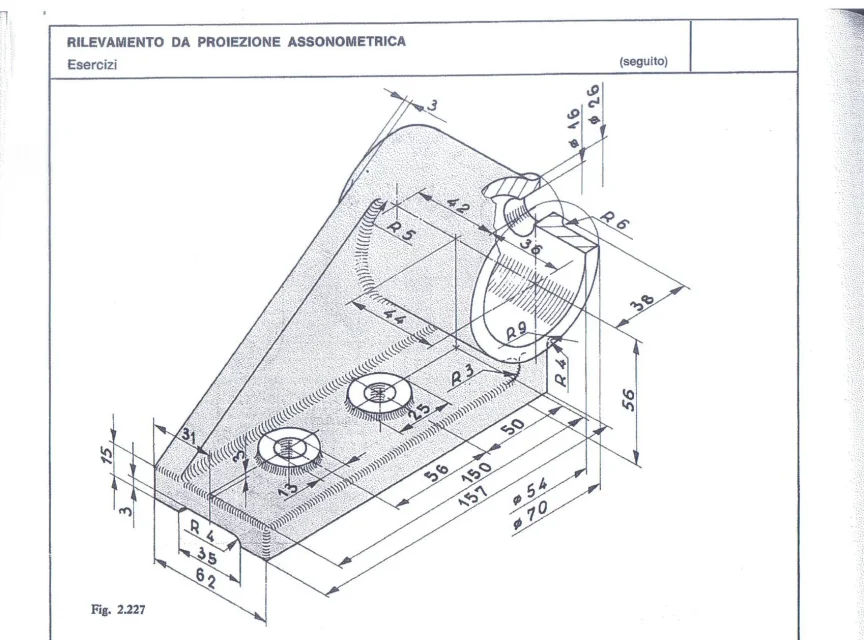
Moreover to create the rectangle at the base of 78 mm, as there is no height, I hypothesized a height of 9 mm.

Where did I go wrong?
Thank you all.
 

Attachments

first of all explains why you divided the rectangles into half lines? If you need an average selection, put a point.
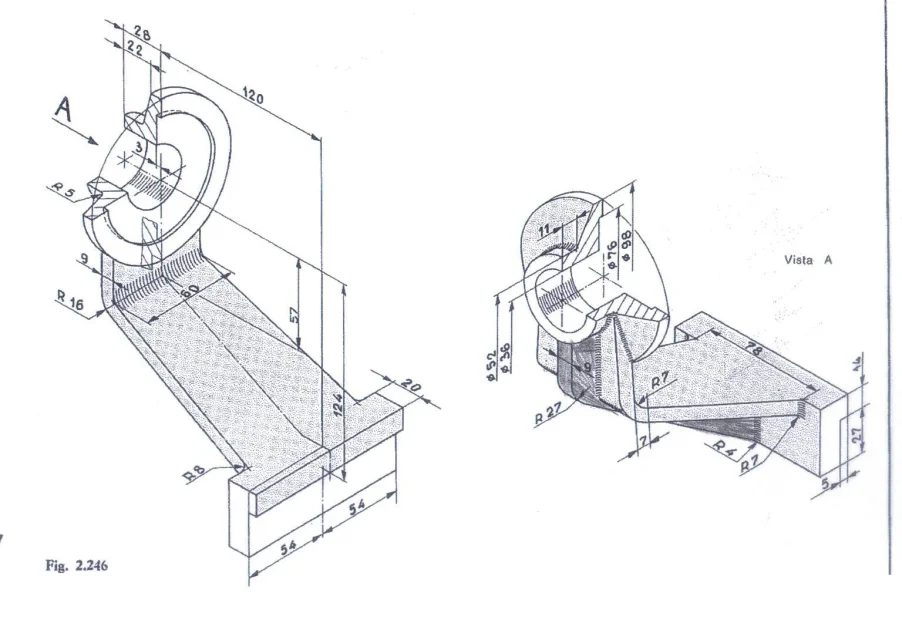
then the upper rectangle is from 52x9; the 52 is deduced seeing it ends tangent to the flangetta, the 9 is well quoted. thickness is 9mm constant
the 2 guide curves if you do so (it can be correct, given the design we are always in the field of hypotheses) do not need to make 3d but enough 2 sketches on the right plane; also the line is vertical. this because you have given the coincidence on the radius and not on the intersection of the lines as you see in the second image of the post #39
the radius of the guides can not be both from 7 inffattyi the outer one is listed by 16 (7+9th thicker)

this at a quick glance
 
/quote)
Bye.
I "divided" the rectangles in half lines because I had thought to use as guide curves instead of the vertices of the triangle possibly the average points, in doubt I did so.
if the strategy had been wrong, it was enough to make sure that the 3d sketch curves passed the tops instead of the middle points.

the upper rectangle had done it 52x11, modifying it in 52x9 the problem of tangence remains. (I have the impression that it is the position of the rectangle to be wrong)

I corrected the driving curves making the internal ones with connection radius 7 and those "external" with connection radius 16 but the result does not change much.
in particular the loft with the 4 guide curves seems to have a double thickness.

Thank you very much for the disposition.
 

Attachments

I "divided" the rectangles in half lines because I had thought to use as guide curves instead of the vertices of the triangle possibly the average points, in doubt I did so.
as I have sctitto it is enough to insert points, selecting one and the line glli from the average point report
the tangency problem remains. (I have the impression that it is the position of the rectangle to be wrong
I wrote it, it is wrong that from 60 (short) that is coincident with the radius is not with the intersection of the lines! !
same speech for the 57 of the sketch5, the intersection is always quoted not the end of the curve... from here the discrepancy between the corners. in that sketch two lines of construction do not serve at all, it is enough one from the center of the ray to its middle point
 
as I have sctitto it is enough to insert points, selecting one and the line glli from the average point report


I wrote it, it is wrong that from 60 (short) that is coincident with the radius is not with the intersection of the lines! !
same speech for the 57 of the sketch5, the intersection is always quoted not the end of the curve... from here the discrepancy between the corners. in that sketch two lines of construction do not serve at all, it is enough one from the center of the ray to its middle point
That's why I'm a pig.

the problem, for example, in the quota from 57, is that I gave as a quota from the axis of the disk higher than the average point of the connection, when I should have quoted from the axis of the disk higher than the intersection of the two segments that form the connection. Did I understand? ? ?

I tried to press the two segments and use the shift button but I can't quote the "virtual" point in question.
as reported here:
http://www.cad3d.it/forum1/threads/19509-quotare-raccordi-e-distanze-tra-essi-bordi-nascosti
 
when I should have quoted from the axis of the higher disk to the intersection of the two segments that form the connection. Did I understand? ? ?
Good job.
I tried to press the two segments and use the shift button but I can't quote the "virtual" point in question.
You should first quote her then assert the chord... however from where you are can;
- hold ctrl or shift, select the two lines and insert a sketch point* (*this is perhaps the pass you miss)
-cancel the radius, you get rejoined the lines, the odds, put the ray back on.
 
Good job.


You should first quote her then assert the chord... however from where you are can;
- hold ctrl or shift, select the two lines and insert a sketch point* (*this is perhaps the pass you miss)
-cancel the radius, you get rejoined the lines, the odds, put the ray back on.
Thank you very much for the advice, I also learned a command I didn't know.

I only attached the profile file hoping that we are now.

then I will create the 4 guidelines with sketch 3d, the external ones with connection radius16, the internal ones with connection radius 7.

the last rib I think can be easily created with a 3d sketch and with the "black" command.
Thank you so much for your pleasure, really!
 

Attachments

Good evening,
I tried to change the file for the guide curves but I guess I didn't understand a bat.

Meanwhile I have made another modeling for advice and any corrections
thanks as always for the time you dedicate me.
 

Attachments

  • 2.227.webp
    2.227.webp
    252.2 KB · Views: 7
  • 2.246.webp
    2.246.webp
    142.8 KB · Views: 5
  • 2.227.rar
    2.227.rar
    199.3 KB · Views: 9
  • 2.246.rar
    2.246.rar
    107.5 KB · Views: 5
from post #37 [massivonweizen_QUOTE]from the pictures see in red profile sketches, in green wide sketch 60 which serves support for the driving curves, in yellow the driving curves including rays. in the loft function selects as profiles only the two red.[/QUOTE] for the other piece missing the radius from 4 opposite to the radius from 3.

then we can discuss until the death of the multiplication of functions to make tubes or why do revolutions to make straight cylindrical elements (with a decuplication of lines, quotas and other) instead of a circle, a quota and function... but each has its own method (by the way, verify that in your version it is possible to make multiple radiation, that is, with only one function to insert different rays of size)

Allow me to advise you to leave these masochemical designs where you do not have a real match and you have to take for good your satisfaction of the result, instead download some 3d model (see grabcad for example) in neutral format (sterp, parasolid or other) so that you have something concrete that you can unseen and that by measuring it you will go to rebuild with the functions that you will look appropriate. importing it from neutral format you will not have a function tree but only a body, also you will know that what you see is modelable with the software.
 
from post #37 [massivonweizen_QUOTE]from the pictures see in red profile sketches, in green wide sketch 60 which serves support for the driving curves, in yellow the driving curves including rays. in the loft function selects as profiles only the two red.
for the other piece missing the radius from 4 opposite to the radius from 3.

by the way but in table 2.227 that r4 and r9 refer to the connection on the faces of the cylindrical piece on the other side?

I think I'll follow your advice.
maybe better to download besides the 3d also the 2d and start from the one for the modeling.
I will be honest, sometimes what I don't understand is the odds, or rather their representation that sometimes seems absurd.
 
by the way but in table 2.227 that r4 and r9 refer to the connection on the faces of the cylindrical piece on the other side?
You don't understand a bat. a drawing that must be interpreted must be thrown out of the window after having inserted it hibernate in the designer... apart from the jokes probably are simple teaching drawings that leave the time they find
maybe better to download besides the 3d also the 2d and start from that for modeling
difficult to find both, if you can also have the file to practice in the tables.
 
You don't understand a bat. a drawing that must be interpreted must be thrown out of the window after having inserted it hibernate in the designer... apart from the jokes probably are simple teaching drawings that leave the time they find


difficult to find both, if you can also have the file to practice in the tables.
Of course!
But I ask myself one thing: If sometimes I get lost on those teachings, won't it be worse in the "real" case?
 
in real life very, very hardly you will find quoted drawings in barbarian assonometry.
This does not mean that they will always be drawn and quoted well, but in that case you attack on the phone and ask for clarifications to the manager of turn.
However it is useless to wrap your head before necessary.
 
Good evening,
I tried to change the file for the guide curves but I guess I didn't understand a bat.
I looked at the file and made some evidence:
that loft will never come if an intermediate profile does not intersect the driving curves. you cannot bind the intermediate rectangle to the apparent intersection of two lines. must be along the real path.
the rectangle at the base can not do it 9 mm high since it is not orthogonal to the section of the bracket and must be greater.

I changed the file to the flight by leaning a little rough on the geometry you already did even if I used it on the contrary (your guide curves became my profile because I'm in a hurry so I'm not sure that the section is very correct. Maybe about it tonight.

I modified the 3d1 sketch creating a closed profile corresponding to the external face of the connecting element, quotation and putting parallelism and perpendicularity between the geometry so as to keep the thickness constant.
I created the surface filled around that 3d sketch
I mirrored the surface on the right floor
I did the loft between the two surfaces without any guide curve and combining the result
I have hidden surface and its mirroring

3d2 and 3d3 sketches I suspended them because they were inutiulized. By doing the piece starting from the loft of the side faces you can simplify much all the part of construction geometry that I left to not remake everything from scratch.

that isometric design is done so with the ass that geometry, respecting the quotas, is not exactly like that represented in the isometric view, especially for what concerns the fittings.
I attach the file in 2013 format (I thought you could also have this version of swx) then maybe tonight if something is unclear we go back up and if you can't open the file I will make you some screen.
View attachment 2.246_2_2.rar
 
You don't understand a bat. a drawing that must be interpreted must be thrown out of the window after having inserted it hibernate in the designer... apart from the jokes probably are simple teaching drawings that leave the time they find


difficult to find both, if you can also have the file to practice in the tables.
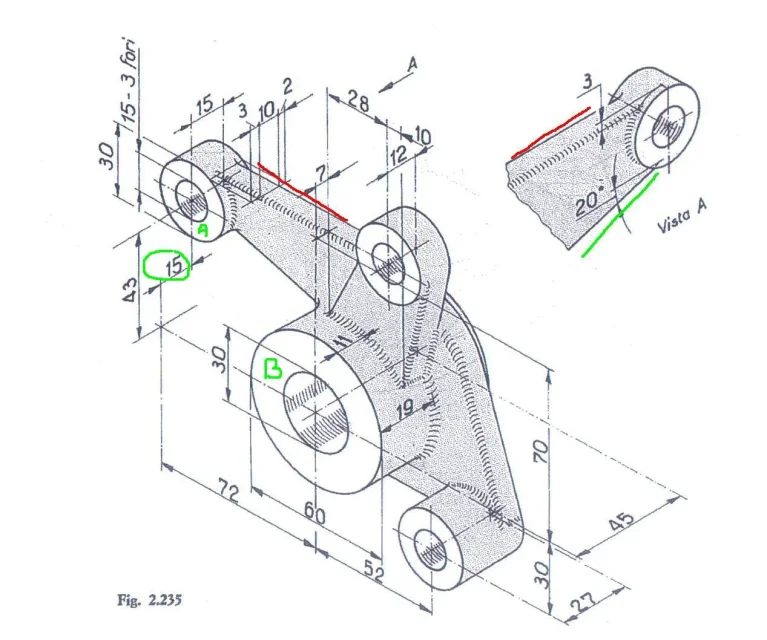
Look right to make you understand.

in this table "seems" that the tract in red (of which the auxiliary view is reported) seems to be straight and tangent to the circumference of diameter 60 mm while the inclined tract (in green) has altitude 20°.

the axis of the cylinder is located at a distance from the cylinder b 72 mm horizontal and the faces are 15 mm apart.

but if the distance between the two vertical axes is 43 mm the red tract can never be tangent and horizontal to the cylinder of 60 mm!!!


but if
 

Attachments

  • 2.235.webp
    2.235.webp
    141.3 KB · Views: 5
Look right to make you understand.

in this table "seems" that the tract in red (of which the auxiliary view is reported) seems to be straight and tangent to the circumference of diameter 60 mm while the inclined tract (in green) has altitude 20°
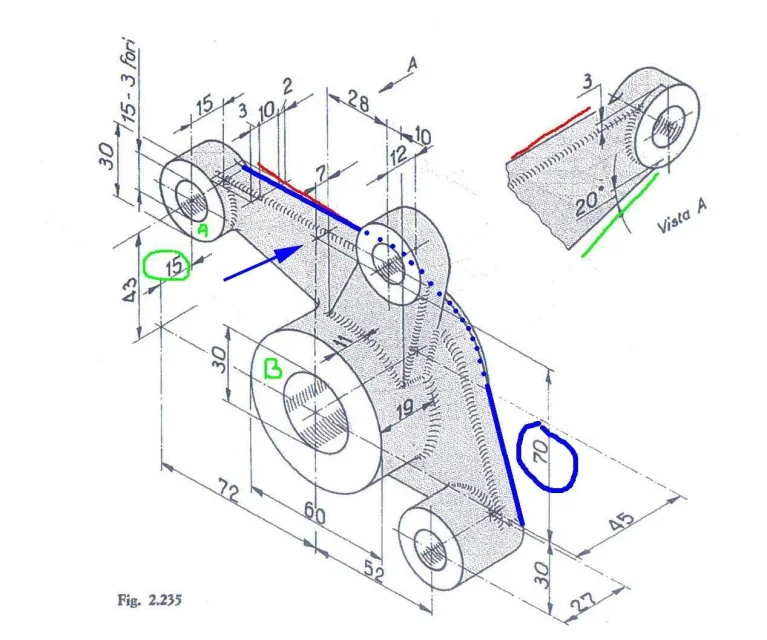
But no!

the red tract is part of the blue line of the attached image and the 70 circled quota is related to the connection radius between the horizontal tract (what you had indicated in red) and the inclined tract on the opposite side.
fig_2_235.webp
 
for me the 70 is the height of the upper mozzetto; How does a share like that define a radius?
 

Forum statistics

Threads
44,997
Messages
339,767
Members
4
Latest member
ibt

Members online

No members online now.
Back
Top