
• This forum is the machine-generated translation of www.cad3d.it/forum1 - the Italian design community. Several terms are not translated correctly.

(autosez 2) soil sections and profiles - automatic extraction

I had escaped. . .

that lisp creates, above the selected polylinea, a 3dpoly spread over the 3dfaces, which can be selected as input for the creation of the cart.
eye that the reference share must be higher than the minimum zeta of 3dpoly.
View attachment 67502
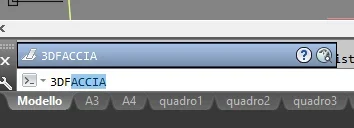
I found the discussion draw a board profile on a plot consisting of 3dface where it talks about how that lisp is recalled, however when I type "3df", in autocad map3d gives me as command only "3dface" as in enclosed photo3df.webp
 
call it back with appload and launch it with p3df
I tried this way:
1) I traced polylinea (green) intersecting faces 3d (yellow triangles)polilinea1.webp2) I then typed p3df comando.webp3) select polylinea and return this messagemessaggio.webppolylinea remains always equal, no vertices are created in intersections with 3d faces
Am I wrong?
 
test with a line or 3dpoly as profile, then delete it (or move it) in order to select the 3dpoly spread over the dtm

643.gif
 
test with a line or 3dpoly as profile, then delete it (or move it) in order to select the 3dpoly spread over the dtm

View attachment 67507
good evening gp, I thank you for the video, I did the same steps described earlier but on another pc with autocad map 2021 and it works perfectly, so I have to deduce that on the pc where I tried this afternoon (autocad map 2017) there is probably some conflict.
Thank you for your support.
little off-topic, how did you record this video to upload it here? did you use some obs studio application, vlc?
Thanks again
 
However, you can handle this "external" utility:)
View attachment 58685
good morning gp, it has been 2 years and 7 months since you provided me this utility u5, I have used it several times successfully even in 2022... Monday you answered my questions about the lisp p3df, now that I am reusing u5 (your profiles just generated after using p3df) but after selecting the polyline from which to extrapolate the distances tilted, in the command bar
I have already tried to look for this type of error and found something on the autodesk site at this link vlax-curve-isclosed However, I do not understand what the solution could be.
Can you help me understand? thanks in advance
 
type (vl-load-com) and dai invio
Unfortunately it does not work, it says command unknown. But I tried with another autocad (autocad map3d 2021) and it works....while this morning I had tried on 2017 and as for the other lisp (p3df) on one version works and on the other no. while autosez v2 works on both...I don't understand why...
 
if it works autosez can not report you command unknown (vl-load-com) comprese the parentesi :rolleyes:
hi gp, I tried to record a short video to show you, I leave you the link of wetransfer to download it otherwise here I do not know how to share it (I have not yet downloaded camtasia):fullizerender.movthe result however is equal to yesterday, also entering the command (vl-load-com) Nothing happens.
 
Good morning, two questions:
- what is the most updated autosez_2 link?
- Having already the section profile can you use autosez_2 only to automate its quotation?
 
Good morning, two questions:
- what is the most updated autosez_2 link?
- Having already the section profile can you use autosez_2 only to automate its quotation?
Good afternoon, I hope I understand your questions well.
1) I would recommend you go back from this page and find the link between comments;
2) Yes, if you already have the polyline that identifies the profile you can use autosez and create the fake. you must pay attention to the reference quota and the initial share of the profile that must be charged between the lisp options.
 
Last edited:
Good morning to all, about the autosez2 lisp, I don't understand why, but today I'm having trouble generating profiles.
I have the level curves made up of 2d quoted polylines and I can't track profiles.
I tried to track the profile from a line that intersects the curves (on layer sections, as indicated by the lisp) but nothing.
I tried to track the profile from a polyline that intersects the curves, but nothing.
the only case in which I can extrapolate the profile is tracking a 3dpole but, in this way I am forced to create the 3dpole pointing on each level curve and time increases disproportionately.
I tried to use the p3df lisp (lisp that generates vertices at each intersection between 3dpoli and a 3dface element) but it does not work to generate vertices on 3dpoli at each intersection with the batimetry polylines.
maybe I remember something wrong about the operation of autosez2?
thanks to all
 
hello to all, there is a way to track a profile using a 3d polylinear instead of the sez line? as an example, I would like to track the profile using the roadside 3d polylinea. Thank you.
 
I don't understand why, but today I'm having trouble generating profiles.
If you have problems with operations that normally were performed, do this attempt: search for the file autosez.dat in the path you can read from the variable localrootprefix and delete it, then run the lisp again.
 
If you have problems with operations that normally were performed, do this attempt: search for the file autosez.dat in the path you can read from the variable localrootprefix and delete it, then run the lisp again.
thanks gp for the answer... then I solved differently using a colleague a topography program, however save the post for next use so if the same situation happens I will try this solution.
 

Forum statistics

Threads
44,997
Messages
339,767
Members
4
Latest member
ibt

Members online

No members online now.
Back
Top
