• This forum is the machine-generated translation of www.cad3d.it/forum1 - the Italian design community. Several terms are not translated correctly.

get fast dxf from sheet metal parts

  • Thread starter Thread starter flaminio
  • Start date Start date
really a big macro... I don't stop being happy every time I use it!
Recently I wanted there to be a chance to export to dxf according to a particular dxf mapping file that I saved between my folders. I tried to change the macro file, but I don't have the necessary skills. I read that to implement export to dxf according to specific mapping you can add the following:

ounces a mapping file has been used, solidworks will continue to use it for each successive save to dxf.
you can enable that option in the api by swapp.setuserpreferencetoggle(swuserpreferencetoggle_e.swdxfmapping, true)
and you can define the path to the mapping file by swapp.setuserpreferencestringlistvalue(swuserpreferencestringlistvalue_e.swdxfmappingfiles, "<path file="" mapping="" to="" your="">"

I understand what you want to do, but I don't know how to insert the two command lines and at which point. I also believe that new variables should be declared with typology. .
Jenuary, can you give me a hand, please?</path>

con la speranza di fare cosa gradita, qui sotto riporto la "sub main" modificata da sovrascrivere nella macro,
in verde trovi i commenti e le spiegazioni per le righe aggiunte, se non è chiaro fammi sapere:

sub main()
dim swapp as sldworks.sldworks
dim swmodel as sldworks.modeldoc2
dim swassy as sldworks.assemblydoc
dim swconf as sldworks.configuration
dim swrootcomp as sldworks.component2
dim nstart as single
dim bret as boolean
set swapp = application.sldworks
set swmodel = swapp.activedoc
set swconf = swmodel.getactiveconfiguration
set swrootcomp = swconf.getrootcomponent3(true)
debug.print "file = " & swmodel.getpathname
''' '''' '' '' ''' '' '' '' '' '' '' '' '' '' '' '' '' '' '' '' '' '' '' '' '' '' '' '' '' '' '' '' '' '' '' '' '' '' '' '' '' '' '' '' '' '' '' '' '' '' '' '' '' '' '' '' '' '' '' '' '' '' '' '' '' '' '' '' '' '' '' '' '' '' '' '' ' '' '' '' '' '' '' '' '' '' '' '' '' '' '' '' '' '' '' '' '' '' '' '' '' '' '' '' '' '' '' '' '' '' '' '' '' ' '' ' ' ' ' '' '' '' ' '' '' ' '' ' ' ' ' ' '
''' '''' '' '' ''' '' '' '' '' '' '' '' '' '' '' '' '' '' '' '' '' '' '' '' '' '' '' '' '' '' '' '' '' '' '' '' '' '' '' '' '' '' '' '' '' '' '' '' '' '' '' '' '' '' '' '' '' '' '' '' '' '' '' '' '' '' '' '' '' '' '' '' '' '' '' '' ' '' '' '' '' '' '' '' '' '' '' '' '' '' '' '' '' '' '' '' '' '' '' '' '' '' '' '' '' '' '' '' '' '' '' '' '' ' '' ' ' ' ' '' '' '' ' '' '' ' '' ' ' ' ' ' '
Setting area for export dxf-dwg
'
'in this part of code imposed the settings because solidworks do not show me
'to every rescue dwg\dxf the mapping set mask

dim bshowmap as boolean
'imposed using the mapping file
bshowmap = swapp.getuserpreferencetoggle(swuserpreferencetoggle_e.swdxfdontshowmap)
if bshowmap = false then bshowmap = true else bshowmap = true
swapp.setuserpreferencetoggle swuserpreferencetoggle_e.swdxfdontshowmap, false 'This part is optional, before changing the mapping file if already set,
'Save in a variable the string of the mapping file so that it can reset after the end of the macro

dim old_mapping_file as string
old_mapping_file = swapp.getuserpreferencestringlistvalue(swdxfmappingfiles) ' mi ritorna ad esempio "c:\...\mio_file.dat" '
'now step to the pointing string of the mapping file
'from before the white, i.e. the gate

swapp.setuserpreferencestringlistvalue swuserpreferencestringlistvalue_e.swdxfmappingfiles, "" whitening mapping strings 'now imposed the mapping file to which solidworks must refer for subsequent rescuesswapp.setuserpreferencestringlistvalue swuserpreferencestringvalue_e.swdxfmappingfiles, "c:\...\mia_mappatura.dat" 'imposed the mapping file 'Having with the compiled string the curtain that we find under the options during saving dxf\dwg I have to pass the dropdown line indexswapp.setuserpreferenceintegervalue swuserpreferenceintegervalue_e.swdxfmappingfileindex, 0 'I'm the first on the list then 0 'This command is optional, I go to set the rescue version
swapp.setuserpreferenceintegervalue swuserpreferenceintegervalue_e.swdxfversion, 3 ' imposed the export release "es.r2000-2002" '
'fine setting area for export dxf-dwg


traversecomponent swrootcomp, 1

Having finished the cycle, inserting these two rows is restored the initial mapping file
swapp.setuserpreferencestringlistvalue swuserpreferencestringlistvalue_e.swdxfmappingfiles, ""
swapp.setuserpreferencestringlistvalue swuserpreferencestringlistvalue_e.swdxfmappingfiles, old_mapping_file 'imposed the mapping file

''' '''' '' '' ''' '' '' '' '' '' '' '' '' '' '' '' '' '' '' '' '' '' '' '' '' '' '' '' '' '' '' '' '' '' '' '' '' '' '' '' '' '' '' '' '' '' '' '' '' '' '' '' '' '' '' '' '' '' '' '' '' '' '' '' '' '' '' '' '' '' '' '' '' '' '' '' ' '' '' '' '' '' '' '' '' '' '' '' '' '' '' '' '' '' '' '' '' '' '' '' '' '' '' '' '' '' '' '' '' '' '' '' '' ' '' ' ' ' ' '' '' '' ' '' '' ' '' ' ' ' ' ' '
''' '''' '' '' ''' '' '' '' '' '' '' '' '' '' '' '' '' '' '' '' '' '' '' '' '' '' '' '' '' '' '' '' '' '' '' '' '' '' '' '' '' '' '' '' '' '' '' '' '' '' '' '' '' '' '' '' '' '' '' '' '' '' '' '' '' '' '' '' '' '' '' '' '' '' '' '' ' '' '' '' '' '' '' '' '' '' '' '' '' '' '' '' '' '' '' '' '' '' '' '' '' '' '' '' '' '' '' '' '' '' '' '' '' ' '' ' ' ' ' '' '' '' ' '' '' ' '' ' ' ' ' ' '
msgbox ("export completed!")

end
 
Thanks jenuary... It was much more complicated than it seemed!

I have tried several times, unfortunately it does not work, probably for my incompany in completing the macro.

the mapping file is not .dat, simply has no extension... Can this be the cause of the problem?

I attach the macro completed with your sub.
 

Attachments

Thanks jenuary... It was much more complicated than it seemed!

the mapping file is not .dat, simply has no extension... Can this be the cause of the problem?
surely the file must have strain".dat" and in the macro code you have to pass
the full file name of extension, otherwise you pass a path of a folder not a file name.
  1. write the full path in the macro line where you pass the mapping file
  2. verify that you have not set on the "folder options" of windows not to show file extensions, at the limit you will uncheck and verify that it has the extension.
 
I always have the extension of visible files. seems strange, but the file is without extension... I created under a text file to which I changed the extension in dat, to show how the other one doesn't have it. for this, in the end, I tried to call it back from code without extension.2017-11-16_172212.webpI tried to get around like this. I assigned the mapping file the extension. dat. in solidworks manual takes it and exports it correctly. the macro no.
 
I see that the test.dat file has zero weight.
attach the mapping file I try, at the limit I also attach the modified macro, because to me it works and I am also in 2017.
 
proof is not the mapping file, the other is the one created by sw. but your sw creates a .dat file? In my case, as I said, I added the extension.
This is the file.
the other possibility is that it was wrong to create the macro file.
 

Attachments

the other possibility is that it was wrong to create the macro file.
If you were practicing the macro, I could see if there was something wrong.
I tried the mapping file you attached by hand saving and it works,
It also works with the macro that I now attach, you check at this point if you had wrong something.
 

Attachments

You sent me my mapping file again. :smile:
the macro I had created was two posts above

copying your code, I find spaces I don't understand. I actually deleted them. Is that what doesn't make my macro go? !

bshowmap = swapp.getuserpreferencetoggle(swuserpreferencetogg le_e.swdxfdontshowmap) e.g. between togg and there is a space that gives me error. I took it off, but then I was doubtful.
 
Bah... I can't make it work. I changed the sw settings, thinking that the previous mapping files set could affect, I changed the location of the mapping file (c:\gialle.dat)... I don't know. bending lines are always drawn and point as by default mapping (and not yellow and continuous as by set mapping file) can be caused by the version of sw 2017?! I surrender?
 

Attachments

I tried to get around like this. I assigned the mapping file the extension. dat. in solidworks manual takes it and exports it correctly. the macro no.
You wrote that the mapping file worked manually, now it doesn't work anymore?
uses the same mapping file that worked and set the bet to that file in the macro.
Once you launch the macro check in the rescue options while you are saving the dxf\dwg if the macro pointed to the correct .dat file.
if you mean it depends on the mapping file that is not set correctly.
 
thanks to your advice I understood this:
- the macro correctly points to the mapping file
- the mapping file, recalled by the macro, works correctly changing color and each feature to the geometry lines
- the mapping file cannot change the bending lines. seems that the macro overwrites the features set by the dat file for the fold lines.
- the same mapping file, used manually, acts on the fold lines correctly.

(before I had dat files that set only the characteristics for the fold lines, that's why I thought the macro didn't make them work)
 
thanks to your advice I understood this:
- the mapping file cannot change the bending lines. seems that the macro overwrites the features set by the dat file for the fold lines.
the macro does not touch anything at the level of fold lines.
try posting 3d models and .dat files for tests, I don't know otherwise how to deepen.
 
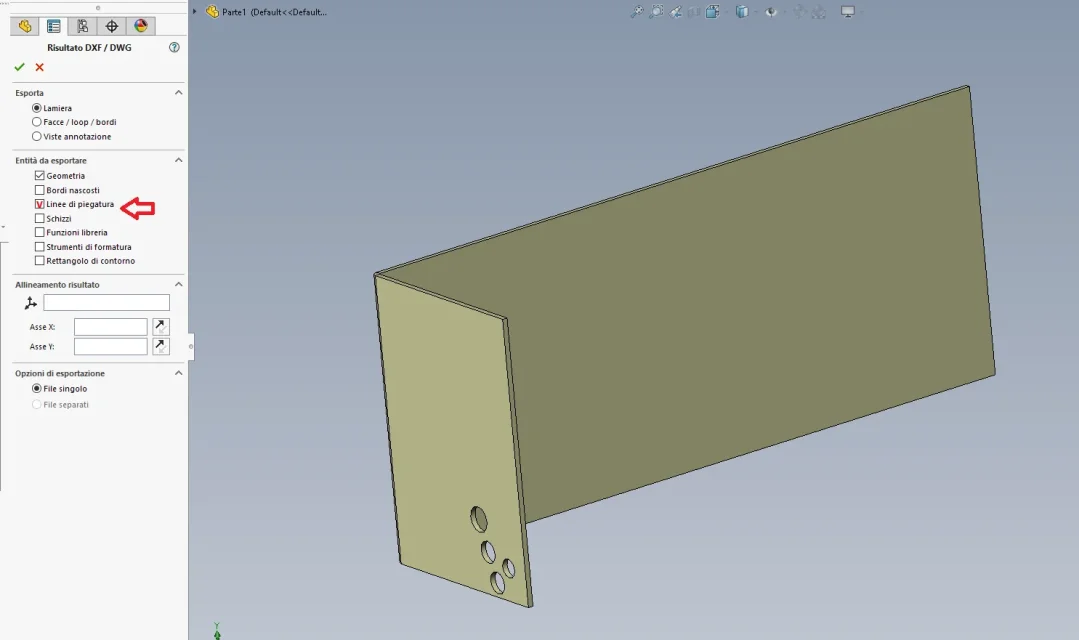
I noticed that by manually rescuing a sheet metal model in dxf a menu appears where you are asked what you want to export, from me the fold lines were off.
once activated and saved I launched the macro from the file together and I found the fold lines.
try to do the same thing to see if the problem is there, the macro does not hit anything, I tested it
 

Attachments

  • Immagine.webp
    Immagine.webp
    35.3 KB · Views: 19
the problem is not having either the fold lines, but having them according to the characteristics of the mapping file.
to have fold lines exported from the macro just put zero instead of one in the row
swchildmodel.exportflatpatternview exfilename & ".dxf", 1
You wrote a few pages earlier. http://help.solidworks.com/2015/eng...swconst.swexportflatpatternviewoptions_e.htmlI always carry with the fold lines, put that tick to each manual export.
if you see the dxf, in the manual one the fold lines are continuous yellow (as from mapping file), in the one exported with the macro are gray and stretch and point. the strange thing is that in both, instead, the edge lines follow the mapping file, that is, they are green.
 
So... .
I did a lot of tests by modifying first of all the mapping file that I renounce in "giallo.dat" where I inserted the colors for the management of the bending lines in yellow made by me.
Unfortunately, as Malf said, the bending lines are ignored during the rescue with the macro, while manually saving the lines in yellow and making them dotted.
I honestly don't know what to do.
 

Attachments

  • A mano.webp
    A mano.webp
    16.4 KB · Views: 22
  • Macro.webp
    Macro.webp
    21.4 KB · Views: 24
  • gialle3.zip
    gialle3.zip
    261 bytes · Views: 1
So, after a morning of evidence, I think I've come to the head. it's as if sw had 2 different syntax for the mapping file: one for the sheet export (recallable by options when saving the flat repetition of a sheet file in dxf) and one for the export file draw. in the first bend lines are distinct up and down and have identification [31] e [32] in square brackets, while in the second the fold lines are simply reported as half-way lines, identification [14], while 31 and 32 are assigned to anything else (contour angle and revision comic).
the second syntax is used in macro export. giving the macro the mapping file written with the first syntax the indications for 31 and 32, intended for the fold lines, were applied to the boundary rectangle and revision comic.

Perhaps syntax is not the right word, they are only different conventions.

this is the complete list of assignment codes in the syntax for exporting draw files and also used by export macros.
[Version]sw990001
[Layers]0 = 2, 1
[Entities]geometry [0] = 3, bylayer, 0
quote [1] = 2, bylayer, 0
note [2] = 2, bylayer, 0
tolleranza di forma [3] = 2, bylayer, 0
tacche di centratura [4] = 2, bylayer, 0
Section lines [5] = 2, bylayer, 0
circles of detail [6] = 2, bylayer, 0
Tags [7] = 2, bylayer, 0
reference labels [8] = 2, bylayer, 0
Reference points [9] = 2, bylayer, 0
simboli di saldatura [10] = 2, bylayer, 0
filettature cosmetiche [11] = 2, bylayer, 0
material [12] = 2, bylayer, 0
blocchi [13] = 2, bylayer, 0
line [14] = 4, bylayer, 0
linee nascoste [15] = 2, bylayer, 0
linee di schizzo [16] = 2, bylayer, 0
campitura [17] = 2, bylayer, 0
detailed margin [18] = 2, bylayer, 0
line keysi [19] = 2, bylayer, 0
user - dotted [20] = 2, bylayer, 0
user - differentiated [21] = 2, bylayer, 0
utente - centro [22] = 2, bylayer, 0
multi-shot association lines [23] = 2, bylayer, 0
symbols of the center plug [24] = 2, bylayer, 0
interrupt lines [25] = 2, bylayer, 0
blocking instance [26] = 2, bylayer, 0
AaUppercase [27] = 2, bylayer, 0
table annotation [28] = 2, bylayer, 0
origin of the drilling table [29] = 2, bylayer, 0
cordoni in saldatura [30] = 2, bylayer, 0
contour rectangle [31] = 2, bylayer, 0
fumetto revisione [32] = 2, bylayer, 0
[Colors]to change the fold lines in the files exported with the macro, then, you have to write in the mapping file the line:
halfway lines [14] = 2, bylayer, 0

I add the jenuary file and a mapping file that exports black contour lines and yellow fold lines, to avoid confusion with all attached files previously.
 

Attachments

Hello I am trying the macro kindly made available by jenuary, but sometimes the scale of the exported dxf is different most times increased by ten times. if someone can help me understand the ark thank you
 

Forum statistics

Threads
44,997
Messages
339,767
Members
4
Latest member
ibt

Members online

No members online now.
Back
Top