
DeDios
Guest
Good morning to all,
I'm ingenious this morning in creating window openings and doors. following the discussion of the arch, I recreated a family opening from the family window.
I attach what I have accomplished (wip, but it should work more or less everything:tongue: ).
Now, I have a doubt about the locks: I have 4 types of clamping, what to do? Do I make four different families for every lockdown? because at first I had created only the entrance of the window, leaving a portion of the wall in order to apply another family lock but... it does not work because it does not recognize me that part of the wall (I think it intends everything as a window) so, as you can see in the annex I made the hole aside, and it touches me to make the locks in the same family.
Is that correct? tips/painting? thank you in advance, good day to all.
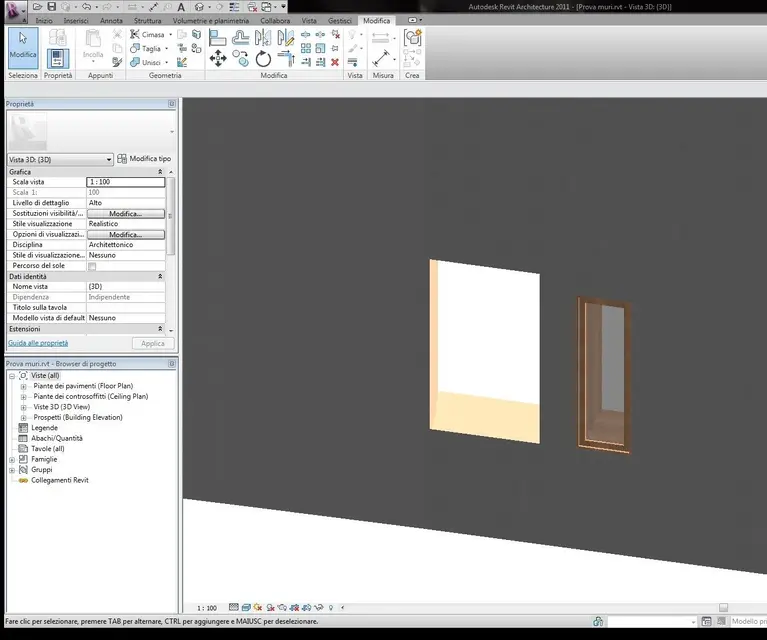
ps is normal that when I hang the window in the wall you see "orange"? I hope you don't see! Maybe it's because I applied them on a wall made "in place". I hope there's no problem with the renders.
I'm ingenious this morning in creating window openings and doors. following the discussion of the arch, I recreated a family opening from the family window.
I attach what I have accomplished (wip, but it should work more or less everything:tongue: ).
Now, I have a doubt about the locks: I have 4 types of clamping, what to do? Do I make four different families for every lockdown? because at first I had created only the entrance of the window, leaving a portion of the wall in order to apply another family lock but... it does not work because it does not recognize me that part of the wall (I think it intends everything as a window) so, as you can see in the annex I made the hole aside, and it touches me to make the locks in the same family.
Is that correct? tips/painting? thank you in advance, good day to all.
ps is normal that when I hang the window in the wall you see "orange"? I hope you don't see! Maybe it's because I applied them on a wall made "in place". I hope there's no problem with the renders.




 :
: